Gesture
Overview
Gestures are detected by the APDS-9960 sensor by analyzing changes in reflected infrared light. This sensor processes raw data to determine the direction of a gesture and emits corresponding events. The APDS-9960 is a versatile I2C device that includes multiple sensors: an RGB ambient light sensor, a proximity sensor, and a sophisticated gesture sensor. SparkFun offers a breakout board for this chip, making it easier to work with (Figure 9.12).
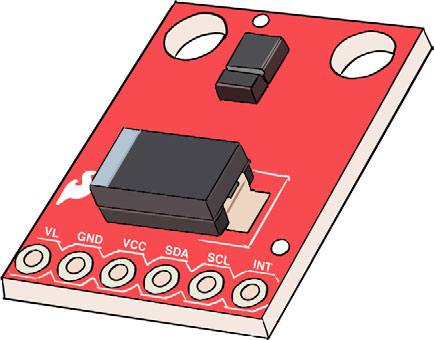 Figure 9.12. The APDS-9960 crams three sensors into one package, including a gesture sensor. SparkFun offers a breakout board that makes working with the chip easier.
Setting Up the Project
To start working with the APDS-9960, create a new project directory and install the necessary dependencies:
mkdir gesture
cd gesture
npm init -y
npm install johnny-five tessel-io
Copy the RemoteSwitch.js file into the gesture directory as it will be used later.
Implementing the APDS9960 Plugin
Initial Setup
Create a file named APDS9960.js and begin with the following code structure:
// Dependencies
const Emitter = require('events').EventEmitter;
const util    = require('util');

/** CONSTANTS HERE **/

module.exports = function (five) {
  return (function () {
    function APDS9960 (opts) {
      // Constructor: Set up instance properties and kick off initialization
    }

    util.inherits(APDS9960, Emitter);

    APDS9960.prototype.resetGesture = function () { };
    APDS9960.prototype.setup = function (callback) { };
    APDS9960.prototype.enable = function () { };
    APDS9960.prototype.readGesture = function () { };
    APDS9960.prototype.processGesture = function () { };
    APDS9960.prototype.decodeGesture = function () { };

    return APDS9960;
  }());
};
Constants and Configuration
Fill in the constants as shown below to configure the APDS-9960:
const REGISTERS = {
  ENABLE   : 0x80,
  WTIME    : 0x83,
  PPULSE   : 0x8E,
  CONFIG2  : 0x90,
  DEVICE_ID: 0x92,
  GPENTH   : 0xA0,
  GEXTH    : 0xA1,
  GCONF1   : 0xA2,
  GCONF2   : 0xA3,
  GOFFSET_U: 0xA4,
  GOFFSET_D: 0xA5,
  GPULSE   : 0xA6,
  GOFFSET_L: 0xA7,
  GOFFSET_R: 0xA9,
  GCONF4   : 0xAB,
  GFLVL    : 0xAE,
  GSTATUS  : 0xAF,
  GFIFO_U  : 0xFC,
};

const FLAGS = {
  GFIFOTH  : 0b10000000,
  GGAIN    : 0b01000000,
  GLDRIVE  : 0b00000000,
  GWTIME   : 0b00000001,
  GPLEN    : 0b11000000,
  GPULSE   : 0b00001001,
  GVALID   : 0b00000001,
  PPLEN    : 0b10000000,
  PPULSE   : 0b10001001,
  LED_BOOST: 0b00110000,
  GIEN     : 0b00000010,
  GMODE    : 0b00000001,
  ENABLE   : 0b01001101,
};

const SETUP_DEFAULTS = {
  ENABLE   : 0x00,
  GPENTH   : 40,
  GEXTH    : 30,
  GCONF1   : FLAGS.GFIFOTH,
  GCONF2   : FLAGS.GGAIN | FLAGS.GLDRIVE | FLAGS.GWTIME,
  GOFFSET_U: 0x00,
  GOFFSET_D: 0x00,
  GOFFSET_L: 0x00,
  GOFFSET_R: 0x00,
  GPULSE   : FLAGS.GPLEN | FLAGS.GPULSE,
};

const ENABLE_VALUES = {
  WTIME  : 0xFF,
  PPULSE : FLAGS.PPLEN | FLAGS.PPULSE,
  CONFIG2: FLAGS.LED_BOOST,
  GCONF4 : FLAGS.GIEN | FLAGS.GMODE,
  ENABLE : FLAGS.ENABLE
};

const GESTURE_THRESHOLD_OUT = 30;
const GESTURE_SENSITIVITY = 10;
Constructor and Initialization
The constructor initializes the APDS-9960 and sets up the necessary configurations:
function APDS9960 (opts) {
  if (!(this instanceof APDS9960)) {
    return new APDS9960(opts);
  }
  five.Board.Component.call(this, opts = five.Board.Options(opts));
  this.interruptState = 1;
  opts.address        = opts.address || I2C_ADDR;
  this.address        = opts.address;
  this.io.i2cConfig(opts);

  this.io.i2cReadOnce(this.address, REGISTERS.DEVICE_ID, 1, data => {
    if (data[0] !== DEVICE_ID) {
      throw new Error('Unable to establish connection with APDS9960');
    }
  });
  this.resetGesture();
  this.setup(this.enable);
}

util.inherits(APDS9960, Emitter);

APDS9960.prototype.resetGesture = function () {
  this.gestureData = {
    raw: [],
    deltas: {},
    movements: {
      vertical  : false,
      horizontal: false,
      up        : false,
      down      : false,
      left      : false,
      right     : false
    },
    valid: false,
    direction: undefined
  };
};
Reading and Processing Gesture Data
When the interrupt pin goes LOW, the readGesture method is invoked to read data from the APDS-9960:
APDS9960.prototype.readGesture = function () {
  this.io.i2cReadOnce(this.address, REGISTERS.GSTATUS, 1, status => {
    if (status & FLAGS.GVALID === FLAGS.GVALID) {
      this.io.i2cReadOnce(this.address, REGISTERS.GFLVL, 1, fifoLevel => {
        this.io.i2cReadOnce(this.address,
          REGISTERS.GFIFO_U, (fifoLevel * 4), rawData => {
            for (var i = 0; i < rawData.length; i += 4) {
              this.gestureData.raw.push({
                up   : rawData[i],
                down : rawData[i + 1],
                left : rawData[i + 2],
                right: rawData[i + 3]
              });
            }
            return this.readGesture();
          });
      });
    } else {
      this.processGesture();
      this.decodeGesture();
      this.resetGesture();
    }
  });
};
The readGesture method checks the GSTATUS register to determine if valid data is available. If so, it reads the number of datasets from the GFLVL register and processes the data from the FIFO registers starting at GFIFO_U.
Processing and Decoding Gesture Data
The methods in the APDS9960 plugin distinguish between processing and decoding gesture data (Figure 9.22).
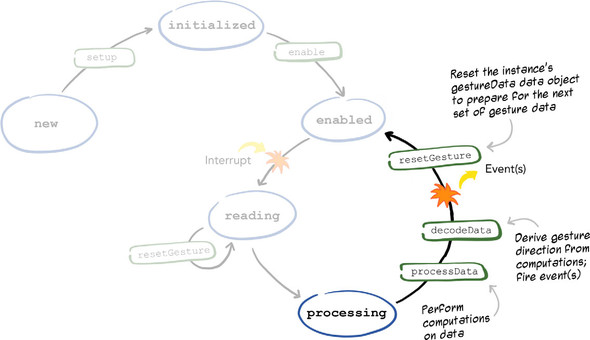 Figure 9.22. processData performs arithmetic on data; decodeData derives gesture direction from the computed results and fires events. Finally, the gesture data object is reset on the instance so it’s ready to collect data from the next gesture.
In the processing step, the raw data is filtered to include only readings where every direction's value exceeds a defined threshold. The change in the ratios of readings over time is computed for each axis, allowing the system to decode the gesture direction and emit events accordingly.
FAQ (Frequently asked questions)
How does the APDS-9960 gesture sensor detect gestures?
What does the plugin do with the raw data from the APDS-9960 sensor?