Git in JavaScript Development
Git is a distributed version control system that is essential for tracking changes in source code during software development. It is widely used in the JavaScript community for managing codebases, collaborating with other developers, and deploying applications to various platforms. Below, we explore how Git is utilized in different contexts within JavaScript development, as discussed in various resources.
Git in the Context of Resin.io
Git in the Context of Resin.io is a powerful tool for managing and deploying application code to connected devices. When working with platforms like resin.io, Git facilitates the deployment process by allowing developers to push their code to a remote repository, which then triggers the deployment to devices.
Initializing a Git Repository
To begin deploying your application, you need to initialize a Git repository in your project directory. This is done using the command:
$ git init
This command sets up a new Git repository, enabling you to track changes and manage your project files effectively.
Adding a Resin.io Git Remote
After initializing your Git repository, you must add a resin.io-specific Git remote. This remote serves as the destination for your code when you push it for deployment. The command to add this remote is provided on the resin.io application dashboard, as shown in Figure 12.7.
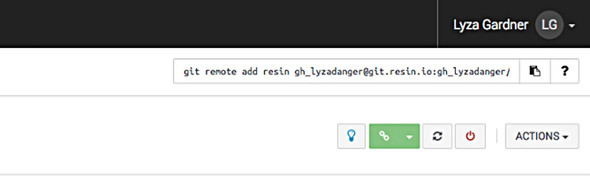 Figure 12.7. Detail of resin.io application dashboard showing where to find the command for adding your application’s resin.io Git remote.
Viewing Git Remotes
To confirm that the resin.io remote has been added successfully, list all of your repository’s remotes with:
$ git remote -v
The output should indicate that the resin.io remote is set up for both fetching and pushing.
Adding and Committing Files
Once your Git repository and remotes are set up, add your project files to the repository and commit them:
$ git add index.js package.json Dockerfile.template app/
$ git commit -m "first commit"
These commands stage your project files and create an initial commit, capturing the current state of your project.
Deploying to Resin.io
With your files committed, push your code to the resin.io remote to trigger deployment:
$ git push resin master
The deployment process can be monitored on your resin.io dashboard.
Iterative Development with Resin.io
Once your resin.io project is set up, you can develop your app iteratively. Pushing changes to your resin.io Git remote triggers a rebuild of your application’s container and redeployment to all connected devices, as illustrated in Figure 12.2.
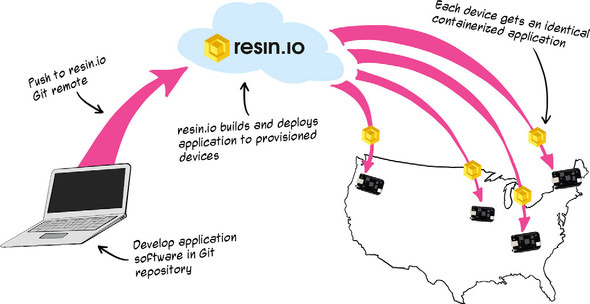 Figure 12.2. Devices that will run the application are provisioned by installing and booting a custom-tailored resin.io OS image on each. Pushing application code to a project-specific resin.io Git remote triggers the rebuilding of the app’s container and its redeployment to connected, provisioned devices.
Deploying to Heroku with Git
Git is also integral to deploying applications to cloud platforms like Heroku. Heroku's integration with Git simplifies the deployment process, allowing developers to manage and deploy applications efficiently.
Creating an App on Heroku
To create an application on Heroku, use their Command Line Interface (CLI), as shown in Figure 4.3.
 Figure 4.3. Creating an app on Heroku using their CLI.
Deploying to Heroku
Once your application is set up on Heroku, deploy updates by pushing your changes to the heroku remote:
$ git push heroku master
This command triggers a deployment process on Heroku, as depicted in Figure 4.4.
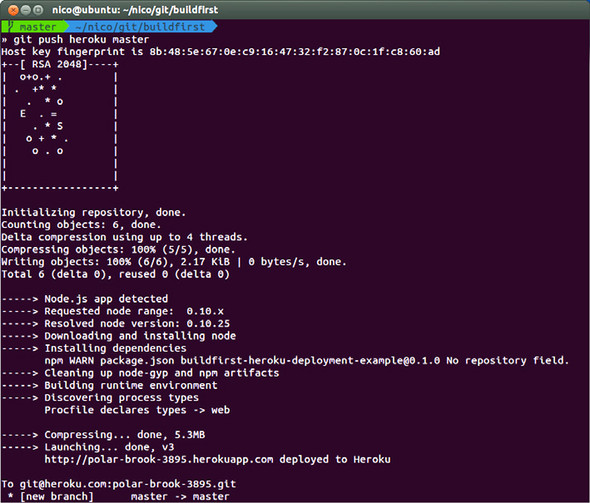 Figure 4.4. Deploying to Heroku—as simple as git push.
This seamless integration with Git ensures that your code is always up-to-date and running smoothly on Heroku.
In summary, Git is a versatile tool in JavaScript development, facilitating version control, collaboration, and deployment across various platforms. Whether deploying to resin.io or Heroku, Git streamlines the process, making it an indispensable part of modern software development workflows.
| Book Title | Usage of git | Technical Depth | Connections to Other Concepts | Examples Used | Practical Application |
|------------|--------------|-----------------|-------------------------------|---------------|-----------------------|
| [JavaScript on Things: Hacking hardware for web developers](https://www.manning.com/books/javascript-on-things) | Discusses Git in the context of deploying applications to resin.io, emphasizing its role in managing and deploying application code to connected devices. [more](https://livebook.manning.com/book/javascript-on-things/chapter-12/46) | Provides detailed steps on initializing a Git repository, adding a resin.io Git remote, and deploying code. [more](https://livebook.manning.com/book/javascript-on-things/chapter-12/46) | Connects Git usage with resin.io deployment processes, including iterative development and continuous deployment. [more](https://livebook.manning.com/book/javascript-on-things/chapter-12/46) | Includes examples of Git commands for initializing repositories, adding remotes, and deploying code. [more](https://livebook.manning.com/book/javascript-on-things/chapter-12/46) | Focuses on practical deployment of applications to resin.io, highlighting real-world application scenarios. [more](https://livebook.manning.com/book/javascript-on-things/chapter-12/46) |
| [JavaScript Application Design: A Build First Approach](https://www.manning.com/books/javascript-application-design) | Explains Git as a distributed version control system used for deploying applications to platforms like Heroku. [more](https://livebook.manning.com/book/javascript-application-design/chapter-4/129) | Covers the integration of Git with Heroku for deployment, including creating apps and pushing updates. [more](https://livebook.manning.com/book/javascript-application-design/chapter-4/129) | Links Git usage with cloud deployment on Heroku, emphasizing seamless integration. [more](https://livebook.manning.com/book/javascript-application-design/chapter-4/129) | Provides examples of using Git commands to deploy applications to Heroku. [more](https://livebook.manning.com/book/javascript-application-design/chapter-4/129) | Highlights the ease of deploying applications to Heroku using Git, focusing on cloud-based application management. [more](https://livebook.manning.com/book/javascript-application-design/chapter-4/129) |
FAQ (Frequently asked questions)
What does Figure 12.7 in the book 'JavaScript on Things' show?
Where can I find the command for adding a resin.io Git remote in the resin.io application dashboard?
How do you create an app on Heroku using their CLI?