HTML in JavaScript Context
HTML, or HyperText Markup Language, is the foundational language used to create and structure content on the web. It is integral to web development, providing the basic building blocks for web pages. HTML is often used in conjunction with JavaScript to create dynamic and interactive web applications. Below, we explore various aspects of HTML as discussed in different JavaScript books.
Overview of HTML
HTML is the standard markup language for creating web pages. It uses a system of tags to define elements such as headings, paragraphs, and lists, which help organize the content of a web page. The current version, HTML5, includes a wide range of features for building modern web applications. The specification for HTML5 can be found here.
HTML and the DOM
HTML is represented in the Document Object Model (DOM) as a tree structure, where each element, attribute, and piece of text is a node. This tree-like representation allows for dynamic manipulation of the document, enabling developers to create interactive and dynamic web pages.
Injecting HTML into the DOM
Injecting HTML into the DOM involves converting an HTML string into a DOM structure and inserting it into the document. Techniques like DOM fragments can optimize this process by allowing multiple nodes to be inserted in a single operation, reducing the number of DOM manipulations.
String Preprocessing
Before converting an HTML string into a DOM structure, it is important to preprocess the string to ensure it is valid and properly formatted. This includes handling self-closing tags and ensuring proper nesting of elements. Preprocessing helps maintain the integrity of the HTML and ensures correct interpretation by browsers.
Handling Self-Closing Tags
Self-closing tags in HTML, such as <img/> or <br/>, need careful handling to ensure they are interpreted correctly across different browsers. The following JavaScript snippet demonstrates a method to convert self-closing tags to a standard form:
const tags = /^(area|base|br|col|embed|hr|img|input|keygen|link|menuitem|meta|param|source|track|wbr)$/i;
function convert(html) {
  return html.replace(/(<(\w+)[^>]*?)\/>/g, (all, front, tag) => {
    return tags.test(tag) ? all : front + "></" + tag + ">";
  });
}
assert(convert("<a/>") === "<a></a>", "Check anchor conversion.");
assert(convert("<hr/>") === "<hr/>", "Check hr conversion.");
HTML Wrapping
HTML wrapping involves enclosing certain elements within required parent elements to ensure they are valid according to HTML semantics. For example, an <option> element must be wrapped within a <select> element.
Structuring Content with HTML
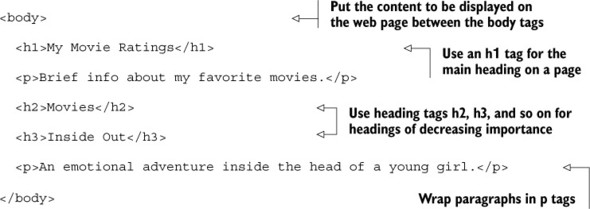
HTML provides a variety of tags to structure content. For example, headings are defined using <h1> to <h6> tags, paragraphs with <p>, and lists with <ul>, <ol>, and <li>. These tags help create a hierarchical structure for the content, making it easier for both users and search engines to understand the layout and importance of different sections.
Example: My Movie Ratings
The following example demonstrates how HTML can be used to create a simple structure for a web page that displays movie ratings. This example uses headings and paragraphs to organize the content.
Integrating HTML with JavaScript
In modern web development, HTML is often used alongside JavaScript to create dynamic web pages. JavaScript can manipulate the HTML structure by adding, removing, or modifying elements on the fly, allowing for interactive and responsive user experiences.
Dynamic Content Insertion
JavaScript can dynamically insert content into a web page. For instance, the following code snippet demonstrates how to select an HTML element with the ID msg and set its inner HTML to display a "Hello World" message:
document.querySelector('#msg').innerHTML = '<h1>Hello World</h1>';
Using Templates to Separate Concerns
To address the challenges of mixing HTML with JavaScript, developers can use templates. Templates allow for the separation of HTML structure from JavaScript logic, making the codebase more modular and maintainable. This approach enhances flexibility, swapability, and maintainability, allowing teams to work more efficiently and effectively.
By keeping HTML, CSS, and JavaScript concerns separate, developers can create more robust and scalable web applications.
| Book Title | Usage of html | Technical Depth | Connections to Other Concepts | Examples Used | Practical Application |
|------------|---------------|-----------------|-------------------------------|---------------|-----------------------|
| [Secrets of the JavaScript Ninja, Second Edition](https://www.manning.com/books/secrets-of-the-javascript-ninja-second-edition) | Discusses HTML in the context of the DOM, focusing on dynamic manipulation and efficient insertion techniques. | Explores HTML's representation in the DOM and techniques like DOM fragments for performance optimization. | Connects HTML with the DOM and JavaScript for creating interactive web pages. | Provides code examples for handling self-closing tags and HTML wrapping. | Emphasizes practical techniques for injecting and manipulating HTML in web applications. [more](https://www.manning.com/books/secrets-of-the-javascript-ninja-second-edition) |
| [Get Programming with JavaScript](https://www.manning.com/books/get-programming-with-javascript) | Covers HTML as a foundational language for structuring web content, often used with CSS and JavaScript. | Discusses HTML's role in creating structured and navigable web pages. | Highlights integration with CSS for styling and JavaScript for interactivity. | Includes examples like "My Movie Ratings" to demonstrate HTML structuring. | Focuses on using templates to separate HTML from JavaScript logic for maintainability. [more](https://www.manning.com/books/get-programming-with-javascript) |
| [Functional Programming in JavaScript](https://www.manning.com/books/functional-programming-in-javascript) | Describes HTML's role in structuring content and creating complex interfaces through composition. | Discusses HTML's foundational elements for building structured documents. | Explores HTML's composition capabilities for creating complex interfaces. | Provides examples of dynamic content insertion using JavaScript. | Demonstrates HTML's use in creating modular and reusable components. [more](https://www.manning.com/books/functional-programming-in-javascript) |
FAQ (Frequently asked questions)
What does HTML stand for?
How can you change the inner HTML of an element using JavaScript?
What is HTML used for?
What is an example of HTML composition?
How can HTML widgets be composed?
What is HTML used for?
How does HTML structure the content of a web page?
What is an example of using HTML for headings and paragraphs?
How is HTML used in creating a news page?
What role do templates play in HTML structure?