If Statement in JavaScript
Overview
An if statement is a fundamental control structure in programming used for decision-making. It allows you to execute a block of code only when a specified condition evaluates to true. If the condition is false, the code block is skipped. This mechanism is essential for controlling the flow of a program based on dynamic conditions.
Basic Syntax
The basic syntax of an if statement in JavaScript is as follows:
if (condition) {
    // Execute code if condition evaluates to true
}
In this structure, the condition is an expression that is evaluated to either true or false. If the condition is true, the code within the curly braces {} is executed. If it is false, the code block is ignored.
Example Usage
Here is a simple example of an if statement:
if (userNumber === secret) {
    console.log("Well done!");
}
In this example, the code checks if the variable userNumber is equal to the variable secret. If they are equal, the message "Well done!" is logged to the console.
If-Else Statement
An if statement can be extended with an else clause to execute an alternative block of code if the condition is false. This is useful for handling binary decisions.
[Figure 12.1](https://livebook.manning.com/book/get-programming-with-javascript/chapter-12/33)
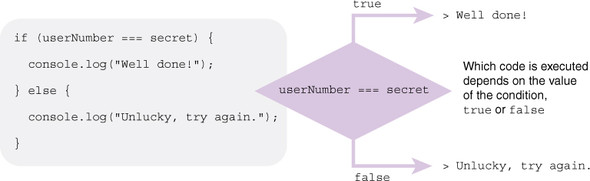 Figure 12.1. Executing code depending on the value of a condition, with if and else
Else-If Statement
For more complex decision-making, you can use an else-if statement to check multiple conditions. This allows you to execute different blocks of code based on different conditions.
Example: A Neater Else-If Block
var getGuesser = function () {
    var secret = Math.floor(Math.random() * 10 + 1);

    return function (userNumber) {
        if (userNumber === secret) {
            return "Well done!";
        } else if (userNumber > secret) {
            return "Too high!";
        } else {
            return "Too low!";
        }
    };
};

var guess = getGuesser();
In this example, a function getGuesser is defined, which generates a random secret number. The returned function checks the user's guess against the secret number. If the guess is correct, it returns "Well done!". If the guess is too high, it returns "Too high!", and if it's too low, it returns "Too low!". This demonstrates the use of if, else if, and else to handle multiple conditions.
FAQ (Frequently asked questions)
What is an if statement used for?
What happens if the condition in an if statement is false?
How does an if statement work with an else clause?
Can you provide an example of an if statement in JavaScript?
What is the purpose of an if statement in programming?
How can you use else if in JavaScript?
What is the role of an if statement in controlling code execution?
What is the basic syntax of an if statement in JavaScript?