Interval in JavaScript
Overview
In JavaScript, an interval is a mechanism that allows a callback function to be executed repeatedly at specified time intervals. This is achieved using the setInterval function. Unlike time-outs, which execute a callback function only once after a delay, intervals continue to fire until they are explicitly cleared using the clearInterval function.
Behavior of Intervals
When an interval is set, it schedules a task to be executed repeatedly. However, the execution of these tasks is subject to the constraints of the JavaScript event loop. This means that if a task is already associated with an interval and is waiting in the queue, a new task will not be added when the interval fires again. Instead, the invocation is dropped, as shown in Figure 13.12.
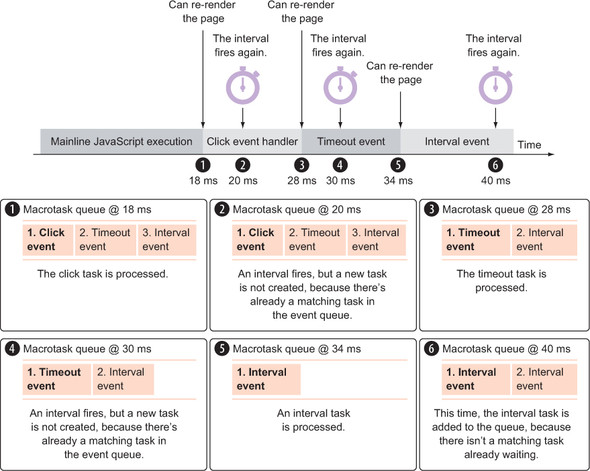 Figure 13.12. If an interval event fires, and a task is already associated with that interval waiting in the queue, a new task isn’t added. Instead, nothing happens, as is shown for the queues at 20 ms and 30 ms.
Example of Interval Usage
Consider the following pseudocode example, which demonstrates the use of setInterval:
setInterval(function intervalHandler(){
  /*Some interval handle code that runs for 8ms*/
}, 10);
In this example, an interval is set to execute a handler function every 10 milliseconds. However, due to the nature of the event loop, the actual execution timing can vary.
Timing and Execution
The timing of interval execution can be affected by other tasks in the event loop. For instance, if a task is already running or queued, the interval task may not execute exactly at the specified interval. This is illustrated in Figure 13.10, which shows a timing diagram of the first 18 ms of execution in an example program.
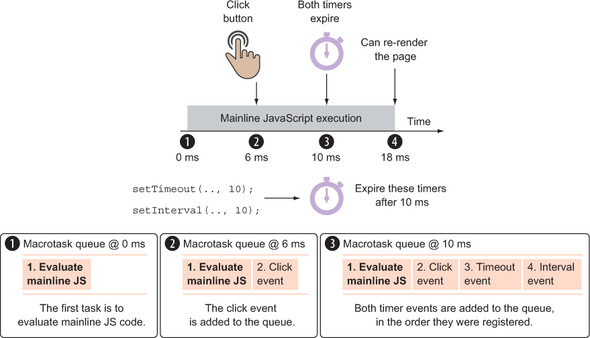 Figure 13.10. A timing diagram that shows 18 ms of execution in the example program. The first, currently running task is to evaluate mainline JavaScript code. It takes 18 ms to execute. During that execution, three events occur: a mouse click, a timer expiry, and an interval firing.
As shown in Figure 13.13, the interval handlers may not execute at the expected times due to other tasks in the queue. For example, even though an interval is set to fire every 10 ms, the actual execution may occur at different times due to the event loop's processing of other tasks.
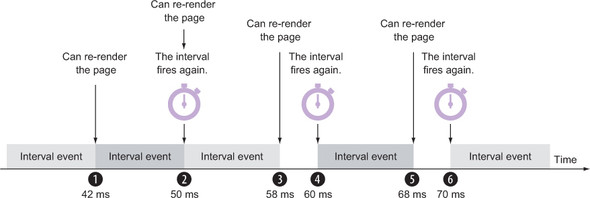 Figure 13.13. Because of the setbacks caused by the mouse click and time-out handler, it takes some time for the interval handlers to start executing every 10 ms.
Key Takeaways
- Intervals in JavaScript are used to execute a function repeatedly at specified intervals.
- The
setIntervalfunction continues to fire until explicitly cleared withclearInterval. - The event loop processes one task at a time, which can lead to delays in the execution of interval handlers.
- The actual execution timing of intervals can vary due to other tasks in the event loop, and some interval invocations may be dropped if a previous task is still queued.