Iterator in JavaScript
An iterator in JavaScript is an object that provides a standardized way to traverse a sequence of values. It implements the iterator protocol, which includes a next() method that returns an object with value and done properties. This mechanism is crucial for enabling objects to be iterated over in various contexts, such as within a for...of loop, when using the spread operator, or during destructuring. JavaScript's built-in data types, like arrays and strings, inherently implement @@iterator, making them naturally iterable. However, custom objects can also implement this symbol to define their own iteration logic.
Overview
In JavaScript, the @@iterator symbol serves as an interface that allows objects to define their iteration behavior. This symbol is crucial for enabling objects to be iterated over in various contexts, such as within a for...of loop, when using the spread operator, or during destructuring. JavaScript's built-in data types, like arrays and strings, inherently implement @@iterator, making them naturally iterable. However, custom objects can also implement this symbol to define their own iteration logic.
An iterator is an object that adheres to the iterator protocol, which requires a next method. This method returns an object containing two properties: value, which holds the next element in the iteration, and done, a boolean indicating whether the iteration is complete.
Implementing Iterators
Enumerating a String as a Character Array
Strings in JavaScript can be thought of as arrays of characters. This allows them to be spread, destructured, or iterated over. The following example demonstrates how a string can be enumerated as a character array:
[...'JoJS'];  // [ 'J', 'o', 'J', 'S' ]         #1

const [first, ...rest] = 'JoJS';                #2
first;   // 'J'
rest;    // ['o', 'J', 'S' ]

const str = 'JoJS'[Symbol.iterator]();          #3
str.next();  // { value: 'J', done: false }
str.next();  // { value: 'o', done: false }
str.next();  // { value: 'J', done: false }
str.next();  // { value: 'S', done: false }
str.next();  // { value: undefined, done: true }
Delayed Iterator
An iterator can also be designed to emit values with a delay. This is useful in scenarios where asynchronous operations are involved:
function delayedIterator(tasks) {
   return {
      next: function () {
         if (tasks.length) {
            const [value, time] = tasks.shift();                   #1
            return new Promise(resolve => {                        #2
               setTimeout(resolve, time, { value, done: false });
            });
         } else {
            return Promise.resolve({
               done: true                                          #3
            });
         }
      }
   };
}
Random-Number Generator Using an Iterator
Iterators can be used to generate sequences of random numbers. The following example shows how to create an iterator that produces random numbers:
function randomNumberIterator(size = 1) {

  function nextRandomInteger(min) {                              #1
    return function(max) {
      return Math.floor(Math.random() * (max - min)) + min;
    };
  }

  const numbers = Array(size)                                    #2
     .fill(1)
     .map(min => nextRandomInteger(min)(Number.MAX_SAFE_INTEGER));

  return {
    next() {
      if(numbers.length === 0) {
        return {done: true};                                     #3
      }
      return {value: numbers.shift(), done: false};              #4
    }
  };
}

let it = randomNumberIterator(3);
console.log(it.next().value);  // 1334873261721158             #5
console.log(it.next().value);  // 6969972402572387             #5
console.log(it.next().value);  // 3915714888608040             #5
console.log(it.next().done);   // true
Custom Iterators in Classes
Blockchain Example
In a blockchain, each block can be iterated over to access its transactions. The Blockchain class can implement the @@iterator symbol to iterate over its blocks:
class Blockchain {

  #blocks = new Map();

  constructor(genesis = createGenesisBlock()) {
     this.#blocks.set(genesis.hash, genesis);           #1
  }

  push(newBlock) {
     this.#blocks.set(newBlock.hash, newBlock);
     return newBlock;
  }

  [Symbol.iterator]() {
    return this.blocks.values()[Symbol.iterator]();     #1
  }
}
Block Example
Similarly, a Block class can implement the @@iterator symbol to iterate over its transactions:
class Block {

  constructor(index, previousHash, data = []) {
    this.index = index;
    this.data  = data;
    this.previousHash = previousHash;
    this.timestamp = Date.now();
    this.hash = this.calculateHash();
  }

  [Symbol.iterator]() {                      #1
    return this.data[Symbol.iterator]();
  }
}
Transaction Example
For terminal objects like Transaction, which do not benefit from iteration, the iterator can be manipulated to handle attempts to iterate gracefully:
class Transaction {
  [Symbol.iterator]() {
     return {
       next: () => ({ done: true })
     }
  }
}
Iterator Protocol
The iterator protocol is a fundamental concept in JavaScript that allows for the creation of custom iteration logic. By implementing the next method, objects can control how they are traversed, providing flexibility and power in handling data structures.
Generators and Lazy Evaluation
Generators in JavaScript provide lazy evaluation, which means they generate values on demand. This is particularly useful for working with potentially infinite sequences, as it prevents the program from attempting to compute an infinite number of values at once.
Figure: Executing the Range Generator in a For..Of Loop](https://livebook.manning.com/book/functional-programming-in-javascript/chapter-8/134)
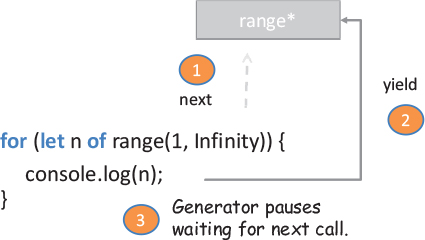 Figure 8.10. Executing the range generator in a for..of loop. Every iteration of the loop prompts the generator to pause and yield new data. Hence, generators have semantics similar to those of an iterator.
This figure illustrates how a generator can be used in a for..of loop, where each iteration prompts the generator to yield new data, demonstrating the lazy evaluation behavior of generators.
Conclusion
Iterators and generators are powerful tools in JavaScript that allow for efficient and flexible data traversal. By understanding and utilizing these constructs, developers can write more expressive and performant code, especially when dealing with large or infinite data sets.
| Book Title | Usage of Iterator | Technical Depth | Connections to Other Concepts | Examples Used | Practical Application |
|------------|-------------------|-----------------|-------------------------------|---------------|-----------------------|
| [The Joy of JavaScript](https://www.manning.com/books/the-joy-of-javascript) | Discusses the `@@iterator` symbol and its role in enabling objects to be iterable. Covers built-in and custom iterators. [more](https://livebook.manning.com/book/the-joy-of-javascript/chapter-7/194) | Explains the iterator protocol and how to implement custom iterators. [more](https://livebook.manning.com/book/the-joy-of-javascript/chapter-9/17) | Connects iterators to asynchronous operations and data structures like blockchain. [more](https://livebook.manning.com/book/the-joy-of-javascript/chapter-7/194) | Examples include character arrays, delayed iterators, and random-number generators. [more](https://livebook.manning.com/book/the-joy-of-javascript/chapter-7/197) | Practical examples include iterating over blockchain transactions and generating random numbers. [more](https://livebook.manning.com/book/the-joy-of-javascript/chapter-9/32) |
| [Secrets of the JavaScript Ninja, Second Edition](https://www.manning.com/books/secrets-of-the-javascript-ninja-second-edition) | Focuses on iterators in the context of generator functions, controlling execution flow. [more](https://livebook.manning.com/book/secrets-of-the-javascript-ninja-second-edition/chapter-6/134) | Detailed explanation of how iterators work with generators, including the `next` method. [more](https://livebook.manning.com/book/secrets-of-the-javascript-ninja-second-edition/chapter-6/134) | Highlights the interaction between iterators and generators, including sending values into generators. [more](https://livebook.manning.com/book/secrets-of-the-javascript-ninja-second-edition/chapter-6/134) | Examples include controlling a generator with an iterator and iterating over generator results. [more](https://livebook.manning.com/book/secrets-of-the-javascript-ninja-second-edition/chapter-6/134) | Demonstrates practical use in managing data flow and execution within generator functions. [more](https://livebook.manning.com/book/secrets-of-the-javascript-ninja-second-edition/chapter-6/134) |
| [Functional Programming in JavaScript](https://www.manning.com/books/functional-programming-in-javascript) | Describes iterators as objects for traversing sequences, used in looping over data structures. [more](https://livebook.manning.com/book/functional-programming-in-javascript/chapter-8/134) | Covers the iterator protocol and lazy evaluation with generators. [more](https://livebook.manning.com/book/functional-programming-in-javascript/chapter-8/134) | Links iterators to functional programming concepts like lazy evaluation and infinite sequences. [more](https://livebook.manning.com/book/functional-programming-in-javascript/chapter-8/134) | Examples include range and squares generators, and iterating over arrays and strings. [more](https://livebook.manning.com/book/functional-programming-in-javascript/chapter-8/134) | Emphasizes efficient data traversal and performance in handling large or infinite data sets. [more](https://livebook.manning.com/book/functional-programming-in-javascript/chapter-8/134) |
FAQ (Frequently asked questions)
What is the @@iterator symbol in JavaScript?
How is the @@iterator symbol used in JavaScript?
Which JavaScript data types implement @@iterator?
Can custom objects implement the @@iterator symbol?
How can you enumerate a string as a character array in JavaScript?
How does destructuring work with strings in JavaScript?
How can you manually iterate over a string in JavaScript?
What is a delayed iterator in JavaScript?
How does the delayed iterator handle tasks?
What happens when there are no more tasks in a delayed iterator?
What is an iterator in JavaScript?
How are iterators used in JavaScript?
How can you create a random-number generator using an iterator in JavaScript?
What does the next method do in a random-number iterator?
What are the properties of the object returned by an iterator's next method?
What is an iterator in JavaScript?
What does the iterator protocol include?
How are iterators used in JavaScript?