JSON (JavaScript Object Notation)
JSON, or JavaScript Object Notation, is a lightweight, text-based data interchange format that is easy for humans to read and write and easy for machines to parse and generate. It is widely used in web applications for data exchange between a server and a client, and it is a popular choice for APIs and data storage due to its simplicity and readability. JSON represents structured data as key-value pairs and is natively supported by JavaScript through functions like JSON.parse for parsing JSON strings into JavaScript objects and JSON.stringify for converting JavaScript objects into JSON strings.
Overview
JSON is based on a subset of JavaScript and supports key-value pairs, arrays, and various data types such as numbers, booleans, and null. Its human-readable format makes it an excellent choice for configuration files and data interchange between a server and a client. In web applications, JSON is often used to store and retrieve user data, such as user profiles and logs in a fitness app.
Importing JSON Files
Importing JSON files into applications can be done using various methods. Below is a function that demonstrates how to import a JSON text file using Node.js:
const file = require('./file.js');

function importJsonFile (filePath) {
 return file.read(filePath)
 .then(textFileData => {
 return JSON.parse(textFileData);
 });
};

module.exports = importJsonFile;
 Figure 3.9 Importing a JSON text file to the CDR
Streaming JSON Data
For handling large JSON files, streaming can be an efficient approach. The bfj library allows us to parse streaming JSON files. Here is how to create a readable JSON data stream:
const bfj = require('bfj');
const fs = require('fs');
const stream = require('stream');

function openJsonInputStream (inputFilePath ) {
 const jsonInputStream = new stream.Readable({ objectMode: true });
 jsonInputStream._read = () => {};

 const fileInputStream = fs.createReadStream(inputFilePath);

 let curObject = null;
 let curProperty = null;

 const emitter = bfj.walk(fileInputStream);

 emitter.on(bfj.events.object, () => {
 curObject = {};
 });

 emitter.on(bfj.events.property, name => {
 curProperty = name;
 });

 let onValue = value => {
 curObject[curProperty] = value;
 curProperty = null;
 };

 emitter.on(bfj.events.string, onValue);
 emitter.on(bfj.events.number, onValue);
 emitter.on(bfj.events.literal, onValue);

 emitter.on(bfj.events.endObject, () => {
 jsonInputStream.push(curObject);
 curObject = null;
 });

 emitter.on(bfj.events.endArray, () => {
 jsonInputStream.push(null);
 });

 emitter.on(bfj.events.error, err => {
 jsonInputStream.emit("error", err);
 });

 return jsonInputStream;
};

module.exports = openJsonInputStream;
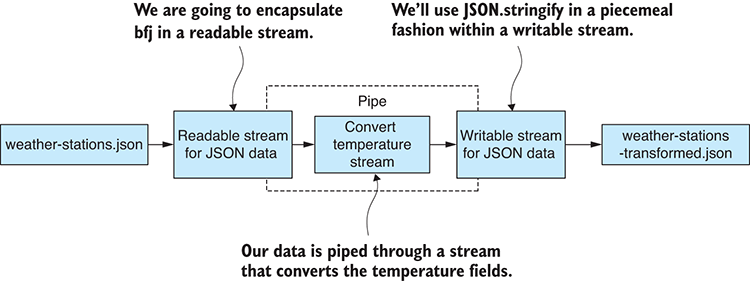 Figure 7.11 Streaming transformation of a huge JSON file
Working with JSON in JavaScript
JavaScript provides built-in methods to work with JSON data. One common use case is parsing JSON data received from a server using the JSON.parse() method, which converts a JSON string into a JavaScript object.
Example
Here is an example of how JSON data can be parsed in JavaScript:
var data = JSON.parse(xhr.responseText);
In this example, xhr.responseText contains the JSON data received from an XMLHttpRequest (XHR). The JSON.parse() method is used to convert this JSON string into a JavaScript object, which can then be used within the application.
Caching with JSON
To optimize performance, especially in web applications, it is common to use a JavaScript object as a cache. This involves placing loaded data or models into the cache and checking the cache before making additional XHR requests. This approach reduces the number of network requests and speeds up data retrieval, enhancing the user experience.
By leveraging JSON's simplicity and the powerful parsing capabilities of JavaScript, developers can efficiently manage data interchange in web applications, ensuring both performance and ease of use.
| Book Title | Usage of JSON | Technical Depth | Connections to Other Concepts | Examples Used | Practical Application |
|------------|---------------|-----------------|-------------------------------|---------------|-----------------------|
| [Data Wrangling with JavaScript](https://www.manning.com/books/data-wrangling-with-javascript) | Discusses JSON as a data interchange format, focusing on its use in web applications and APIs. [more](https://livebook.manning.com/book/data-wrangling-with-javascript/chapter-3/77) | Covers JSON parsing and stringifying, importing JSON files, and handling JSON streams with Node.js. [more](https://livebook.manning.com/book/data-wrangling-with-javascript/chapter-3/85) | Connects JSON usage with Node.js, file handling, and streaming data. [more](https://livebook.manning.com/book/data-wrangling-with-javascript/chapter-7/125) | Provides code examples for importing, reading, writing, and transforming JSON streams. [more](https://livebook.manning.com/book/data-wrangling-with-javascript/chapter-7/133) | Emphasizes practical applications in data wrangling and handling large JSON files efficiently. [more](https://livebook.manning.com/book/data-wrangling-with-javascript/chapter-7/133) |
| [Get Programming with JavaScript](https://www.manning.com/books/get-programming-with-javascript) | Highlights JSON's role in web data exchange and configuration files. [more](https://livebook.manning.com/book/get-programming-with-javascript/chapter-20/49) | Explains JSON parsing with `JSON.parse()` and caching strategies in JavaScript. [more](https://livebook.manning.com/book/get-programming-with-javascript/chapter-20/49) | Links JSON to web application data management, including user profiles and logs. [more](https://livebook.manning.com/book/get-programming-with-javascript/chapter-20/49) | Includes examples of parsing JSON data from XMLHttpRequests. [more](https://livebook.manning.com/book/get-programming-with-javascript/chapter-20/87) | Focuses on optimizing web app performance through JSON caching and data management. [more](https://livebook.manning.com/book/get-programming-with-javascript/chapter-20/49) |
FAQ (Frequently asked questions)
How is JSON used in the fitness app?
What is JSON used for?
What is the structure of JSON?
Is JSON human-readable?
How is JSON used in JavaScript?
What does Figure 3.9 in the book illustrate?
How can you import a JSON text file in JavaScript?
What is the purpose of the importJsonFile function?
Why is JSON a popular choice for data interchange?
What is JSON used for in web applications?
What does Figure 7.11 in the book show?
How can you transform a huge JSON file in Node.js?
What is the role of convertTemperatureStream in transforming JSON files?
How does the web app get data for the C3 line chart?
What is the default chart type in the C3 line chart example?