Lint in JavaScript Application Design
Overview
Lint is a crucial tool in the JavaScript development process, used to check code for syntax errors and enforce coding best practices. It acts as a static code analysis tool, identifying potential issues without the need to execute the code. This makes it similar to a compiler for interpreted languages like JavaScript, where it helps developers catch errors early in the development cycle.
Linting involves running a program that analyzes the code for potential errors. This process is essential in maintaining code quality, ensuring that the code is free from syntax errors and adheres to predefined coding standards. In the context of JavaScript application design, linting is integrated into the build process to automatically check the code whenever a build is run.
Linting in Practice
Example of Lint Errors
Linting can reveal various errors in a code snippet. For instance, consider the following code:
function compose_ticks_count (start) {
  start || start = 1;
  this.counter = start;
  return function (time) {
    ticks = +new Date;
    return ticks + '_'  + this.counter++
  }
}
This code snippet may contain several lint errors, such as undeclared variables or improper use of operators. Running this code through a linter would highlight these issues, allowing the developer to address them before the code is executed.
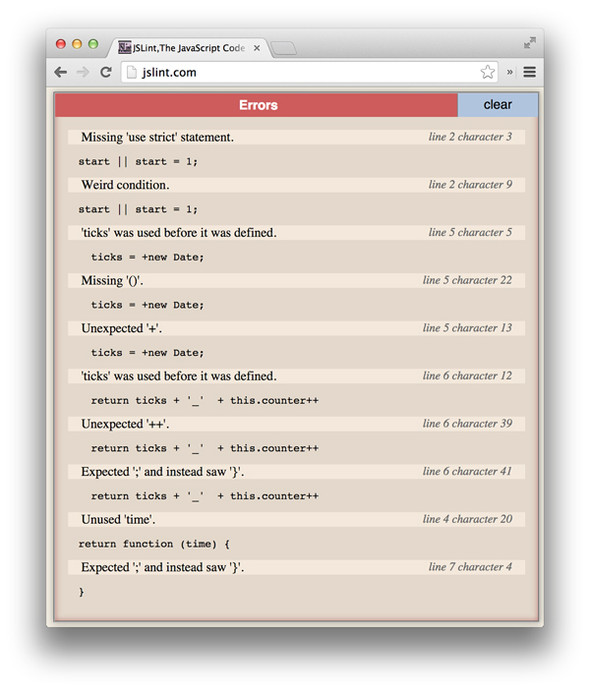 Figure 1.5. Lint errors found in a code snippet.
Configuring Lint Tasks
To integrate linting into the build process, tools like grunt-contrib-jshint can be used. This package allows developers to configure lint tasks that automatically check JavaScript files for errors. Below is an example configuration for a lint task:
grant.initConfig({
 jshint: {
   client: [
     'public/js/**/*.js',
     '!public/js/vendor'
   ]
 }
});
In this configuration, the jshint task is set to analyze all JavaScript files within the public/js directory, excluding those in the vendor subdirectory. This setup helps maintain a high level of code quality by ensuring that all custom JavaScript code adheres to the specified linting rules.
FAQ (Frequently asked questions)
What is lint in JavaScript?
How does lint help in JavaScript development?
What does a lint error look like in a code snippet?
Can you provide an example of a code snippet with potential lint errors?
How can lint improve code quality?
What is the process of linting?
What tool is used for linting in the book's context?
Why is linting important during a build?
How is a lint task configured in a project?