Nightmare
Nightmare is a powerful Node.js library designed for server-side visualization. It functions as a headless browser built on Electron, enabling automated interactions with web pages and rendering them into images or PDFs. This makes it an invaluable tool for tasks such as capturing charts as images or generating multipage reports in PDF format.
Features and Capabilities
Nightmare allows developers to control Electron running as a headless browser, providing a seamless way to automate web page interactions. This capability is particularly useful for tasks that require rendering web content without a graphical user interface.
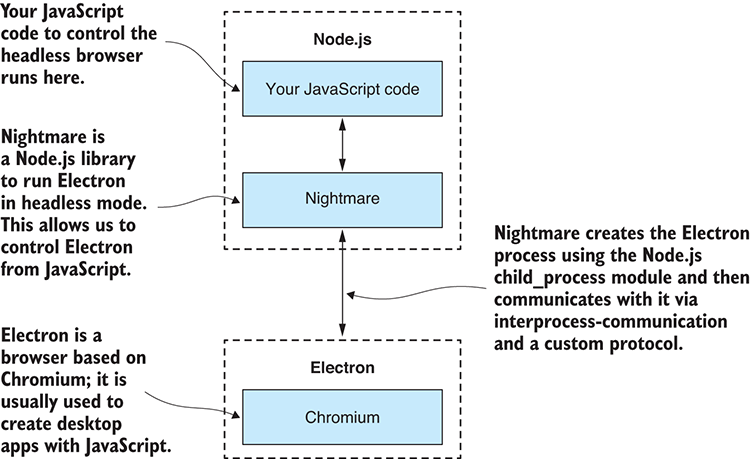 Figure 11.3 Nightmare allows us to control Electron running as a headless browser.
Example Usage
Below is an example of how Nightmare can be used to capture a chart from a web page and save it as an image file. This example demonstrates the process of starting a web server, navigating to a web page, waiting for the content to load, and then capturing a screenshot.
Capturing a Chart to an Image File
const webServer = require('./web-server.js');
const Nightmare = require('nightmare');

webServer.start()    #1
    .then(server => {
        const outputImagePath = "./output/nyc-temperatures.png";

 const nightmare = new Nightmare();    #2
 return nightmare.goto("http://localhost:3000")    #3
 .wait("svg")    #4
 .screenshot(outputImagePath)    #5
 .end()    #6
 .then(() => server.close());    #7
    })
    .then(() => {
        console.log("All done :)");
    })
    .catch(err => {
        console.error("Something went wrong :(");
        console.error(err);
    })

#1   Starts the web server
#2   Creates the Nightmare instance
#3   Points the browser at the web server we started
#4   Waits until an svg element appears onscreen, indicating that the chart has loaded
#5   Captures a screenshot to an image file
#6   Ends the Nightmare session. Any queued operations are completed, and the headless browser is terminated.
#7   Stops the web server when we’re done
In this example, the process begins by starting a web server. A Nightmare instance is then created, which navigates to the specified local web page. The script waits for an SVG element to appear, ensuring that the chart is fully loaded before capturing a screenshot. Finally, the Nightmare session is ended, and the web server is stopped. This example highlights the simplicity and efficiency of using Nightmare for automated web page rendering tasks.
FAQ (Frequently asked questions)
What is Nightmare used for in server-side visualization?
How does Nightmare interact with Electron?
How can you capture a chart to an image file using Nightmare?
What are the steps involved in using Nightmare to capture a screenshot?
What can Nightmare be used for in Node.js?