Nodemon
Nodemon is a utility designed to enhance the development process for Node.js applications. It automatically monitors your code for changes and restarts the application, providing immediate feedback and streamlining the development workflow. This tool is particularly beneficial for developers who want to avoid the repetitive task of manually stopping and restarting the server after each code modification.
Definition and Overview
Nodemon is a powerful tool that automatically restarts your Node.js application whenever file changes are detected. This feature significantly enhances the development workflow by providing live feedback, enabling developers to see the results of their code changes immediately without the need for manual intervention. It is especially beneficial in exploratory coding, where quick iterations and efficient data exploration are crucial.
Installation
Nodemon is typically installed globally on your system using npm, which makes it accessible from the command line across your system. To install Nodemon globally, you can run the following command:
npm install -g nodemon
Once installed, Nodemon can be used in place of the node command. For example, instead of running:
node app.js
You can run:
nodemon app.js
Usage
When you run a script with Nodemon, it doesn't exit after the script completes. Instead, it pauses and waits for any modifications to the script. Upon detecting changes, Nodemon automatically re-executes the code. This cycle continues until you quit Nodemon using Ctrl-C.
Monitoring Files
By default, Nodemon monitors all *.js files in the directory. However, you can customize this behavior by using a .nodemonignore file, similar to a .gitignore file, to specify files and directories that Nodemon should ignore. This is useful for excluding files that do not need to trigger a restart when changed.
Using Nodemon with Grunt
Nodemon can be integrated into a Grunt workflow using the grunt-nodemon plugin. This allows you to automate the process of running Nodemon alongside other tasks. For instance, you can use grunt-concurrent to run multiple tasks simultaneously, such as Nodemon and a file watcher.
Here is an example configuration for using Nodemon with Grunt:
Listing 3.3. Using nodemon from Grunt
nodemon: {
  dev: {
    script: 'app.js'
  }
},
concurrent: {
  dev: {
    tasks: ['nodemon', 'watch']
   }
}
In this setup, the nodemon task is configured to run app.js, and the concurrent task is set up to run both nodemon and watch tasks concurrently. This setup improves the development workflow by automatically restarting the application and watching for file changes, thus saving time and effort for developers.
Visual Representation
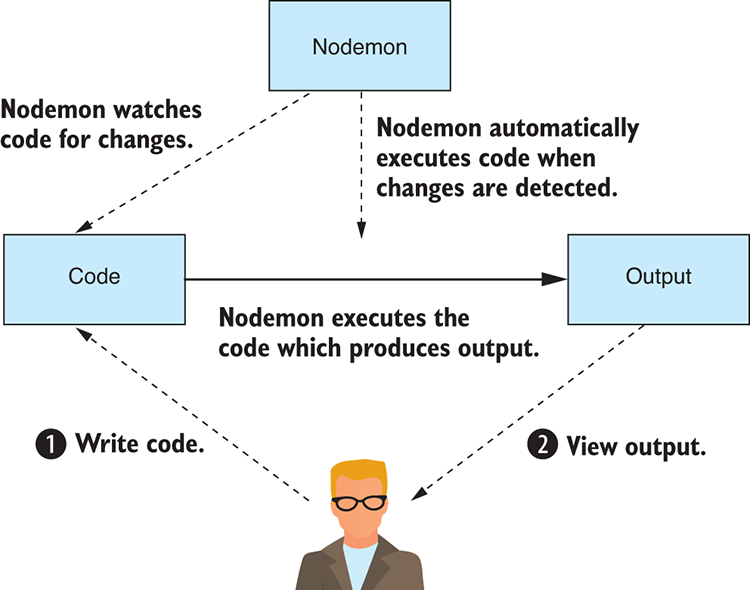
Figure 5.8 Nodemon watches your code and executes it automatically when you make changes.
This figure illustrates how Nodemon continuously monitors your code and executes it automatically whenever changes are made, thus facilitating a seamless development experience.
| Book Title | Usage of nodemon | Technical Depth | Connections to Other Concepts | Examples Used | Practical Application |
|------------|------------------|-----------------|-------------------------------|---------------|-----------------------|
| [Data Wrangling with JavaScript](https://www.manning.com/books/data-wrangling-with-javascript) | Discusses nodemon as a tool for automatic code execution upon file changes, enhancing development workflow. [more](https://livebook.manning.com/book/data-wrangling-with-javascript/chapter-5/70) | Provides a detailed overview of nodemon's functionality and installation process. [more](https://livebook.manning.com/book/data-wrangling-with-javascript/chapter-5/69) | Highlights nodemon's role in exploratory coding and its integration into the development process. [more](https://livebook.manning.com/book/data-wrangling-with-javascript/chapter-5/70) | Includes examples of using nodemon in command line operations. [more](https://livebook.manning.com/book/data-wrangling-with-javascript/chapter-5/70) | Emphasizes nodemon's utility in providing immediate feedback and facilitating quick iterations. [more](https://livebook.manning.com/book/data-wrangling-with-javascript/chapter-5/70) |
| [JavaScript Application Design: A Build First Approach](https://www.manning.com/books/javascript-application-design) | Describes nodemon as a utility for automatic application restarts upon file changes. [more](https://livebook.manning.com/book/javascript-application-design/chapter-3/166) | Covers installation and basic usage, including file monitoring and customization options. [more](https://livebook.manning.com/book/javascript-application-design/chapter-3/166) | Explains integration with Grunt for enhanced workflow automation. [more](https://livebook.manning.com/book/javascript-application-design/chapter-3/166) | Provides configuration examples for using nodemon with Grunt. [more](https://livebook.manning.com/book/javascript-application-design/chapter-3/166) | Focuses on improving development workflow by automating tasks and reducing manual intervention. [more](https://livebook.manning.com/book/javascript-application-design/chapter-3/166) |
FAQ (Frequently asked questions)
What is nodemon used for in a Node app?
How is nodemon configured in Grunt?
What is nodemon used for in Node.js development?
How does nodemon streamline the development process?
How does nodemon enhance the development workflow?
What does Figure 5.8 illustrate about nodemon?
How is nodemon used in exploratory coding with Node.js?