Parallel Processing
Parallel processing is a technique used to enhance performance and data throughput by dividing a task into smaller parts and processing them simultaneously using multiple processes or threads. This approach leverages the capabilities of modern multi-core processors to handle different parts of a task concurrently, significantly increasing the efficiency of data processing tasks.
Overview of Parallel Processing
In parallel processing, data is divided into separate windows, and multiple processes are used to handle each window simultaneously. This method takes advantage of multiple CPU cores, allowing for increased throughput and faster processing times. The concept of forking processes is central to parallel processing, where the fork function in Node.js is used to create multiple processes that can handle different parts of a task simultaneously.
Implementing Parallel Processing
Master and Slave Processes
The implementation of parallel processing can be illustrated through the use of master and slave processes. The master process coordinates the execution of multiple slave processes, each responsible for processing a specific data window. This structure is depicted in Figure 8.11.
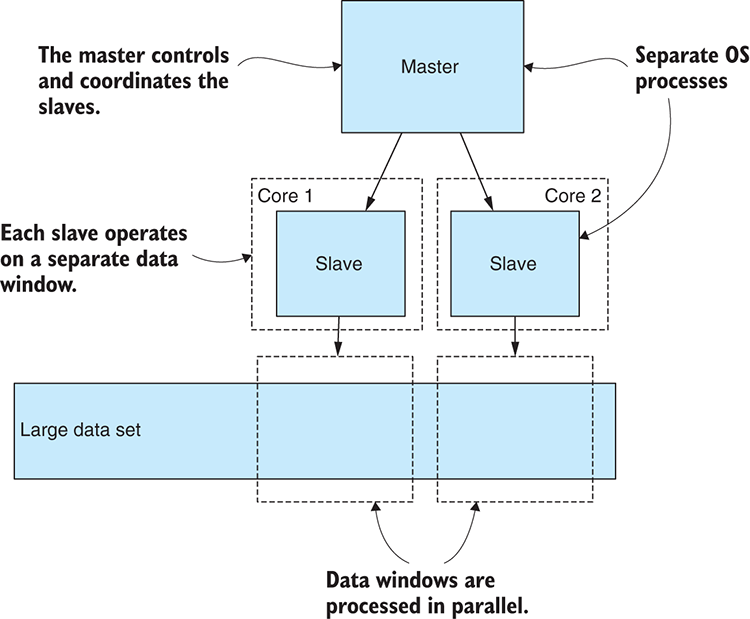 Figure 8.11 Using multiple OS processes to work on data in parallel
Slave Process
The slave process is responsible for processing a single data window. The position and size of the data window are passed to the script using command-line parameters skip and limit. The following is an example of a slave process script:
Listing 8.8 The slave process that does the work in parallel (listing-8.8.js)
// ... openDatabase function is omitted ...

function processData (collection, skipAmount, limitAmount) {    #1
 return collection.find()    #2
 .skip(skipAmount)    #2
 .limit(limitAmount)    #2
        .toArray()
 .then(data => {    #3
            console.log(">> Your code to process " + data.length + " ➥ records here!");
 });    #3
};    #1

console.log("Processing records " + argv.skip + " to " + (argv.skip + ➥ argv.limit));

openDatabase()
    .then(db => {
 return processData(db.collection, argv.skip, argv.limit)    #4
            .then(() => db.close());
    })
    .then(() => {
        console.log(
            "Done processing records " + argv.skip +
            " to " + (argv.skip + argv.limit)
        );
    })
    .catch(err => {
        console.error(
            "An error occurred processing records " + argv.skip +
            " to " + (argv.skip + argv.limit)
        );
        console.error(err);
    });

#1   This is a helper function to process a window of data.
#2   Executes a database query, but only retrieves the specified data window
#3   The set of records is received, so add your data processing code here.
#4   Processes data after opening the database. Here we pass through skip and limit command-line arguments.
Master Process
The master process is responsible for coordinating the slave processes. It divides the database into data windows and manages the execution of slave processes in parallel. The following is an example of a master process script:
Listing 8.9 The master process that coordinates the slave processes (listing-8.9.js)
const argv = require('yargs').argv;
const spawn = require('child_process').spawn;    #1
const parallel = require('async-await-parallel');

// ... openDatabase function is omitted ...

function runSlave (skip, limit, slaveIndex) {    #2
 return new Promise((resolve, reject) => {    #3
 const args = [    #4
 "listing-8.8.js",    #4
 "--skip",    #4
 skip,    #4
 "--limit",    #4
 limit    #4
 ];    #4

 const childProcess = spawn("node", args);    #5

    // … input redirection omitted …

 childProcess.on("close", code => {    #6
            if (code === 0) {
 resolve();    #7
            }
            else {
 reject(code);    #8
            }
 });    #5

 childProcess.on("error", err => {    #9
 reject(err);    #10
 });    #9
 });    #3
};    #2

function processBatch (batchIndex, batchSize) {    #11
 const startIndex = batchIndex * batchSize;    #12
 return () => {    #13
 return runSlave(startIndex, batchSize, batchIndex);    #14
 };    #13
};    #11

function processDatabase (numRecords) {    #15

 const batchSize = 100;    #16
 const maxProcesses = 2;    #17
 const numBatches = numRecords / batchSize;    #18
 const slaveProcesses = [];    #19
 for (let batchIndex = 0; batchIndex < numBatches; ++batchIndex) {    #19
 slaveProcesses.push(processBatch(batchIndex, batchSize));    #19
 }    #19

    return parallel(slaveProcesses, maxProcesses);
};    #15

openDatabase()
    .then(db => {
 return db.collection.find().count()    #20
 .then(numRecords => processDatabase (numRecords))    ㉑   #U #U
            .then(() => db.close());
    })
    .then(() => {
        console.log("Done processing all records.");
    })
    .catch(err => {
        console.error("An error occurred reading the database.");
        console.error(err);
    });

#1   Requires the Node.js spawn function that allows us to invoke operating system commands
#2   This is a helper function that initiates the slave process.
#3   Wraps the slave process in a promise
#4   These are the arguments to the Node.js slave process, including the script to run. Note how skip and limit arguments are passed to the slave, so that it’s only concerned with a specific data window.
#5   Uses the Node.js spawn function to initiate the slave process
#6   Handles the close event; this tells us when the slave process has ended.
#7   Resolves the promise when the slave ends with an error code of zero, indicating it completed successfully
#8   Rejects the promise when the slave has ended with an error code other than zero, indicating that it failed
#9   Handles the error event; for some reason the process failed to start.
#10   Rejects the promise when an error has occurred
#11   This is a helper function to sequence the operation of a slave for a specific data window.
#12   Computes the record at the start of the index for the current batch of records
#13   Encapsulates invocation of the slave in an anonymous function; this allows us to queue the operation and defer it until later.
#14   Lines up the slave for deferred invocation
#15   This is a helper function that processes the entire database.
#16   Specifies the number of records to include in each data window
#17   Tells the number of processes to run in parallel. Increase this number when you have more CPU cores to spare.
#18   Computes the total number of data windows that we must process
#19   Builds a queue of deferred slave invocations. Each entry in the list is a function that when invoked will run the slave for a specific batch of records.
#20   Counts the total number of records in the database
Installation of Required Modules
To implement the above scripts, you need to have the yargs module for reading command-line parameters and the async-await-parallel module for managing parallel execution. These can be installed in a Node.js project using the following command:
npm install --save yargs async-await-parallel
By using parallel processing, you can significantly enhance the performance of data processing tasks, especially when dealing with large datasets. However, it's important to manage the complexity that comes with coordinating multiple processes to ensure efficient and error-free execution.
FAQ (Frequently asked questions)
What is parallel processing?
How does the master process coordinate slave processes in parallel processing?
What is the role of the spawn function in parallel processing?
How are errors handled in parallel processing with slave processes?
What is the purpose of the processBatch function in parallel processing?
How is data processed in parallel?