Photoresistor
Overview
A photoresistor, also known as a photocell or light-dependent resistor (LDR), is a type of resistor whose resistance changes based on the light intensity it is exposed to. It becomes more conductive with more light and less conductive in darkness. This property makes photoresistors useful in various applications where light sensing is required.
How Photoresistors Work
The resistance of a photoresistor decreases as the light intensity increases, making it more conductive. Conversely, in darker conditions, the resistance increases, making it less conductive. This behavior is illustrated in Figure 4.5.
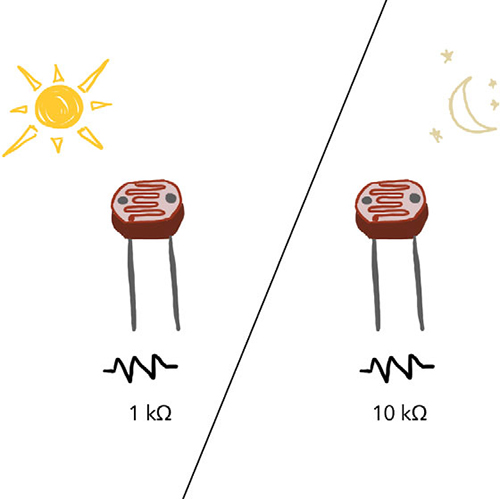 Figure 4.5. As light conditions change, the resistance of the photoresistor changes. It becomes more conductive—that is, less resistive—when more light hits it. When it’s darker, the resistance is higher.
Photoresistor Circuit
To use a photoresistor in a circuit, a voltage divider is typically employed. This setup allows for a readable output voltage signal for an analog input pin, which varies with light intensity. The wiring diagram for a photoresistor voltage divider circuit is shown in Figure 4.16.
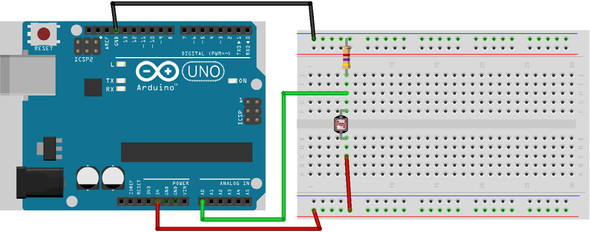 Figure 4.16. Wiring diagram for the photoresistor voltage divider circuit. The jumper wire connected to A0 needs to have its other end connected to Vout, between the photoresistor (R1) and the 4.7 kV resistor (R2).
Implementing with Johnny-Five
To sense changes in light conditions using a photoresistor, you can use the Johnny-Five library with a simple script. Below is a basic example of how to set up a photoresistor with Johnny-Five:
Listing 4.4. Photoresistor.js
const five = require('johnny-five');
const board = new five.Board();

board.on('ready', () => {
  const sensor = new five.Sensor({
    pin: 'A0'
  });
  sensor.on('data', () => {
    console.log(sensor.value);
  });
});
Running the Script
Once the script is running, you can observe the changes in light by placing your hand over the photoresistor or adjusting the ambient light. The logged output will reflect these changes, as shown in Listing 4.5.
Listing 4.5. Photoresistor data logging output
$ node photoresistor.js
1464612512404 Device(s) /dev/cu.usbmodem1421
1464612512416 Connected /dev/cu.usbmodem1421
1464612515883 Repl Initialized
>> 354
354
355
355
355
355
354
353
432
Adjusting Sensor Sensitivity
The threshold attribute on the Sensor object can be adjusted to change the sensitivity of the change event. By default, the threshold is set to 1, meaning any change in value will trigger the event. You can modify this to a higher value to reduce sensitivity, as demonstrated in Listing 4.7.
Listing 4.7. Logging changing photoresistor values
var const = require('johnny-five');
var const = new five.Board();

board.on('ready', () => {
  const sensor = new five.Sensor({
    pin: 'A0'
  });
  console.log(sensor.value);             1
  sensor.threshold = 5;                  2
  sensor.on('change', () => {            3
    console.log(sensor.value);
  });
});
- 1 Logs out the sensor’s initial value
By understanding and utilizing these concepts, you can effectively integrate photoresistors into your projects to detect and respond to changes in light conditions.
FAQ (Frequently asked questions)
What is a photoresistor?
How does a photoresistor work?
How does light affect the resistance of a photoresistor?
How can you use a photoresistor with JavaScript?
What is the role of a voltage divider in a photoresistor circuit?