Piezo
Overview
Piezos are fascinating devices that convert electrical energy into mechanical energy, producing sound waves. This capability allows them to play tunes by applying voltages at specific frequencies. Additionally, piezos can function as sensors to detect vibrations, making them versatile components in various electronic projects.
Structure and Connection
Piezos come in different forms, some with wire leads and others with legs. Regardless of the form, they have two pins: positive (+) and negative (-). This is illustrated in Figure 5.23.
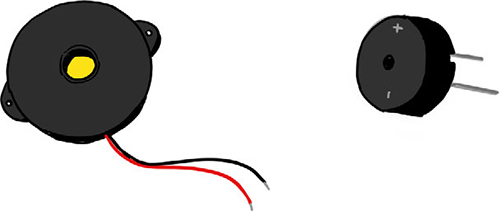 Figure 5.23. Some piezos have wire leads, and others have legs. Piezos have two pins: + and -.
Depending on the type of piezo, you can either plug it directly into a breadboard or connect its wires to the breadboard. Figure 5.24 shows a wiring diagram for replacing an LED with a piezo.
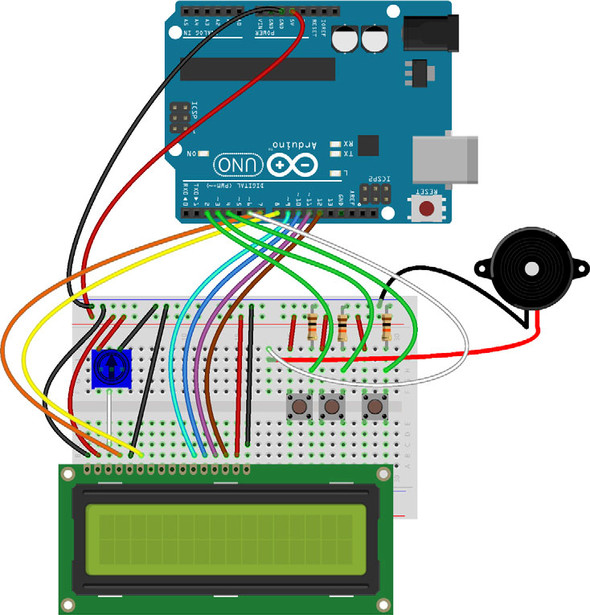 Figure 5.24. Wiring diagram showing the replacement of the LED with a piezo
Making Noise with Piezos
Piezos produce sound by applying voltage at specific frequencies, which creates vibrations corresponding to musical notes. This process uses Pulse Width Modulation (PWM) to generate square waves, with the frequency of these waves determining the note played. For example, the note A4 is played at 440 Hz. The reverse piezoelectric effect is at play here, where electricity is converted into mechanical movement, resulting in sound waves.
Playing Tunes on the Piezo
To play tunes on a piezo, you can use the Johnny-Five library's Piezo class, which simplifies the handling of timing and frequency. Notes are specified by their names, such as 'e5', so you don't need to memorize frequencies. You can pass an object representing a "tune" to the play method, which includes properties like tempo (beats per minute) and a song (an array of notes and their durations).
Instantiating a Piezo
To start using a piezo, you need to instantiate it in your code. Below is an example of how to instantiate a piezo using Johnny-Five:
Listing 5.23. Instantiating a piezo
var alertChime = new five.Piezo(6);
This code snippet shows how to create a new Piezo object connected to pin 6, ready to play tunes or act as a sensor.
FAQ (Frequently asked questions)
What is a piezo and how does it work?
What are the physical characteristics of piezos?
How do you instantiate a piezo in JavaScript?
How do piezos produce sound?
How is PWM used with piezos to play notes?