Player Object in JavaScript
Overview
In the context of JavaScript programming, particularly within the development of games like "The Crypt," a player object is a fundamental construct that encapsulates all relevant data about a player. This includes attributes such as the player's name, health, location, and items. By using player objects, developers can streamline function calls by passing the entire object as an argument, rather than individual pieces of information. This approach not only simplifies code but also enhances the organization and management of player data.
Creating a Player Object
A player object is typically created using a constructor function. This function defines the properties of the player, such as name, health, and place, and includes methods for interacting with these properties. This design allows for efficient creation and management of player data within the game.
Example: Player Constructor Function
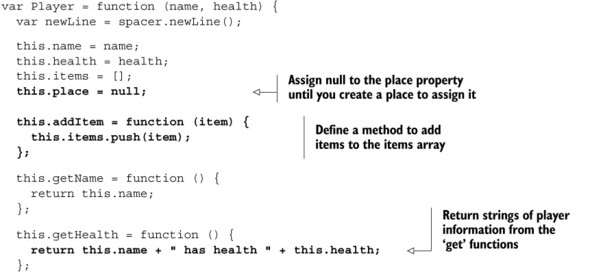 Listing 9.12. A Player constructor function (http://jsbin.com/leqahi/edit?js,console)
Encapsulation and Data Management
In "The Crypt" game, the player object initially had all attributes and methods as public. However, the design was updated to hide some data, controlling access and exposing only necessary methods. This encapsulation ensures that only intended interactions with the player data are possible, enhancing security and integrity.
The Player object model manages player data and provides methods such as getData, hasItem, removeItem, and applyDamage. This separation of concerns allows for a more modular and maintainable codebase.
Displaying Player Information
To display player information, the display functions are moved from the Player model into a separate module called playerView. This module is solely responsible for the presentation of player data, allowing the Player model to focus on data management.
Example: Displaying Player Information Using Objects
 Listing 6.10. Displaying player information using objects (http://jsbin.com/puteki/edit?js,console)
Example: Moving Display Functions to a Separate Module
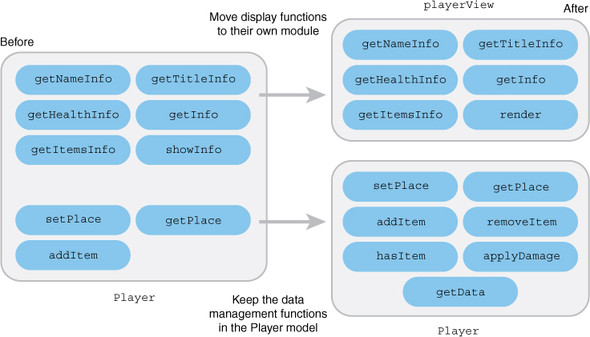 Figure 15.3. Move the display functions from the Player model into their own module.
Web-Based Player View
The player view module is updated to display player information on a web page. This is achieved by modifying the render method to insert text into an HTML element, providing a user-friendly interface for viewing player data.
Example: A Web-Based Player View
Listing 17.7. A web-based player view (http://jsbin.com/cehexi/edit?js,console)
Interacting with the Player Object
The player object can be moved to a new destination by updating its location using the setPlace method, based on the direction provided by the user. This method allows for dynamic interaction within the game environment, enhancing the player's experience.
Example: Displaying a Player Object in the Console
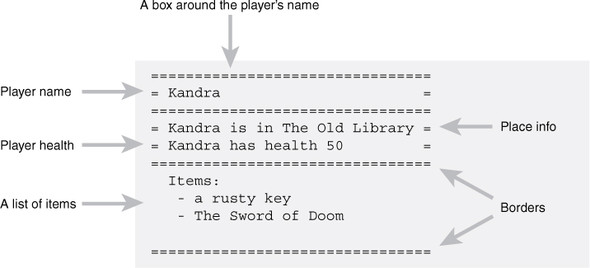 Figure 9.6. The elements shown when a Player object is displayed on the console.
FAQ (Frequently asked questions)
What is a player object in JavaScript?
How can player objects simplify function calls?
How is a Player object created in JavaScript?
What are the benefits of using a constructor function for Player objects?
What attributes does a Player object have in 'The Crypt' game?
How does the updated design of Player objects improve data security?
How is a player object's location updated in 'The Crypt' game?
What methods does the Player object provide for managing player data?
Where are the display functions for the Player object moved to?
How do you create a view for player objects?
How is player information displayed on a web page in 'The Crypt' game?