Post in JavaScript
In JavaScript, the term "post" often refers to the HTTP POST method, which is used to send data to a server. This method is integral to web development, enabling the creation or updating of resources on a server. The POST method is commonly used in scenarios such as form submissions, where user input is sent to the server for processing.
Overview of HTTP POST
The HTTP POST method is a request method supported by HTTP used by the World Wide Web. By design, the POST request method requests that a web server accept the data enclosed in the body of the request message, most likely for storing it. It is often used when uploading a file or submitting a completed web form.
Client-Side Implementation
In a practical example, a client-side application might use a mock air pollution sensor to read data from a CSV file and submit it to a server using HTTP POST. This involves sending data packets to a server endpoint, which are then processed by an HTTP POST request handler. The following code snippet demonstrates how this is achieved:
const fs = require('fs');
const request = require('request-promise');
const importCsvFile = require('./toolkit/importCsvFile.js');

const dataFilePath = "../../data/brisbanecbd-aq-2014.csv";    // Path to the CSV file
const dataSubmitUrl = "http://localhost:3000/data-collection-point";    // URL for data submission

importCsvFile(dataFilePath)
    .then(data => {
        let curIndex = 0;

        setInterval(() => {
            const outgoingData = Object.assign({}, data[curIndex]);
            curIndex += 1;

            request.post({
                uri: dataSubmitUrl,
                body: outgoingData,
                json: true
            });

        }, 1000);
    })
    .catch(err => {
        console.error("An error occurred.");
        console.error(err);
    });
Server-Side Implementation
On the server side, a Node.js server can be set up to accept incoming data using HTTP POST. The server listens for data submissions at a specific endpoint and prints the incoming data to the console for verification:
const express = require('express');
const app = express();
const bodyParser = require('body-parser');

app.use(bodyParser.json());

app.post("/data-collection-point", (req, res) => {
    console.log(req.body);
    res.sendStatus(200);
});

app.listen(3000, () => {
    console.log("Data collection point listening on port 3000!");
});
Data Flow
The data flow from the sensor to the server is illustrated in the following figures:
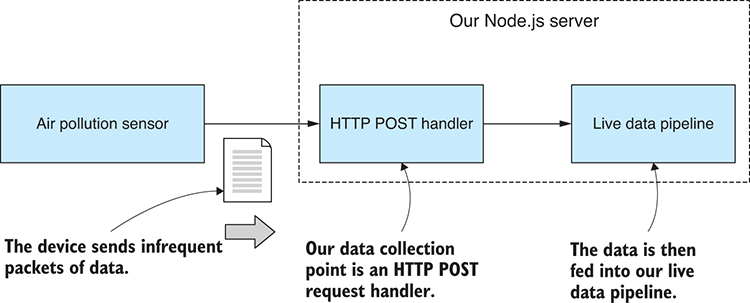 Figure 12.7 HTTP POST is used to send single packets of data to our server.
The server receives data and prints it to the console, as shown in the next figure:
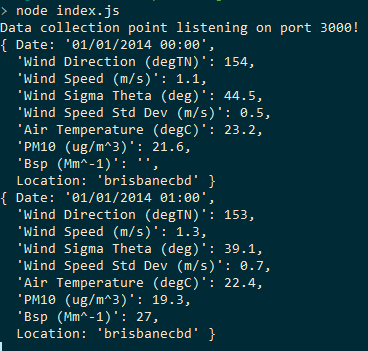 Figure 12.8 Output displayed as our Node.js server receives data using HTTP POST.
Handling Errors in POST Requests
When a POST request is made, the server expects the data to meet certain validation criteria. If the data does not meet these criteria, the server may respond with a 400 Bad Request error. This indicates that the request was malformed or contained invalid data. Here is an example of a POST request that results in a 400 Bad Request error:
HTTP/1.1 400 Bad Request
{
  "error": {
    "code": "bf-400",
    "message": "Some required fields were invalid.",
    "context": {
      "validation": [
        "The product name must be 6-20 alphanumeric characters",
        "The price can't be negative",
        "At least one product category should be selected"
      ]
    }
  }
}
Explanation
-
HTTP Status Code: The response begins with the HTTP status code
400 Bad Request, indicating that the server could not process the request due to client-side errors. -
Error Object: The response body contains an
errorobject that provides more details about the issue:- Code: A specific error code (
bf-400) that can be used for programmatic error handling. - Message: A human-readable message explaining that some required fields were invalid.
- Context: Additional context is provided to help identify the specific validation issues.
- Code: A specific error code (
This detailed error response helps developers and users understand what went wrong with the POST request and what needs to be corrected for a successful submission.
Libraries Used
- request-promise: A higher-level library used on the client side to simplify HTTP requests and wrap them in promises.
- express: A popular Node.js library used on the server side to handle HTTP requests more efficiently.
- body-parser: Middleware for parsing incoming request bodies in a middleware before your handlers, available under the
req.bodyproperty.
For more detailed information, you can refer to the Data Wrangling with JavaScript and JavaScript Application Design: A Build First Approach books.
| Book Title | Usage of post | Technical Depth | Connections to Other Concepts | Examples Used | Practical Application |
|------------|---------------|-----------------|-------------------------------|---------------|-----------------------|
| [Data Wrangling with JavaScript](https://www.manning.com/books/data-wrangling-with-javascript) | Discusses POST as an HTTP method for sending data to a server, particularly for infrequent data submissions. [more](https://livebook.manning.com/book/data-wrangling-with-javascript/chapter-12/60) | Detailed explanation of client-side and server-side implementations using Node.js and Express. [more](https://livebook.manning.com/book/data-wrangling-with-javascript/chapter-12/60) | Connects POST requests to data flow from sensors to servers, using libraries like request-promise and body-parser. [more](https://livebook.manning.com/book/data-wrangling-with-javascript/chapter-12/60) | Provides code snippets for a mock air pollution sensor and a Node.js server. [more](https://livebook.manning.com/book/data-wrangling-with-javascript/chapter-12/60) | Demonstrates practical use in submitting sensor data to a server. [more](https://livebook.manning.com/book/data-wrangling-with-javascript/chapter-12/60) |
| [JavaScript Application Design: A Build First Approach](https://www.manning.com/books/javascript-application-design) | Describes POST requests as a method for sending data to a server to create or update resources. [more](https://livebook.manning.com/book/javascript-application-design/chapter-9/29) | Explains the server's response to POST requests, including error handling with HTTP status codes. [more](https://livebook.manning.com/book/javascript-application-design/chapter-9/29) | Discusses validation criteria and error handling in the context of POST requests. [more](https://livebook.manning.com/book/javascript-application-design/chapter-9/29) | Provides an example of a POST request resulting in a 400 Bad Request error. [more](https://livebook.manning.com/book/javascript-application-design/chapter-9/29) | Focuses on understanding and correcting errors in POST requests for successful submissions. [more](https://livebook.manning.com/book/javascript-application-design/chapter-9/29) |
FAQ (Frequently asked questions)
What does a 400 Bad Request error indicate in a POST request?
What information is provided in the response of a 400 Bad Request error?
What are some examples of validation issues that can cause a 400 Bad Request error?
What is the HTTP POST method used for?
How is HTTP POST used in the context of this book chapter?
When is HTTP POST suitable for data submission?
What happens to data packets sent via HTTP POST?