Replace Method in JavaScript
The replace method in JavaScript is a versatile tool for string manipulation, allowing developers to substitute parts of a string with new content. It is particularly useful for dynamic text processing, such as updating templates, correcting text, or performing complex pattern-based replacements using regular expressions.
Basic Usage
The replace method is used to replace specified parts of a string with new content. It takes two arguments: the substring or regular expression to find, and the string or function to replace it with. By default, replace only substitutes the first occurrence unless a global regular expression is used.
Example
"One too three".replace("too", "two"); // Returns "One two three"
In this example, the word "too" is replaced with "two", resulting in the string "One two three".
Regular Expressions and Global Replacement
The replace method can utilize regular expressions to perform more complex replacements. For instance, replacing all uppercase letters in a string with X can be achieved as follows:
"ABCDEfg".replace(/[A-Z]/g, "X"); // Returns "XXXXXfg"
Here, the global flag g ensures that all matches are replaced, not just the first one.
Capture References
Advanced usage of replace involves capture groups, which allow parts of the matched string to be reused in the replacement string. This is done using $1, $2, etc., to refer to the captured groups.
Example
"fontFamily".replace(/([A-Z])/g, "-$1").toLowerCase(); // Returns "font-family"
In this example, the capital letter F is captured and referenced in the replacement string as $1, converting camelCase to dashed notation.
Dynamic Replacement with Functions
The replace method can also accept a function as the replacement argument, providing dynamic replacement capabilities. This function is called for each match and can return a replacement value based on the match.
Example: Converting Dashed to Camel Case
function upper(all, letter) { return letter.toUpperCase(); }
"border-bottom-width".replace(/-(\w)/g, upper); // Returns "borderBottomWidth"
Here, the function upper converts the matched character (following a dash) to uppercase, transforming the dashed string into camel case.
Using Replace for Traversal
Beyond simple replacements, replace can be used to traverse a string and extract information. This is achieved by passing a function as the replacement argument, which can manipulate or collect data from the string.
Example: Compressing a Query String
function compress(source) {
  const keys = {};
  source.replace(/([^=&]+)=([^&]*)/g, function(full, key, value) {
    keys[key] = (keys[key] ? keys[key] + "," : "") + value;
    return "";
  });
  const result = [];
  for (let key in keys) {
    result.push(key + "=" + keys[key]);
  }
  return result.join("&");
}

compress("foo=1&foo=2&blah=a&blah=b&foo=3"); // Returns "foo=1,2,3&blah=a,b"
In this example, replace is used to traverse the query string, extracting key-value pairs and compressing them into a more compact format.
Chaining Replacements
The replace method can be chained to perform multiple replacements in a single line of code, enhancing code readability and conciseness.
Example
"One too three".replace("One", "Far").replace("three", "long"); // Returns "Far too long"
Here, "One" is replaced with "Far", and "three" is replaced with "long", resulting in the string "Far too long".
Visual Example
The following figure illustrates a scenario where a placeholder has not been replaced:
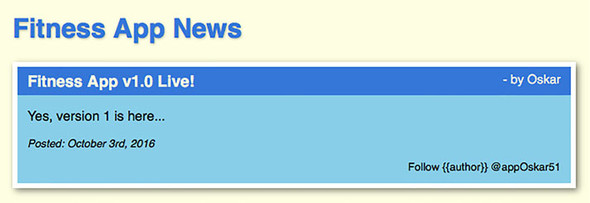 Figure 19.3. A news item—one of the {{author}} placeholders has not been replaced (bottom right).
This figure highlights the importance of ensuring all placeholders are correctly replaced to avoid incomplete or incorrect output.
Conclusion
The replace method is an essential tool in JavaScript for string manipulation. Its ability to handle both simple and complex replacements, support for regular expressions, and dynamic replacement functions make it invaluable for developers working with dynamic text content. For more detailed examples and explanations, refer to the Get Programming with JavaScript and Secrets of the JavaScript Ninja, Second Edition.
| Book Title | Usage of replace | Technical Depth | Connections to Other Concepts | Examples Used | Practical Application |
|------------|------------------|-----------------|-------------------------------|---------------|-----------------------|
| [Get Programming with JavaScript](https://www.manning.com/books/get-programming-with-javascript) | Discusses basic usage of `replace` for string manipulation, including chaining replacements and replacing placeholders in templates. [more](https://livebook.manning.com/book/get-programming-with-javascript/chapter-19/59) | Covers the method's ability to replace the first occurrence by default and the use of regular expressions for more complex replacements. [more](https://livebook.manning.com/book/get-programming-with-javascript/chapter-19/46) | Connects `replace` to the concept of a fluent interface, demonstrating method chaining for more readable code. [more](https://livebook.manning.com/book/get-programming-with-javascript/chapter-19/46) | Provides examples of replacing words in a sentence and placeholders in HTML templates. [more](https://livebook.manning.com/book/get-programming-with-javascript/chapter-19/75) | Highlights practical uses such as updating templates and correcting text dynamically. [more](https://livebook.manning.com/book/get-programming-with-javascript/chapter-19/59) |
| [Secrets of the JavaScript Ninja, Second Edition](https://www.manning.com/books/secrets-of-the-javascript-ninja-second-edition) | Explores `replace` for dynamic string manipulation using regular expressions and capture groups. [more](https://www.manning.com/books/secrets-of-the-javascript-ninja-second-edition) | Delves into advanced features like capture references and dynamic replacement with functions. [more](https://www.manning.com/books/secrets-of-the-javascript-ninja-second-edition) | Demonstrates using `replace` for traversal and extraction of information from strings, such as compressing query strings. [more](https://www.manning.com/books/secrets-of-the-javascript-ninja-second-edition) | Includes examples of converting camelCase to dashed notation and compressing query strings. [more](https://www.manning.com/books/secrets-of-the-javascript-ninja-second-edition) | Shows practical applications in text processing tasks and data extraction. [more](https://www.manning.com/books/secrets-of-the-javascript-ninja-second-edition) |
FAQ (Frequently asked questions)
What does the replace method do in JavaScript?
Can the replace method be used for multiple replacements?
Where can I find an example of replacing one string with another in JavaScript?
How do you use the replace method in JavaScript?
Does the replace method in JavaScript replace all occurrences of a string?
What happens if a placeholder is not replaced in a string?
How can you replace placeholders in a string using JavaScript?
What does the replace method return in JavaScript?
Can you chain multiple replace calls in JavaScript?