Resin.io
Overview
Resin.io is a powerful service designed for the containerized deployment and management of internet-connected, provisioned Linux IoT devices. By leveraging Docker containers, Resin.io packages applications along with their dependencies, ensuring consistent deployment across a multitude of devices. This approach simplifies the process of managing and updating applications on IoT devices, making it an attractive solution for developers working in the IoT space.
Setting Up and Using Resin.io
Signing Up
To begin using Resin.io, you need to sign up for an account. The sign-up process is straightforward and can be initiated on the Resin.io website.
 Figure 12.3. Sign up for an account at resin.io.
Project and Device Setup
Once a Resin.io project and its devices are set up, you can develop your application iteratively. The process involves pushing changes to your Resin.io Git remote, which triggers the rebuilding of your application's container with the updated code. This updated container is then deployed to all connected, provisioned devices, regardless of their location.
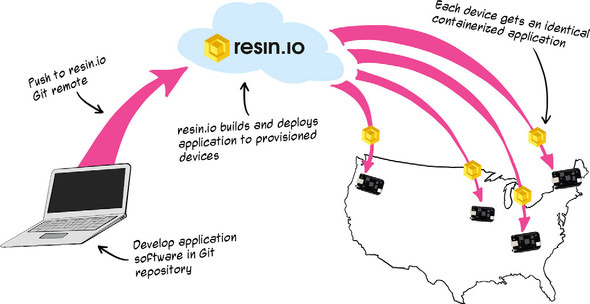 Figure 12.2. Devices that will run the application are provisioned by installing and booting a custom-tailored resin.io OS image on each. Pushing application code to a project-specific resin.io Git remote triggers the rebuilding of the app’s container and its redeployment to connected, provisioned devices.
Git Integration
To deploy your application, you need to push your repository’s master branch to Resin.io. This requires adding a Resin.io-specific Git remote. The command to set up this remote can be found on the Resin.io application dashboard.
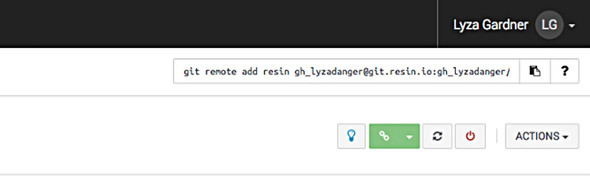 Figure 12.7. Detail of resin.io application dashboard showing where to find the command for adding your application’s resin.io Git remote
After setting up the Git remote, you can view all of your repository’s remotes by executing a specific command in your local repository. This setup allows you to push your code to Resin.io efficiently.
Deployment and Iteration
The first deployment may take several minutes, but subsequent updates are faster. You can track the deployment progress on the Resin.io dashboard.
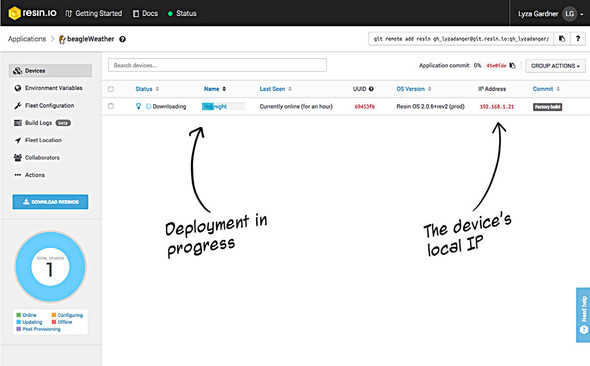 Figure 12.8. Resin.io application dashboard during deployment
To iterate on your application, make changes in your local repository, commit them, and push as needed. This iterative process allows for rapid development and testing of IoT applications.
Dockerfile Template
Creating a Dockerfile.template is a crucial step in setting up your project. This file allows the use of certain variables and is mostly boilerplate, sourced from Resin.io’s documentation.
Listing 12.1. Dockerfile.template
# [base-image for node on any machine using a template variable](https://livebook.manning.com/book/javascript-on-things/chapter-12/26)
FROM resin/%%RESIN_MACHINE_NAME%%-node:6

# [Defines our working directory in container](https://livebook.manning.com/book/javascript-on-things/chapter-12/26)
WORKDIR /usr/src/app

# [Copies the package.json first for better cache on later pushes](https://livebook.manning.com/book/javascript-on-things/chapter-12/46)
COPY package.json package.json

# [This install npm dependencies on the resin.io build server,](https://livebook.manning.com/book/javascript-on-things/chapter-12/26)
# [making sure to clean up the artifacts it creates in order to reduce the](https://livebook.manning.com/book/javascript-on-things/chapter-12/46)
 image size.
RUN JOBS=MAX npm install --production --unsafe-perm && npm cache clean &&
 rm -rf /tmp/*

# [This will copy all files in our root to the working  directory in the](https://livebook.manning.com/book/javascript-on-things/chapter-12/26)
 container
COPY . ./

# [Enable systemd init system in container](https://livebook.manning.com/book/javascript-on-things/chapter-12/26)
ENV INITSYSTEM on

# [server.js will run when container starts up on the device](https://livebook.manning.com/book/javascript-on-things/chapter-12/26)
CMD ["npm", "start"]
This template sets up a Node.js environment, installs dependencies, and defines the command to start the application. It is a foundational component for deploying applications using Resin.io.
FAQ (Frequently asked questions)
What is resin.io?
How does resin.io package applications?
What is the benefit of using Docker containers in resin.io?
How can I start using resin.io?