Test in JavaScript
Testing is a crucial part of software development, ensuring that code behaves as expected and maintains quality and correctness. In JavaScript, various tools and frameworks are available to facilitate testing, ranging from simple assertions to comprehensive test suites.
Testing Practices and Techniques
Testing in JavaScript involves verifying that code behaves as expected under various conditions. This includes unit tests, integration tests, and functional tests, each focusing on different aspects of the application. Testing is integrated into the build process for continuous development and deployment, ensuring that code quality and reliability are maintained throughout the development lifecycle.
Unit Testing
Unit tests are designed to verify the functionality of individual components or units of code in isolation. They focus on the smallest testable parts of an application, ensuring they work as expected independently from the rest of the system. This isolation helps in identifying and fixing issues at the component level before they affect the entire application.
Integration Testing
Integration testing involves testing the interaction between different components or systems to ensure they work together as expected. This type of testing is crucial for identifying issues that may arise when individual components are combined, ensuring that the application functions correctly as a whole.
Testing Techniques
Arrange, Act, Assert Pattern
The 'Arrange, Act, Assert' pattern is a common approach in testing, consisting of three phases:
- Arrange: Setting up the necessary conditions for the test, preparing the environment and inputs needed.
- Act: Executing the functionality being tested, performing the actions that will produce the results to be verified.
- Assert: Verifying that the outcome of the test matches the expected result, ensuring that the functionality behaves as intended.
Mocking and Spies
Mocking involves creating fake versions of objects or functions to simulate their behavior in a controlled way. This is useful for isolating the system under test and ensuring that tests are not affected by external dependencies. Spies are used to track the usage of functions, including how many times they were called and with what arguments, without altering their behavior.
Proxies
Testing with proxies involves using proxies to intercept and control interactions with objects or functions. This technique is used to simulate different scenarios and ensure that tests are not affected by external dependencies.
Testing in Different Environments
In Browser Testing
Testing in the browser involves simulating user interactions, handling AJAX requests, and verifying DOM updates. Tools like Sinon are used for mocking, and careful setup and teardown of the test environment are required to ensure accurate results.
Node and Browser Environments
Automated testing can be done in both Node and browser environments using tools like Tape and Testling. These tools can be integrated with build systems like Grunt to automate the testing process, ensuring that tests are continuously executed and code integrity is maintained.
Continuous Testing
Continuous testing involves using a watch configuration to automatically run tests and linting tasks whenever there are changes in the codebase. This approach ensures that tests are continuously executed, maintaining code integrity and allowing for rapid feedback during development.
Testing Specific Features
Event Emitters
Testing event emitters involves verifying that the 'on' method correctly attaches listeners and that the 'emit' method triggers these listeners as expected. Tests should focus on the public API and ensure that listeners receive the correct arguments.
Validation on View Models
Testing validation on view models involves ensuring that models are invalid under certain conditions and valid when all conditions are met. Tests use a list of test cases to check different validation scenarios, such as missing names or invalid quantities.
Convenience vs. Convention
In testing, 'convenience vs. convention' refers to the balance between writing tests that are easy to understand and maintain versus following strict testing conventions. Pragmatic testing allows for multiple assertions in a single test if they test the same functionality, providing flexibility in test design.
Simple DOM Test Case
A basic example of a DOM test case can be seen in the following jQuery snippet. This test appends the text "test" to a div element with the id test.
<style>
  #test { width: 100px; height: 100px; background: red; }
</style>
<div id="test"></div>
<script src="dist/jquery.js"></script>
<script>
  $(document).ready(function() {
    $("#test").append("test");
  });
</script>
JavaScript Assertion
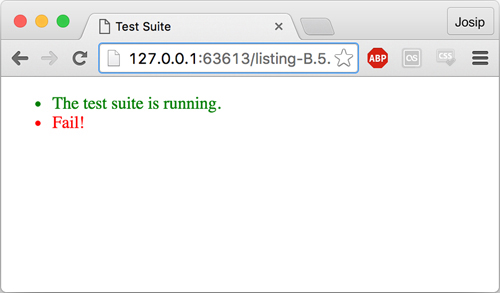
A simple implementation of a JavaScript assertion can be used to verify conditions in your code. The assert function creates a list item indicating whether a test has passed or failed.
<!DOCTYPE html>
<html>
  <head>
    <title>Test Suite</title>
    <script>
      function assert(value, desc) {
        var li = document.createElement("li");
        li.className = value ? "pass" : "fail";
        li.appendChild(document.createTextNode(desc));
        document.getElementById("results").appendChild(li);
      }
      window.onload = function() {
        assert(true, "The test suite is running.");
        assert(false, "Fail!");
      };
    </script>
    <style>
      #results li.pass { color: green; }
      #results li.fail { color: red; }
    </style>
  </head>
  <body>
    <ul id="results"></ul>
  </body>
</html>
QUnit Testing
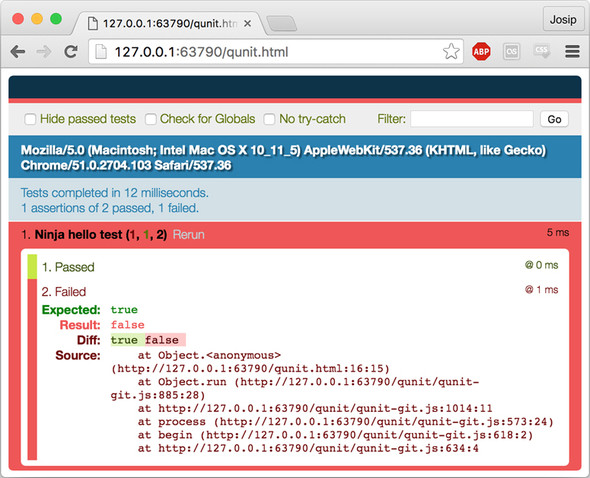
QUnit is a powerful JavaScript testing framework. The following example demonstrates a QUnit test that checks if a function correctly greets a ninja.
<!DOCTYPE html>
<html>
  <head>
    <link rel="stylesheet" href="qunit/qunit-git.css"/>
    <script src="qunit/qunit-git.js"></script>
  </head>
  <body>
    <div id="qunit"></div>
    <script>
      function sayHiToNinja(ninja) {
        return "Hi " + ninja;
      }

      QUnit.test("Ninja hello test", function(assert){
        assert.ok( sayHiToNinja("Hatori") == "Hi Hatori", "Passed");
        assert.ok( false, "Failed");
      });
    </script>
  </body>
</html>
Jasmine Testing
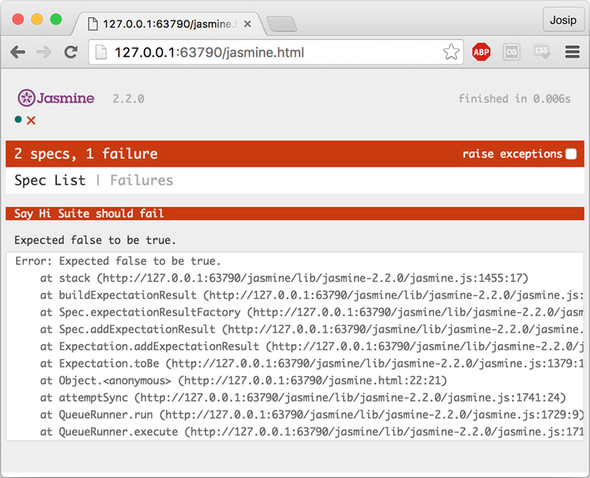
Jasmine is another popular testing framework for JavaScript. The following example illustrates how to test the sayHiToNinja function using Jasmine.
<!DOCTYPE html>
<html>
<head>
  <link rel="stylesheet" href="lib/jasmine-2.2.0/jasmine.css">
  <script src="lib/jasmine-2.2.0/jasmine.js"></script>
  <script src="lib/jasmine-2.2.0/jasmine-html.js"></script>
  <script src="lib/jasmine-2.2.0/boot.js"></script>
</head>
<body>
<script>
  function sayHiToNinja(ninja) {
    return "Hi " + ninja;
  }

  describe("Say Hi Suite", function() {
    it("should say hi to a ninja", function() {
      expect(sayHiToNinja("Hatori")).toBe("Hi Hatori");
    });

    it("should fail", function(){
      expect(false).toBe(true);
    })
  });
</script>
</body>
</html>
Online Testing Tools
For quick tests, online tools like JSFiddle, CodePen, and JS Bin can be used. These platforms allow you to create and share test cases easily.

Console Assertions
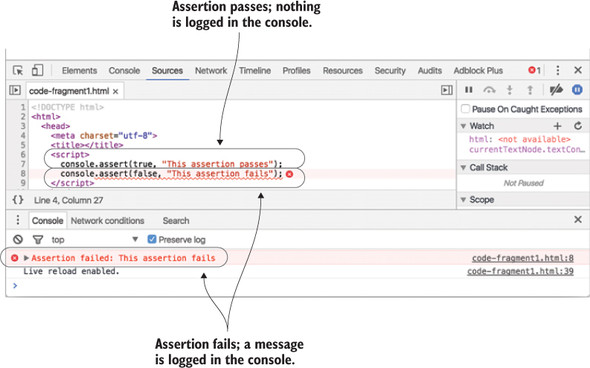
For quick and simple tests, JavaScript's built-in console.assert() method can be used. It logs a message to the console only if an assertion fails.
For more detailed information, you can refer to the books JavaScript Application Design: A Build First Approach and Secrets of the JavaScript Ninja, Second Edition.
| Book Title | Usage of test | Technical Depth | Connections to Other Concepts | Examples Used | Practical Application |
|------------|---------------|-----------------|-------------------------------|---------------|-----------------------|
| [JavaScript Application Design: A Build First Approach](https://www.manning.com/books/javascript-application-design) | Discusses various testing strategies including unit and integration testing, and tools like Sinon for mocking. [more](https://livebook.manning.com/book/javascript-application-design/chapter-8/1) | Explores testing techniques such as the 'Arrange, Act, Assert' pattern, mocking, and proxies. [more](https://livebook.manning.com/book/javascript-application-design/chapter-8/48) | Connects testing to continuous integration and deployment processes. [more](https://livebook.manning.com/book/javascript-application-design/chapter-8/267) | Provides examples of testing event emitters and validation on view models. [more](https://livebook.manning.com/book/javascript-application-design/chapter-8/66) | Emphasizes the integration of testing into the build process for continuous development. [more](https://livebook.manning.com/book/javascript-application-design/chapter-8/1) |
| [Secrets of the JavaScript Ninja, Second Edition](https://www.manning.com/books/secrets-of-the-javascript-ninja-second-edition) | Covers simple DOM test cases, JavaScript assertions, and frameworks like QUnit and Jasmine. [more](https://drek4537l1klr.cloudfront.net/maras/Figures/b0fig11.jpg) | Provides detailed examples of using QUnit and Jasmine for testing. [more](https://drek4537l1klr.cloudfront.net/maras/Figures/b0fig13_alt.jpg) | Discusses the use of online tools like JSFiddle for testing combinations of HTML, CSS, and JavaScript. [more](https://drek4537l1klr.cloudfront.net/maras/Figures/b0fig10_alt.jpg) | Includes practical examples of test cases and assertions in JavaScript. [more](https://drek4537l1klr.cloudfront.net/maras/Figures/b0fig12_alt.jpg) | Highlights the use of console assertions for quick testing and debugging. [more](https://drek4537l1klr.cloudfront.net/maras/Figures/b0fig12_alt.jpg) |
FAQ (Frequently asked questions)
What are the testing practices mentioned in JavaScript application design?
What does testing in software development involve?
What is the 'Arrange' phase in testing?
What is the 'Assert' phase in testing?
What is the 'Act' phase in testing?
What are unit tests in software development?
What does 'convenience vs. convention' mean in testing?
How do you test event emitters?
What is involved in testing the '.on' method?
What is the purpose of using spies in testing?
What is mocking in testing?
How are proxies used in testing?
What is the focus of unit testing?
What types of tests are included in software testing?
What does testing in the browser involve?
What is the focus of testing in the MVC shopping list application?
How is validation tested on a view model?
How are automated tests run in JavaScript application design?
How can Tape tests be automated in Grunt?
What is continuous testing?
What types of testing are involved in application design?