User
In the context of the fitness app, a user is an individual whose exercise data is tracked and displayed. The app is designed to manage multiple users, allowing for seamless switching between them to view their respective exercise data. This functionality is crucial for users who share the app on a single device or for trainers who manage multiple clients.
User Model
The user is represented by a model created using the User constructor. This model is comprehensive and includes the following components:
- User's Name: Each user is identified by their name, which is a fundamental part of the user model.
- List of Exercise Sessions: The model maintains a list of exercise sessions for each user. This list is essential for tracking the user's progress and history.
- Methods for Managing and Retrieving Session Data: The user model includes various methods that allow for the management and retrieval of session data. These methods enable users to add new sessions, update existing ones, and access historical data efficiently.
Switching Between Users
The fitness app provides a user-friendly interface for switching between different users. This feature is depicted in the following figure:
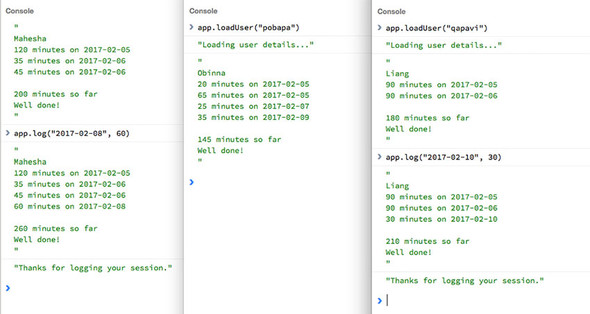 Figure 20.1. Switching between users while using the fitness app
This capability is particularly useful in scenarios where multiple users need to access their data on the same device, ensuring that each user's data remains organized and easily accessible.
FAQ (Frequently asked questions)
What is a user in the fitness app?
What does the User constructor model include?
How is a user defined in the fitness app context?
Can you switch between different users in the fitness app?
What does Figure 20.1 illustrate in the fitness app?