User Model in a Fitness App
Overview
In the context of a fitness app, a user model is constructed using the User constructor. This model is more sophisticated than simple data objects as it incorporates private variables and public methods such as addSession and getData. These methods provide enhanced functionality, allowing for better management and retrieval of user data.
Functionality
The user model is designed to encapsulate user data, offering a structured way to manage user information. By using the User constructor, developers can create instances of user models that maintain data privacy and integrity. The model's methods enable the addition of new sessions and the retrieval of user data, ensuring that the app can efficiently handle user interactions and data processing.
Implementation
To implement the user model, the User constructor is imported into the project using an HTML script element. This setup is crucial for building the user model from user data, as demonstrated in the following listing:
[Listing 14.2: Importing the User Constructor](https://livebook.manning.com/book/get-programming-with-javascript/chapter-14/39)
<!-- User constructor -->
<script src="http://output.jsbin.com/suzala.js"></script>
[Listing 14.3: Building a User Model from User Data](https://livebook.manning.com/book/get-programming-with-javascript/chapter-14/39)
 Listing 14.3. A function to build a user model from user data (http://jsbin.com/zenire/edit?html,js,console)
The buildUser function is used to transform plain user data, initially stored as a simple JavaScript object, into an enhanced user model. This transformation involves hiding the data as private variables while adding methods to manage the model's state and access a copy of the data.
Usage in Different Views
The user model is versatile and can be utilized by different views within the app to produce varied outputs. This flexibility is illustrated in the following figure:
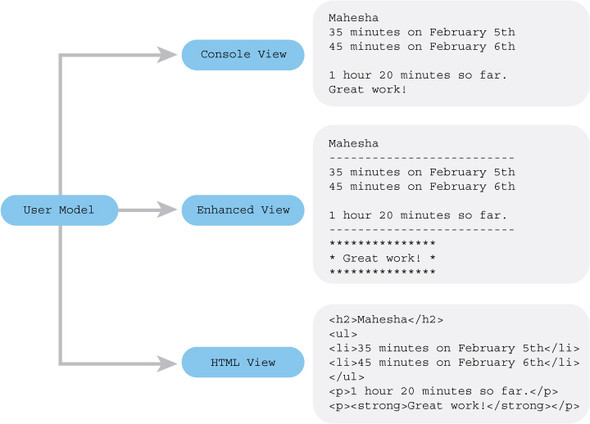 Figure 15.1. The same user model is used by different views to produce different output.
By leveraging the user model, developers can ensure that the app's interface remains consistent and responsive to user interactions, while maintaining a robust backend structure for data management.
FAQ (Frequently asked questions)
How is a user model created in the fitness app?
What does the user model in the fitness app include?
What functionality does the user model provide in the fitness app?
How is the user model used in the fitness app?
What does Figure 15.1 illustrate about the user model?