Weather
In the realm of hardware hacking and web development, weather data can be utilized in various innovative ways. This page explores the concept of weather as it pertains to two distinct projects: the Weather Ball and a mini weather station application.
Weather Ball Project
The Weather Ball project leverages forecast data obtained from the Dark Sky API. This data is crucial for determining the color and blinking pattern of an RGB LED, which visually represents changes in temperature and precipitation. By using this approach, developers can create a tangible and interactive representation of weather conditions, making it easier to understand and visualize environmental changes.
Mini Weather Station Application
The mini weather station application is a versatile project that provides live-updating temperature and pressure data. It is implemented using a combination of Johnny-Five, Express, and socket.IO, allowing it to run on various platforms such as Raspberry Pi and Arduino Uno. The application collects environmental data, specifically temperature and pressure, using the BMP180 multisensor connected to a Tessel. This data is then processed and displayed in real-time on a web page through WebSocket technology, enabling users to view updates without needing to refresh the page.
Implementation and Adaptation
The mini weather station application was originally created for the Tessel platform. However, it can be adapted to work on other single-board computers (SBCs) like the Raspberry Pi 3 and microcontrollers such as the Arduino Uno. This flexibility allows developers to choose the hardware that best suits their needs and preferences.
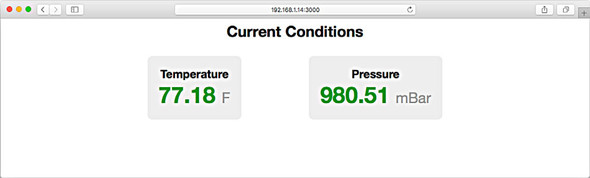 Figure 11.15. The mini weather app provides live-updating temperature and pressure data that can be viewed in a browser on any computer on the same network.
The figure above illustrates the mini weather app, which provides real-time data that can be accessed from any computer on the same network. This capability makes it a practical tool for monitoring environmental conditions in various settings.
In summary, these projects demonstrate how weather data can be harnessed in creative ways to build interactive and informative applications. Whether through visual indicators like the Weather Ball or real-time data displays in the mini weather station, developers can create engaging experiences that bring weather data to life.
FAQ (Frequently asked questions)
What is the weather ball project?
How does the weather ball represent weather data?
What data does the remote weather station collect?
How is the weather data displayed in the remote weather station project?
What is the mini weather station application?
Can the mini weather station run on different platforms?
How does the mini weather station serve data to clients?