Weather Station
Overview
A weather station in this context refers to a setup using a Tessel 2 and a BMP180 multisensor to read environmental data such as temperature and pressure. This data is served over a local web server, allowing it to be accessed and displayed in real-time on a web browser. The application is a live-updating system that provides temperature and pressure data using a BMP180 sensor. It can be implemented on various platforms, such as Raspberry Pi and Arduino Uno, using Johnny-Five for I/O handling and Express for serving the client-side application. The application uses Socket.IO to emit weather data updates to connected clients.
Implementation
Using Tessel 2 and BMP180
The weather station example involves using a Tessel 2 and a BMP180 multisensor to collect temperature and pressure data. This data is then served over a local web server, allowing it to be accessed and displayed in real-time on a web browser using WebSocket technology.
Raspberry Pi Implementation
Below is a Pi-compatible version of the index.js file, which sets up the weather station using a Raspberry Pi:
Listing 11.9. A Pi-compatible version of index.js
const five     = require('johnny-five');
const Raspi   = require('raspi-io');
const express  = require('express');
const SocketIO = require('socket.io');

const path = require('path');
const http = require('http');
const os   = require('os');

const app    = new express();
const server = new http.Server(app);
const socket = new SocketIO(server);
app.use(express.static(path.join(__dirname, '/app')));

const board = new five.Board({ io: new Raspi() });

board.on('ready', () => {
  const weatherSensor = new five.Multi({
    controller: 'BMP180',
    freq: 5000
  });

  socket.on('connection', client => {
    weatherSensor.on('change', () => {
      client.emit('weather', {
        temperature: weatherSensor.thermometer.F,
        pressure: (weatherSensor.barometer.pressure * 10)
      });
    });
  });

  server.listen(3000, () => {
    console.log(`http://${os.networkInterfaces().wlan0[0].address}:3000`);
  });
});
Real-Time Data Display
The temperature and pressure values update in real-time in your browser via websockets, as shown in the figure below:
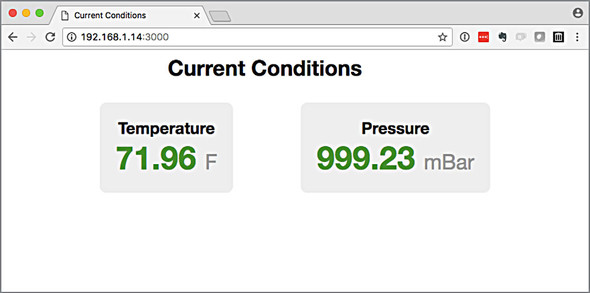 Figure 8.12. The temperature and pressure values update in real time in your browser, via websockets.
Adapting for BeagleBone Black
To adapt the weather station for the BeagleBone Black, you need to connect the BMP180 sensor, create a weather directory, copy the source code, remove the tessel-io dependency, and install the beaglebone-io plugin. Additionally, update the server port to 4000 and use eth0 for network interfaces.
Requirements
 What you’ll need
- 1 configured, networked BeagleBone Black and power supply
This setup allows the weather station to be flexible and adaptable to different hardware platforms, providing a robust solution for real-time environmental data monitoring.
FAQ (Frequently asked questions)
What components are used in the weather station setup in this chapter?
How is the weather data accessed and displayed in this setup?
How do temperature and pressure values update in the browser in this project?
What technology is used to display weather data in real-time on a web browser?
What platforms can the weather station be implemented on?
What libraries are used for I/O handling and serving the client-side application?
How are weather data updates emitted to connected clients?
What is the purpose of the code in Listing 11.9?
How often does the weather sensor update its data?
What happens when a client connects to the server?
How do you adapt the weather station for the BeagleBone Black?