Broadcasting in PyTorch
Overview
Broadcasting is a powerful feature in PyTorch that simplifies complex tensor operations by allowing efficient element-wise computations between tensors of varying shapes. This mechanism is inspired by NumPy's broadcasting semantics and is crucial for performing operations on tensors without needing to manually reshape or replicate data. During broadcasting, dimensions are compared element-wise from right to left. If the dimensions are compatible, the tensors can be broadcasted together. Compatible dimensions are either equal or one of the dimensions is 1.
Definition
Broadcasting in PyTorch allows element-wise binary operations such as addition, subtraction, multiplication, and division to be performed on tensors of different shapes by following specific rules:
- If one of the operands is size 1 in a dimension, PyTorch uses the single entry along this dimension with each of the entries in the other tensor.
- If both sizes are greater than 1, they must be the same, and element-wise matching is used.
- If one tensor has more dimensions, the entirety of the other tensor is used for each entry along these dimensions.
This automatic extension of dimensions makes operations compatible and eliminates the need for explicit reshaping.
Examples
Scalar and Tensor Operations
Consider the following example where a scalar is added to a tensor:
Tensor X:             Scalar Y:

  [[ 1  2  3 ]]   +     10

Result (Broadcasted Scalar Addition):

  [[ 11 12 13 ]]
Here, the scalar 10 is added to each element of the tensor X, resulting in a new tensor where each element is incremented by 10.
Tensor Multiplication
Broadcasting can also be applied to tensor multiplication:
3 x 1
           1 x 3
           ------
           3 x 3

  Tensor A:             Tensor B:

  [[ 1  2  3 ]]         [[10]
                  *      [20]
                         [30]]

Result (Broadcasted Multiplication):

  [[ 10  20  30 ]
   [ 20  40  60 ]
   [ 30  60  90 ]]
In this example, tensor A is multiplied by tensor B, resulting in a 3x3 matrix where each element of A is multiplied by each element of B.
Tensor Addition
Another example demonstrates tensor addition with broadcasting:
2 x 3
           2 x 1 x 3
           ----------
           2 x 2 x 3

  Matrix A:             Tensor B:

  [[ 1  2  3 ]           [[[10 20 30]]
                   +
   [ 4  5  6 ]]           [[40 50 60]]]

Result (Broadcasted Tensor Addition):

  [[[ 11 22 33 ]
    [ 44 55 66 ]]
   [[ 41 52 63 ]
    [ 44 55 66 ]]]
Here, matrix A is added to tensor B, resulting in a new tensor where each element of A is added to the corresponding elements of B.
PyTorch Example
The following code snippet demonstrates broadcasting in PyTorch:
# [In[7]:](https://livebook.manning.com/book/deep-learning-with-pytorch-second-edition/chapter-5/57)
x = torch.ones(())
y = torch.ones(3,1)
z = torch.ones(1,3)
a = torch.ones(2, 1, 1)
print(f"shapes: x: {x.shape}, y: {y.shape}")
print(f"        z: {z.shape}, a: {a.shape}")
print("x * y:", (x * y).shape)
print("y * z:", (y * z).shape)
print("y * z * a:", (y * z * a).shape)

# [Out[7]:](https://livebook.manning.com/book/deep-learning-with-pytorch-second-edition/chapter-5/57)

shapes: x: torch.Size([]), y: torch.Size([3, 1])
        z: torch.Size([1, 3]), a: torch.Size([2, 1, 1])
x * y: torch.Size([3, 1])
y * z: torch.Size([3, 3])
y * z * a: torch.Size([2, 3, 3])
This example shows how tensors of different shapes can be multiplied together using broadcasting rules, resulting in new tensors with compatible shapes.
Visual Example
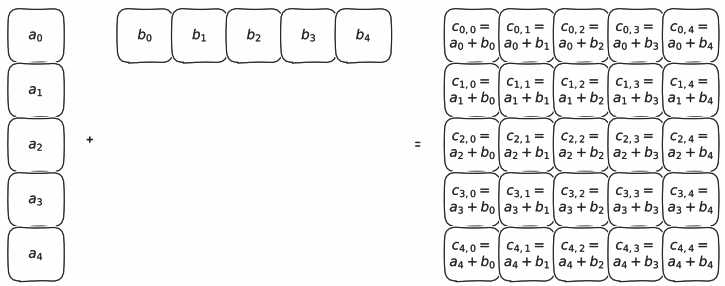 Figure 5.5 Broadcasting example for a (5,1) + (1,5) tensor. The result is a (5,5) tensor, where each row of the first tensor is added to each column of the second tensor.
This figure illustrates how broadcasting works for a (5,1) tensor added to a (1,5) tensor, resulting in a (5,5) tensor. Each row of the first tensor is added to each column of the second tensor, demonstrating the power and flexibility of broadcasting in PyTorch.
FAQ (Frequently asked questions)
What is an example of broadcasting in PyTorch?
What is broadcasting in PyTorch?
How does broadcasting work in PyTorch?
Can you provide an example of scalar addition using broadcasting in PyTorch?
What is an example of broadcasted multiplication in PyTorch?
How does broadcasting work with tensors of different shapes in PyTorch?
What is the purpose of broadcasting in PyTorch?
What operations can be performed using broadcasting in PyTorch?
What are the rules for broadcasting in PyTorch?
How does broadcasting work with multiple tensors in PyTorch?