Scale2
Overview
The scale2 function is a simple yet powerful tool used in 3D graphics to scale vectors, effectively resizing objects in a 3D space. This function multiplies each component of a vector by a scalar value, in this case, 2.0, which results in doubling the size of the object represented by those vectors.
Function Definition
The scale2 function is defined as follows:
from vectors import scale
def scale2(v):
   return scale(2.0, v)
This function takes a 3D vector v as input and returns a new vector that is twice as large. The scale function from the vectors module is used to perform the actual multiplication.
Application in 3D Modeling
To apply the scale2 transformation to a 3D model, such as a teapot, each vertex of the model must be scaled. This is done by iterating over each triangle that makes up the model and applying scale2 to each vertex:
original_triangles = load_triangles()        #1
scaled_triangles = [
    [scale2(vertex) for vertex in triangle]  #2
    for triangle in original_triangles       #3
]
#1 Loads the triangles using the code from appendix C
#2 Applies scale2 to each vertex in a given triangle to get new vertices
#3 Does this for each triangle in the list of original triangles
After scaling, the new set of triangles can be rendered to visualize the transformed model. Figure 4.5 illustrates the effect of applying scale2 to a teapot model, resulting in a teapot that is twice as big.
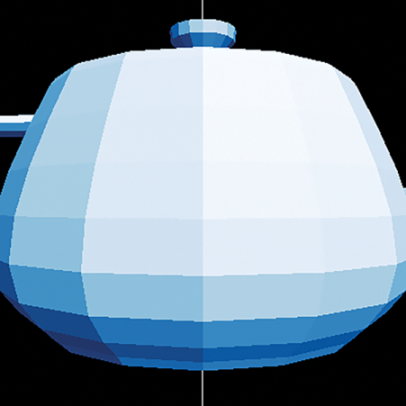 Figure 4.5 Applying scale2 to each vertex of each triangle gives us a teapot that is twice as big.
Combining Transformations
The scale2 function can be combined with other transformations to achieve more complex effects. For example, after scaling, a translation can be applied to move the object in space. This is demonstrated in the following code snippet, where each vertex is first scaled and then translated:
scaled_translated_triangles = [
   [translate1left(scale2(vertex)) for vertex in triangle]
   for triangle in original_triangles
]
draw_model(scaled_translated_triangles)
This sequence of transformations results in a teapot that is not only larger but also shifted to the left, as shown in Figure 4.6.
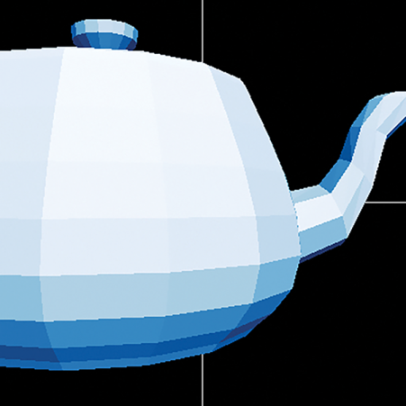 Figure 4.6 The teapot is bigger and moved to the left as we hoped!
Function Composition
The concept of function composition allows for the creation of new transformations by combining existing ones. For instance, the transformation that scales and then translates can be encapsulated in a single function:
def scale2_then_translate1left(v):
    return translate1left(scale2(v))
Alternatively, using functional programming techniques, this can be expressed as:
scale2_then_translate1left = compose(translate1left, scale2)
This approach highlights the flexibility and power of treating functions as first-class objects in Python, enabling the construction of complex transformations through the composition of simpler ones. Figure 4.7 illustrates the process of applying scale2 followed by translate1left to a teapot model.
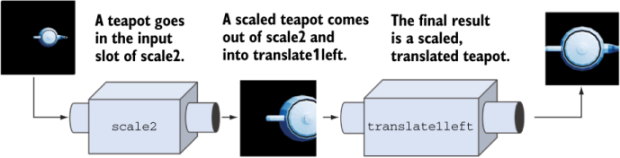 Figure 4.7 Calling scale2 and then translate1left on a teapot to output a transformed version
FAQ (Frequently asked questions)
What happens when scale2 is applied to each vertex of a triangle?
How is the scale2 function defined in Python?