Understanding __getattr__ in Python
In Python, __getattr__ is a special method used to define behavior for when an attribute is accessed that doesn't exist in an object's __dict__. This method is particularly useful for implementing lazy attributes, where the attribute's value is computed only when it is accessed for the first time.
Attribute Resolution Order
When Python attempts to access an attribute of an instance object, it follows a specific order to resolve the attribute:
- Check the Instance's
__dict__: Python first checks if the attribute exists in the instance's__dict__. This is a dictionary that stores all the attributes of the instance. - Call
__getattr__: If the attribute is not found in the__dict__, Python then calls the__getattr__method, if it is defined, to attempt to retrieve the attribute.
This process is illustrated in Figure 9.6:
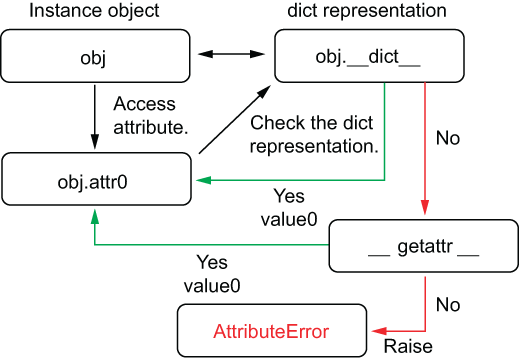 Figure 9.6 The order of resolving an instance object’s attribute. Python first checks whether the dict object of the instance object contains the attribute. If the dict object doesn't contain the attribute, Python checks whether it can return a value by calling the getattr special method.
Implementing __getattr__
To demonstrate how __getattr__ can be used, consider the following example where it is overridden in a class to implement a lazy attribute:
Listing 9.7 Overriding __getattr__ in a class
class User:
   def __init__(self, username):
       self.username = username
       print(f"### User {username} created")

   def __getattr__(self, item):
       print(f"__getattr__ called for {item}")
       if item == "profile_data":
           profile_data = self._get_profile_data()
           setattr(self, item, profile_data)
           return profile_data

   def _get_profile_data(self):
       # get the data from the server and load it into memory
       print("*** Run the expensive operation")
       fetched_data = "Extensive data, including thumbnail, followers, etc."
       return fetched_data
Explanation
- Lazy Loading: In this example, the
Userclass has a__getattr__method that is triggered when an attribute that doesn't exist in the instance's__dict__is accessed. If the attributeprofile_datais accessed, the method_get_profile_datais called to fetch the data, simulating an expensive operation. - Caching: Once the data is fetched, it is stored in the instance's
__dict__usingsetattr, so subsequent accesses toprofile_datado not trigger the expensive operation again.
Usage Example
Consider the following usage of the User class:
followers = get_followers("Ashley")    #1
# [output the following lines:](https://livebook.manning.com/book/python-how-to/chapter-9/214)
### [User John created](https://livebook.manning.com/book/python-how-to/chapter-9/214)
### [User Aaron created](https://livebook.manning.com/book/python-how-to/chapter-9/214)
### [User Zack created](https://livebook.manning.com/book/python-how-to/chapter-9/214)

follower0 = followers[0]
follower0.profile_data                 #2
# [output the following lines:](https://livebook.manning.com/book/python-how-to/chapter-9/214)
__getattr__ called for profile_data
*** Run the expensive operation
'Extensive data, including thumbnail, followers, etc.'

follower0.profile_data                 #3
'Extensive data, including thumbnail, followers, etc.'
- Action 1: When we get a user's followers, the created
Userinstance objects contain only usernames, which saves memory. - Action 2: When
profile_datais accessed for the first time, the expensive operation runs to fetch the data. - Action 3: On subsequent accesses to
profile_data, the data is retrieved from the instance's__dict__, avoiding the expensive operation and saving time.
FAQ (Frequently asked questions)
What is the order of resolving an instance object's attribute in Python?
How can you override the getattr method in a class?
What happens when getattr is called in the User class?
What is the purpose of the _get_profile_data method in the User class?
What is the purpose of using getattr in Python?