Account
In the context of object-oriented programming, the concept of an "Account" is often used to encapsulate functionalities related to managing user accounts, such as retrieving account numbers and balances. This encapsulation is part of a broader design strategy to separate concerns and organize code into distinct classes, each responsible for a specific aspect of the application.
Class Design
The Account class is designed to handle all functionalities related to account management. This includes retrieving account numbers and balances from a database. The class is initialized with a student_id, which is used to query the database for the relevant account information.
[Listing 9.11: The Updated Account and Demographics Classes](https://livebook.manning.com/book/python-how-to/chapter-9/249)
class Account:
   def __init__(self, student_id):
       self.student_id = student_id
       # query the database to get additional information using student_id
       self.account_number = self.get_account_number_from_db()
       self.balance = self.get_balance_from_db()

   def get_account_number_from_db(self):
       # query database to locate the account number using student_id
       account_number = 123456
       return account_number

   def get_balance_from_db(self):
       # query database to get the balance for the account number
       balance = 100.00
       return balance
Integration with Other Classes
The Account class is often used in conjunction with other classes, such as Demographics and Student, to provide a comprehensive view of a student's information. The Student class, for example, can have attributes that are instances of both Account and Demographics, allowing for easy access to a student's account and demographic information.
[Listing 9.10: Separating Classes to Have Distinct Concerns](https://livebook.manning.com/book/python-how-to/chapter-9/249)
class Account:
   def __init__(self, student_id):
       # query the database to get additional information using student_id
       self.account_number = 123456
       self.balance = 100

class Demographics:
   def __init__(self, student_id):
       # query the database to get additional information using student_id
       self.age = 12
       self.gender = "Female"
       self.race = "Black"

class Student:
   def __init__(self, first_name, last_name, student_id):
       self.first_name = first_name
       self.last_name = last_name
       self.student_id = student_id
       self.account = Account(self.student_id)
       self.demographics = Demographics(self.student_id)
Example Usage
By creating an instance of the Student class, you can access the account and demographic information easily:
student = Student("John", "Smith", "987654")
print(student.account.__dict__)
# [output: {'account_number': 123456, 'balance': 100}](https://livebook.manning.com/book/python-how-to/chapter-9/249)

print(student.demographics.__dict__)
# [output: {'age': 12, 'gender': 'Female', 'race': 'Black'}](https://livebook.manning.com/book/python-how-to/chapter-9/249)
Displaying Account Information
The Account class can be used directly to display account information, such as the balance:
balance_output = f"Balance: {student.account.balance}"
print(balance_output)
# [output: Balance: 100.0](https://livebook.manning.com/book/python-how-to/chapter-9/249)
Design Considerations
While it is possible to add methods in the Student class to access account and demographic information, this can lead to tight coupling between classes. Tight coupling can make maintenance and updates more challenging, as changes in one class may necessitate changes in another.
class Student:
   def __init__(self, first_name, last_name, student_id):
       self.first_name = first_name
       self.last_name = last_name
       self.student_id = student_id
       self.account = Account(self.student_id)
       self.demographics = Demographics(self.student_id)

   def get_account_balance(self):
       return self.account.balance

   def get_demographics(self):
       demo = self.demographics
       return demo.age, demo.gender, demo.race
Visual Representation
The separation of functionalities into distinct classes can be visually represented using UML diagrams. This approach helps in understanding the relationships and responsibilities of each class.
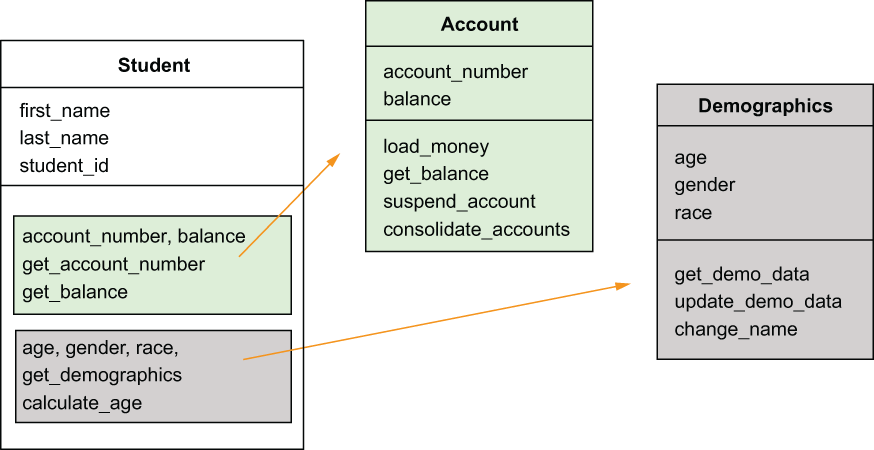 Figure 9.10 Isolate the functionalities of handling Account and Demographics to form separate classes (UML diagram version 2). Please note that I list some other attributes and methods that could exist in each class.
FAQ (Frequently asked questions)
What is the purpose of isolating functionalities in classes?
What does Figure 9.10 illustrate?
What is the role of the Account class in the code snippet?
How does the Account class retrieve the account number?
How is the balance obtained in the Account class?