asyncio: An Overview
asyncio is a Python library designed to write concurrent code using the async/await syntax. It is particularly useful for I/O-bound and high-level structured network code. The library allows for asynchronous programming, enabling the execution of tasks without blocking the main thread. This capability is leveraged in various scenarios, such as managing thread pool executors for concurrent HTTP requests, building responsive UIs, and implementing parallel processing in MapReduce workflows.
Echo Server with asyncio
One of the practical applications of asyncio is building an echo server. This involves using coroutines and tasks to handle socket connections and data transmission concurrently. By utilizing asyncio, the server can manage multiple connections simultaneously without blocking, providing a more efficient and scalable solution compared to traditional synchronous methods.
Parallel MapReduce with asyncio
asyncio can significantly enhance the performance of MapReduce operations by running map functions in separate processes. This is achieved by partitioning data into chunks and using asyncio.gather to wait for all operations to complete. The following listing demonstrates how to implement parallel MapReduce using process pools:
[Listing 6.8 Parallel MapReduce with Process Pools](https://livebook.manning.com/book/python-concurrency-with-asyncio/chapter-6/94)
import asyncio
import concurrent.futures
import functools
import time
from typing import Dict, List

def partition(data: List, chunk_size: int) -> List:
    for i in range(0, len(data), chunk_size):
        yield data[i:i + chunk_size]

def map_frequencies(chunk: List[str]) -> Dict[str, int]:
    counter = {}
    for line in chunk:
        word, _, count, _ = line.split('\t')
        if counter.get(word):
            counter[word] = counter[word] + int(count)
        else:
            counter[word] = int(count)
    return counter

def merge_dictionaries(first: Dict[str, int], second: Dict[str, int]) -> Dict[str, int]:
    merged = first
    for key in second:
        if key in merged:
            merged[key] = merged[key] + second[key]
        else:
            merged[key] = second[key]
    return merged

async def main(partition_size: int):
    with open('googlebooks-eng-all-1gram-20120701-a', encoding='utf-8') as f:
        contents = f.readlines()
        loop = asyncio.get_running_loop()
        tasks = []
        start = time.time()
        with concurrent.futures.ProcessPoolExecutor() as pool:
            for chunk in partition(contents, partition_size):
                tasks.append(loop.run_in_executor(pool, functools.partial(map_frequencies, chunk)))

            intermediate_results = await asyncio.gather(*tasks)
            final_result = functools.reduce(merge_dictionaries, intermediate_results)

            print(f"Aardvark has appeared {final_result['Aardvark']} times.")

            end = time.time()
            print(f'MapReduce took: {(end - start):.4f} seconds')

if __name__ == "__main__":
    asyncio.run(main(partition_size=60000))
Using Threads with asyncio
asyncio can also be used to manage threads, particularly for running blocking operations inside threads to prevent blocking the entire event loop. This is achieved by using thread pool executors, which allow asyncio to manage threads and execute tasks concurrently. The following listing illustrates how to use a thread pool executor with asyncio for concurrent HTTP requests:
[Listing 7.5 Using a Thread Pool Executor with asyncio](https://livebook.manning.com/book/python-concurrency-with-asyncio/chapter-7/55)
import functools
import requests
import asyncio
from concurrent.futures import ThreadPoolExecutor
from util import async_timed

def get_status_code(url: str) -> int:
    response = requests.get(url)
    return response.status_code

@async_timed()
async def main():
    loop = asyncio.get_running_loop()
    with ThreadPoolExecutor() as pool:
        urls = ['https:// www .example .com' for _ in range(1000)]
        tasks = [loop.run_in_executor(pool, functools.partial(get_status_code, url)) for url in urls]
        results = await asyncio.gather(*tasks)
        print(results)

asyncio.run(main())
Building Responsive UIs with asyncio
asyncio can be integrated into existing synchronous applications, such as desktop GUIs built with Tkinter, by running the asyncio event loop in a separate thread. This approach helps build responsive UIs by preventing the Tkinter event loop from blocking the main thread. The following figure illustrates how the Tkinter event loop submits a task to the asyncio event loop, which runs in a separate thread:
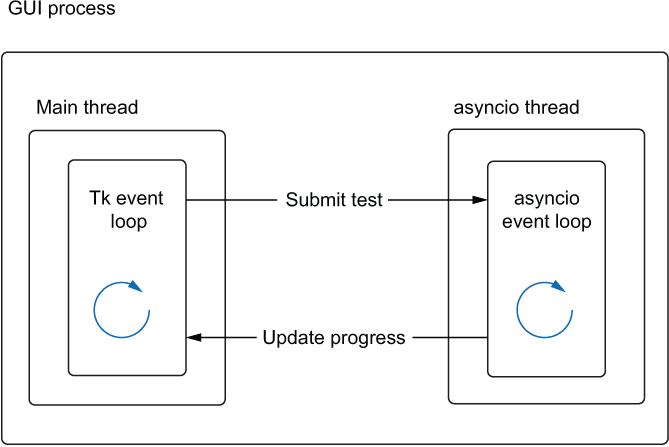 Figure 7.5 The tk event loop submits a task to the asyncio event loop, which runs in a separate thread.
Stress Testing with asyncio
asyncio can also be used for stress testing applications by making a large number of concurrent requests. The following listing demonstrates a stress test class that uses asyncio to perform load testing:
[Listing 7.13 The Stress Test Class](https://livebook.manning.com/book/python-concurrency-with-asyncio/chapter-7/122)
import asyncio
from concurrent.futures import Future
from asyncio import AbstractEventLoop
from typing import Callable, Optional
from aiohttp import ClientSession

class StressTest:

    def __init__(self, loop: AbstractEventLoop, url: str, total_requests: int, callback: Callable[[int, int], None]):
        self._completed_requests: int = 0
        self._load_test_future: Optional[Future] = None
        self._loop = loop
        self._url = url
        self._total_requests = total_requests
        self._callback = callback
        self._refresh_rate = total_requests // 100

    def start(self):
        future = asyncio.run_coroutine_threadsafe(self._make_requests(), self._loop)
        self._load_test_future = future

    def cancel(self):
        if self._load_test_future:
            self._loop.call_soon_threadsafe(self._load_test_future.cancel)

    async def _get_url(self, session: ClientSession, url: str):
        try:
            await session.get(url)
        except Exception as e:
            print(e)
        self._completed_requests = self._completed_requests + 1
        if self._completed_requests % self._refresh_rate == 0 or self._completed_requests == self._total_requests:
            self._callback(self._completed_requests, self._total_requests)

    async def _make_requests(self):
        async with ClientSession() as session:
            reqs = [self._get_url(session, self._url) for _ in range(self._total_requests)]
            await asyncio.gather(*reqs)
In summary, asyncio is a versatile library that can be used to enhance the performance and responsiveness of Python applications through concurrent programming. Whether it's handling network connections, performing parallel processing, or integrating with existing synchronous systems, asyncio provides the tools necessary for efficient asynchronous execution.
FAQ (Frequently asked questions)
How can asyncio be used to build an echo server?
How does asyncio improve MapReduce operations?
How can you implement MapReduce with asyncio?
What is the role of asyncio.gather in MapReduce?
What is the process of mapping and reducing with asyncio?
What is asyncio used for in Python?
How does asyncio manage thread pool executors?
How can you use a thread pool executor with asyncio?
Why use threads with asyncio?
How can asyncio be used to build a responsive UI?
How does the tk event loop interact with the asyncio event loop?
What is the purpose of the StressTest class in asyncio?
How can you cancel a running asyncio task?
How can asyncio be integrated into a Tkinter application?