Backend-for-Frontend Pattern
The backend-for-frontend (BFF) pattern is a microservice design pattern that addresses challenges in user interface (UI) development within a microservice architecture. It involves creating a specialized backend service that aggregates data from multiple microservices to provide a tailored response for a specific frontend. This pattern is particularly useful in optimizing data delivery and improving user experience by minimizing latency and ensuring consistent logic across different clients.
Overview
In a typical microservice architecture, a client may need to make multiple requests to different services to gather all the necessary data for a single view. This can lead to increased latency and complexity, especially when dealing with different types of clients such as web-based UIs, iOS, and Android mobile UIs. The BFF pattern addresses these issues by centralizing the data aggregation and logic handling in one service, reducing the number of requests a client needs to make.
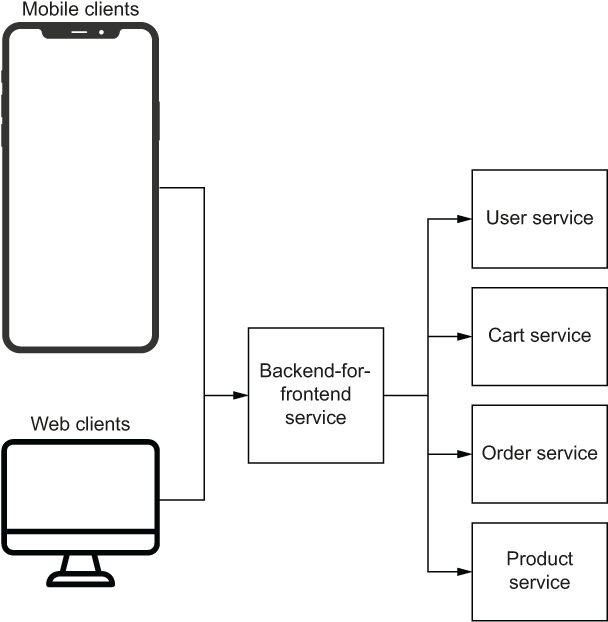 Figure 10.1 The backend-for-frontend pattern
As illustrated in Figure 10.1, instead of each UI directly communicating with multiple services, a BFF service is introduced. This service makes the necessary calls to the underlying services, aggregates the responses, and returns a single, cohesive response to the client. This not only cuts down on the number of round trips across the network but also allows for embedding logic related to failovers or retries within the BFF service. This centralization of logic ensures consistency and reduces redundancy across different clients.
Implementation
Implementing the BFF pattern involves creating a service that aggregates data from multiple microservices. This service handles timeouts, optional data, and ensures a resilient user experience even when some services fail. Below is an example implementation of a BFF service for an e-commerce storefront:
import asyncio
from asyncio import Task
import aiohttp
from aiohttp import web, ClientSession
from aiohttp.web_request import Request
from aiohttp.web_response import Response
import logging
from typing import Dict, Set, Awaitable, Optional, List

routes = web.RouteTableDef()

PRODUCT_BASE = 'http:/ /127.0.0.1:8000'
INVENTORY_BASE = 'http:/ /127.0.0.1:8001'
FAVORITE_BASE = 'http:/ /127.0.0.1:8002'
CART_BASE = 'http:/ /127.0.0.1:8003'


@routes.get('/products/all')
async def all_products(request: Request) -> Response:
    async with aiohttp.ClientSession() as session:
        products = asyncio.create_task(session.get(f'{PRODUCT_BASE}/products'))
        favorites = asyncio.create_task(session.get(f'{FAVORITE_BASE}/users/3/favorites'))
        cart = asyncio.create_task(session.get(f'{CART_BASE}/users/3/cart'))

        requests = [products, favorites, cart]
        done, pending = await asyncio.wait(requests, timeout=1.0)

        if products in pending:
            [request.cancel() for request in requests]
            return web.json_response({'error': 'Could not reach products service.'}, status=504)
        elif products in done and products.exception() is not None:
            [request.cancel() for request in requests]
            logging.exception('Server error reaching product service.', exc_info=products.exception())
            return web.json_response({'error': 'Server error reaching products service.'}, status=500)
        else:
            product_response = await products.result().json()
            product_results: List[Dict] = await get_products_with_inventory(session, product_response)

            cart_item_count: Optional[int] = await get_response_item_count(cart, done, pending, 'Error getting user cart.')
            favorite_item_count: Optional[int] = await get_response_item_count(favorites, done, pending, 'Error getting user favorites.')
            return web.json_response({'cart_items': cart_item_count, 'favorite_items': favorite_item_count, 'products': product_results})


async def get_products_with_inventory(session: ClientSession, product_response) -> List[Dict]:
    def get_inventory(session: ClientSession, product_id: str) -> Task:
        url = f"{INVENTORY_BASE}/products/{product_id}/inventory"
        return asyncio.create_task(session.get(url))

    def create_product_record(product_id: int, inventory: Optional[int]) -> Dict:
        return {'product_id': product_id, 'inventory': inventory}

    inventory_tasks_to_product_id = {
        get_inventory(session, product['product_id']): product['product_id'] for product in product_response
    }

    inventory_done, inventory_pending = await asyncio.wait(inventory_tasks_to_product_id.keys(), timeout=1.0)

    product_results = []

    for done_task in inventory_done:
        if done_task.exception() is None:
            product_id = inventory_tasks_to_product_id[done_task]
            inventory = await done_task.result().json()
            product_results.append(create_product_record(product_id, inventory['inventory']))
        else:
            product_id = inventory_tasks_to_product_id[done_task]
            product_results.append(create_product_record(product_id, None))
            logging.exception(f'Error getting inventory for id {product_id}', exc_info=inventory_tasks_to_product_id[done_task].exception())

    for pending_task in inventory_pending:
        pending_task.cancel()
        product_id = inventory_tasks_to_product_id[pending_task]
        product_results.append(create_product_record(product_id, None))

    return product_results


async def get_response_item_count(task: Task, done: Set[Awaitable], pending: Set[Awaitable], error_msg: str) -> Optional[int]:
    if task in done and task.exception() is None:
        return len(await task.result().json())
    elif task in pending:
        task.cancel()
    else:
        logging.exception(error_msg, exc_info=task.exception())
    return None


app = web.Application()
app.add_routes(routes)
web.run_app(app, port=9000)
In this implementation, the all_products route handler sends requests to the products, cart, and favorite services concurrently. It waits for these requests to complete within a specified timeout and processes the results. The service aggregates the data, handles potential errors, and returns a unified response to the client. This approach ensures that the frontend receives all necessary data in a single response, improving efficiency and user experience.
FAQ (Frequently asked questions)
What is the backend-for-frontend pattern?
How does the backend-for-frontend pattern improve user experience?
What does Figure 10.1 illustrate in the context of the backend-for-frontend pattern?
How does the backend-for-frontend pattern optimize data delivery?
What benefits does the backend-for-frontend pattern provide in terms of user experience?
How is the backend-for-frontend service implemented in Python?
What is the purpose of the 'get_products_with_inventory' function in the backend-for-frontend implementation?
How does the backend-for-frontend service handle timeouts and errors?
What is involved in implementing the backend-for-frontend pattern?
What is the main function of the backend-for-frontend pattern?