Choice in Python
In Python, the concept of "choice" is multifaceted, encompassing user input validation, random selection from collections, and command-line argument restrictions. This entry synthesizes information from various Python books to provide a comprehensive understanding of how "choice" is implemented and utilized in Python programming.
User Input and Menu Choices
In the context of user interfaces, particularly in console applications, "choice" often refers to the selection of an option from a menu. This is a common pattern in Python applications, where user input is validated against a list of allowed options to ensure correctness.
Menu Functionality
A typical implementation involves a menu function that displays a list of options and prompts the user to make a selection. The function checks the user's input against a list of valid answers, which includes the indices of the menu items and an option to exit. This ensures that only valid inputs are processed, enhancing the robustness of the application.
def menu(choices, title="Menu", prompt="Choose your item: "):
    print(title)
    print(len(title) * "-")
    i = 1
    for c in choices:
        print(i, c)
        i += 1
    while True:
        choice = input(prompt)
        allowed_answers = [str(a) for a in range(1, len(choices) + 1)] + ["X", "x"]
        if choice in allowed_answers:
            if choice.lower() == "x":
                return ""
            else:
                return choices[int(choice) - 1]
        else:
            print(f"Enter a number from 1 to {len(choices)}")
This function is part of a larger program structure, often integrated into a main menu system that orchestrates the flow of the application based on user choices.
Random Choice
The random.choice() function is a powerful tool for selecting a single random element from a list. This function is particularly useful in applications where variability is desired, such as generating random outputs or simulating random events.
Example Usage
In a program designed to generate random insults, random.choice() can be used to select a random noun from a list, contributing to the dynamic nature of the generated content.
import random

nouns = ["buffoon", "nincompoop", "dolt"]
random_noun = random.choice(nouns)
print(f"You are a {random_noun}!")
Argument Choices with argparse
The argparse module in Python provides a way to handle command-line arguments, with the choices parameter allowing developers to restrict input to a predefined set of values. This feature is useful for ensuring that user inputs are valid, reducing the need for additional error-checking code.
Example: Restricting Choices
Consider a program that requires the user to specify a color and a size for a garment. The color must be one of "red," "yellow," or "blue," and the size must be an integer between 1 and 10. The following code demonstrates how to implement these restrictions using argparse:
import argparse

def get_args():
    parser = argparse.ArgumentParser(description='Choices')
    parser.add_argument('color', metavar='str', help='Color', choices=['red', 'yellow', 'blue'])
    parser.add_argument('size', metavar='size', type=int, choices=range(1, 11), help='The size of the garment')
    return parser.parse_args()

def main():
    args = get_args()
    print('color =', args.color)
    print('size =', args.size)

if __name__ == '__main__':
    main()
Error Handling
If a user provides an invalid input, argparse will automatically generate an error message indicating the problem and listing the valid options. This built-in error checking and feedback mechanism significantly reduces the amount of code needed for input validation.
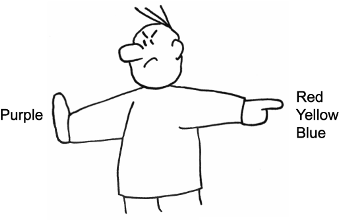
In summary, the concept of "choice" in Python is integral to user interaction, randomization, and command-line argument processing. By leveraging built-in functions and modules, Python developers can efficiently manage user inputs and enhance the functionality of their applications.
| Book Title | Usage of choice | Technical Depth | Connections to Other Concepts | Examples Used | Practical Application |
|------------|-----------------|-----------------|-------------------------------|---------------|-----------------------|
| [A Pythonic Adventure: From Python basics to a working web app](https://www.manning.com/books/a-pythonic-adventure) | Discusses 'choice' in the context of user input validation for menu selections. | Explores robust input handling and error management. | Connects to user interface design and input validation. | Provides a detailed example of a menu function with error handling. | Demonstrates practical use in creating user-friendly applications. [more](https://livebook.manning.com/book/a-pythonic-adventure/chapter-4) |
| [Tiny Python Projects: Learn coding and testing with puzzles and games](https://www.manning.com/books/tiny-python-projects) | Covers 'choice' in terms of selecting elements from collections and command-line argument validation. | Delves into the use of `random.choice()` and `argparse` for input restrictions. | Links to randomness in programming and command-line interface design. | Includes examples of using `random.choice()` and `argparse` for input validation. | Highlights practical applications in command-line tools and random data generation. [more](https://livebook.manning.com/book/tiny-python-projects/chapter-9/78) |
FAQ (Frequently asked questions)
What does 'choice' refer to in the chapter?
How is 'choice' validated in the chapter?
What does the choice function from the random module do?
How is the choice function used in the abuse.py program?
What is the purpose of using random.choice() in abuse.py?