Color in Python and Flask Development
In the context of Python and Flask development, color management is an essential aspect of creating visually appealing applications. This wiki page explores the implementation and usage of color classes and templates in Python applications, particularly focusing on the Color class and its integration into other components like the Shape class and web templates.
The Color Class
The Color class is a Python data class designed to encapsulate a palette of colors. It provides a structured way to manage colors within an application, moving the allowable color list within the scope of the class and out of the global module namespace. This encapsulation is beneficial for maintaining clean and organized code.
Implementation
The Color class is defined as follows:
@dataclass
class Color:

    PALETTE = [
        arcade.color.BLACK,
        arcade.color.LIGHT_GRAY,
        arcade.color.LIGHT_CRIMSON,
        arcade.color.LIGHT_BLUE,
        arcade.color.LIGHT_CORAL,
        arcade.color.LIGHT_CYAN,
        arcade.color.LIGHT_GREEN,
        arcade.color.LIGHT_YELLOW,
        arcade.color.LIGHT_PASTEL_PURPLE,
        arcade.color.LIGHT_SALMON,
        arcade.color.LIGHT_TAUPE,
        arcade.color.LIGHT_SLATE_GRAY,
    ]
    color: tuple = PALETTE[0]
    _color: tuple = field(init=False)

    @property
    def color(self) -> tuple:
        return self._color

    @color.setter
    def color(self, value: tuple) -> None:
        if value in Color.PALETTE:
            self._color = value
This class uses a list of predefined colors from the arcade.color module. It includes getter and setter property decorators to manage the color attribute, ensuring that only colors from the defined palette can be set.
UML Diagram
The UML diagram for the Color class and its integration with other classes is shown in Figure 4.8.
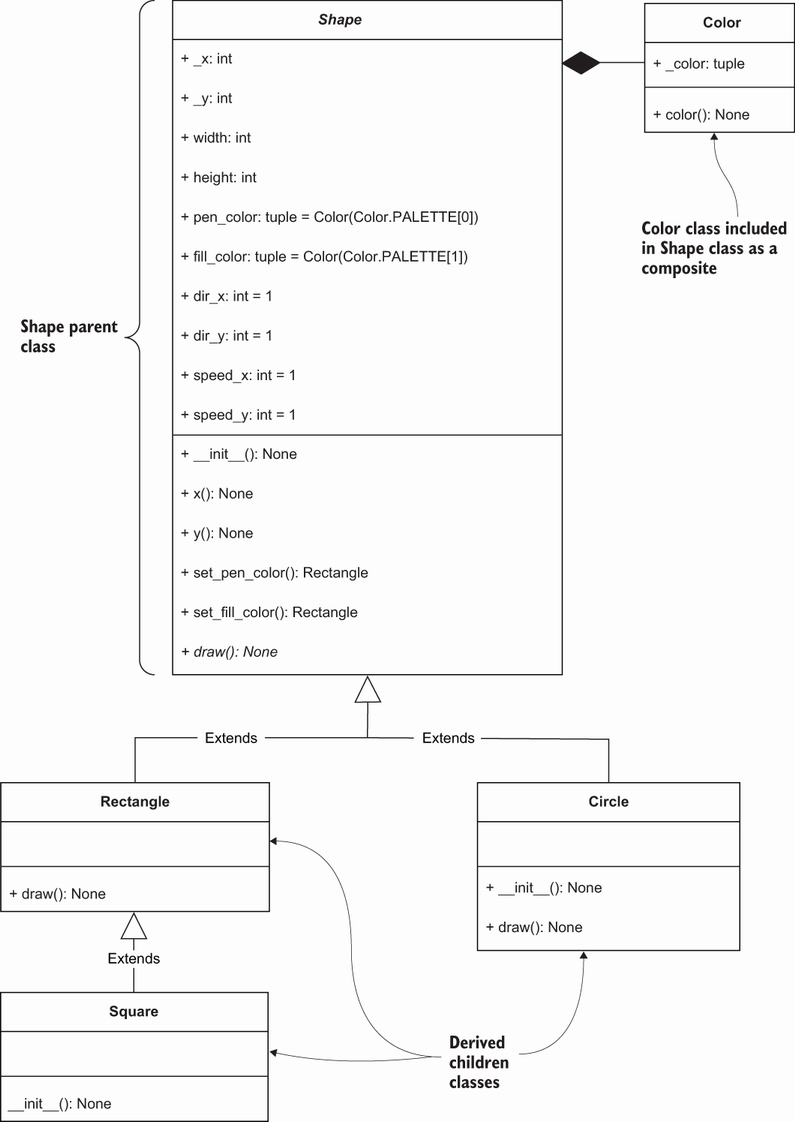 Figure 4.8 The UML diagrams for the classes, including the composited Color class
Integration with the Shape Class
The Shape class utilizes the Color class for its pen and fill color attributes. This integration demonstrates a HAS-A relationship, where a Shape class has Color attributes but isn’t a color itself. The __init__() method of the Shape class is modified to include these color attributes:
class Shape:

    def __init__(
        self,
        x: int,
        y: int,
        width: int,
        height: int,
        pen: Color = Color(),
        fill: Color = Color(),
        dir_x: int = 1,
        dir_y: int = 1,
        speed_x: int = 1,
        speed_y: int = 1,
    ):
        self._x = x
        self._y = y
        self.width = width
        self.height = height
        self.pen = Color(Color.PALETTE[0])
        self.fill = Color(Color.PALETTE[1])
        self.dir_x = 1 if dir_x > 0 else -1
        self.dir_y = 1 if dir_y > 0 else -1
        self.speed_x = speed_x
        self.speed_y = speed_y
The pen and fill colors are initialized to black and light gray, respectively, using the Color class.
Web Template Integration
In web applications, color management extends to the user interface. The BannerColors class is an example of managing a list of colors for web banners. It provides a method to generate a random subset of colors for display:
class BannerColors:
    COLORS = [
        "lightcoral", "salmon", "red", "firebrick", "pink",
        "gold", "yellow", "khaki", "darkkhaki", "violet",
        "blue", "purple", "indigo", "greenyellow", "lime",
        "green", "olive", "darkcyan", "aqua", "skyblue",
        "tan", "sienna", "gray", "silver"
    ]

    def get_colors(self):
        return sample(BannerColors.COLORS, 5)
HTML Template Example
The index.html template demonstrates how these colors can be integrated into a web page:
{% extends "base.html" %}

{% block content %}
<h2>Current time: {{ data["now"] }}</h2>
<p>Page visits: {{ data["page_visit"].counts() }}</p>
<p>List of available banner colors:</p>
<ul>
    {% for banner_color in data["banner_colors"]["display"] %}
    <li>{{ banner_color }}</li>
    {% endfor %}
</ul>
<div id="color-change">
    <button class="change-banner-color">
        Change Banner Color
    </button>
</div>
{% endblock %}
This template extends a base template and includes a list of banner colors and a button to change the banner color, showcasing the dynamic use of colors in a web application.
Web Page Example
Figure 6.5 illustrates a web page with enhanced style and interactivity, including color management.
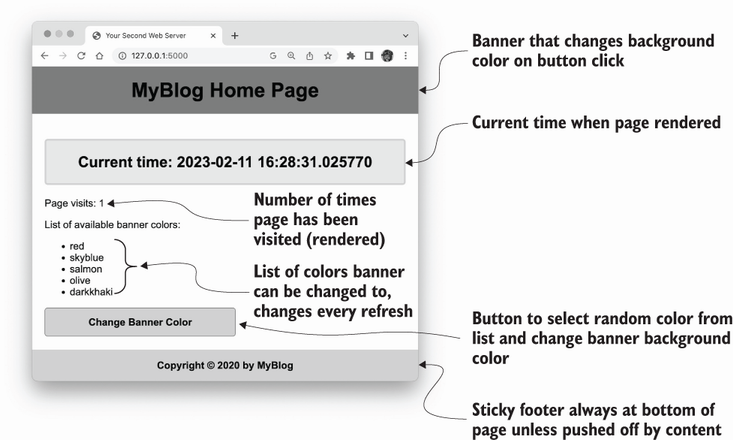 Figure 6.5 The web page with more style and color and some interactivity
In summary, the management of colors in Python and Flask applications involves creating structured classes like Color and BannerColors, integrating them into other components, and utilizing them in web templates to enhance the user interface.
FAQ (Frequently asked questions)
What does Figure 4.8 in 'The Well-Grounded Python Developer' depict?
What is the purpose of the Color class in 'The Well-Grounded Python Developer'?
What colors are included in the Color class palette?
How does the Color class ensure a color is valid?