Debugging in Python
Debugging is a fundamental aspect of software development, crucial for identifying, analyzing, and resolving errors or bugs within code. In Python, debugging ensures that programs run smoothly and as intended. This process involves various tools and techniques that help developers pinpoint and fix issues efficiently.
Overview of Debugging
Debugging in Python involves a systematic approach to finding and fixing bugs. This typically includes reproducing the bug, setting breakpoints, logging, and employing other strategies to understand the root cause of a problem and implement a solution that prevents it from recurring. The goal is to ensure robust and reliable software.
Techniques and Tools for Debugging
Breakpoints
Breakpoints are a powerful tool in debugging that allow developers to pause the execution of an application at a specific point. This pause enables the examination of the application's current state, including variable values and the call stack, which can help in identifying the source of a bug. By stepping through the code line by line, developers can observe the flow of execution and detect where things go wrong.
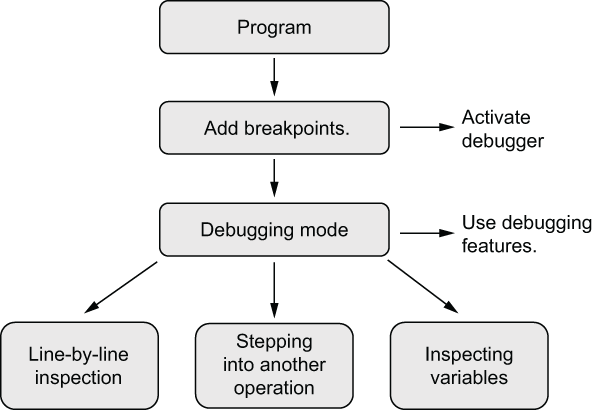 Figure 13.4 The general aspects of debugging programs in Python. For a program, we add breakpoints to the places where we debug. When the execution encounters the breakpoint, it activates the interactive debugger. Then we can perform a variety of debugging tasks, such as running code line by line.
Logging
Logging is another essential technique in debugging. It involves recording events and data during the application's runtime, which can be invaluable for tracing the application's path and identifying issues. Python's built-in logging system is preferred over using print statements, as it provides more flexibility and control over the logging output. Logs can be configured to capture different levels of information, from basic messages to detailed error reports.
Flask Debug Toolbar
For Flask applications, the Flask Debug Toolbar is an invaluable tool during development. It provides internal information directly in the browser window, which would otherwise require manual debugging or examining log files. The toolbar offers insights into request and response data, SQL queries, and other critical aspects of the application, making it easier to identify and fix issues.
Using the assert Statement
The assert statement is a simple yet powerful tool for debugging in Python. It is used to check conditions that should always be true in a program. If the condition is false, an AssertionError is raised, indicating a logical error in the code. This can be particularly useful during the development phase to catch bugs early.
def divide(a, b):
    assert b != 0, "The divisor must not be zero."
    return a / b
Disabling Assertions in Production
While assert statements are valuable during development, they can introduce performance overhead. Therefore, it is common practice to disable assertions in production code. This can be done by running Python with the -O (optimize) flag, which removes all assert statements from the bytecode.
Strategies for Effective Debugging
Debugging Bad Results
When an application produces incorrect results, debugging involves using a debugger to understand the application's state at the point of error. This process includes examining the call stack and checking data sets for errors. By understanding the context in which the error occurs, developers can implement targeted fixes.
Process of Elimination
The process of elimination is a methodical approach to narrowing down the domain where a bug exists, whether in the code or data. This strategy involves using breakpoints, logging, or dividing data sets to isolate the problem area. By systematically ruling out potential causes, developers can focus on the most likely sources of the bug.
Rubber-Ducking
Rubber-ducking is a unique debugging technique that involves explaining a problem to someone else, or even to an inanimate object like a rubber duck. This process can help clarify the issue and often leads to a solution, as articulating the problem can reveal overlooked details or assumptions.
Standard Library Support for Debugging
Python's standard library offers a variety of modules that aid in debugging:
- Testing: Modules like
unittestanddoctestallow developers to write test cases that automatically verify the correctness of their code. - Profiling: Tools such as
cProfileandprofilehelp in analyzing the performance of Python programs, identifying bottlenecks and optimizing code execution. - Error Tracebacks: The
tracebackmodule provides utilities for extracting, formatting, and printing stack traces of Python programs, making it easier to understand the context of errors.
By employing these tools and strategies, developers can effectively debug their Python applications, ensuring robust and reliable software.
| Book Title | Usage of Debugging | Technical Depth | Connections to Other Concepts | Examples Used | Practical Application |
|------------|--------------------|-----------------|-------------------------------|---------------|-----------------------|
| [The Well-Grounded Python Developer: How the pros use Python and Flask](https://www.manning.com/books/the-well-grounded-python-developer) | Discusses debugging as a critical process in software development, focusing on Python and Flask. | Covers systematic approaches, breakpoints, logging, and tools like Flask Debug Toolbar. | Connects debugging to software reliability and development efficiency. | Uses examples like debugging bad results and process of elimination. | Emphasizes practical strategies for effective debugging in real-world applications. [more](https://livebook.manning.com/book/the-well-grounded-python-developer/chapter-7/182) |
| [Python How-To](https://www.manning.com/books/python-how-to) | Focuses on debugging in Python using tracebacks and interactive tools. | Explains tracebacks, breakpoints, and interactive debugging with `pdb`. | Links debugging to program flow and error resolution. | Provides a practical example with a task management application. | Highlights the use of interactive debuggers for troubleshooting. [more](https://livebook.manning.com/book/python-how-to/chapter-13/1) |
| [The Quick Python Book, Fourth Edition](https://www.manning.com/books/the-quick-python-book-fourth-edition) | Describes debugging as essential for identifying and fixing code issues. | Discusses the use of `assert` statements and standard library modules. | Relates debugging to testing, profiling, and error handling. | Includes examples like using `assert` for logical checks. | Focuses on using Python's standard library for efficient debugging. [more](https://livebook.manning.com/book/the-quick-python-book-fourth-edition/chapter-19/30) |
FAQ (Frequently asked questions)
What is the Flask Debug Toolbar used for?
How does the Flask Debug Toolbar help developers?
What is debugging?
What techniques are involved in debugging?
What is the purpose of using breakpoints in debugging?
What is logging in debugging?
Why is Python's logging system preferred over print statements?
How do you debug bad results?
What is the process of elimination in debugging?
What methods can be used in the process of elimination?
What is rubber-ducking in debugging?
What is debugging?
How do tracebacks help in debugging?
How are tracebacks used in debugging?
What is an example of an error identified by a traceback?
Why are tracebacks important in debugging?
How can developers use tracebacks to fix errors?
What is interactive debugging in Python?
What tools are used for interactive debugging in Python?
How do breakpoints work in Python debugging?
What happens when a breakpoint is encountered during execution?
How can a breakpoint be used in a Python script?
What is the purpose of using a script file like task_debug.py?
How does the assert statement help in debugging Python programs?
What is the purpose of the assert statement in Python?
Can assertions be disabled in Python, and why would you do that?
What tools does the Python standard library provide for debugging?