Email Functionality in MyBlog Application
In the MyBlog application, email functionality is a crucial component, particularly for user registration and confirmation processes. This functionality is implemented using the SendInBlue service, which provides a robust API for sending transactional emails. The integration of this service into the application allows for seamless email delivery, such as sending confirmation emails to users.
Entity Relationship Diagram (ERD)
Before diving into the email functionality, it's important to understand the structure of the User table, which is central to managing user data, including email addresses. The following figure illustrates the ERD of the User table, showing its fields and their data types:
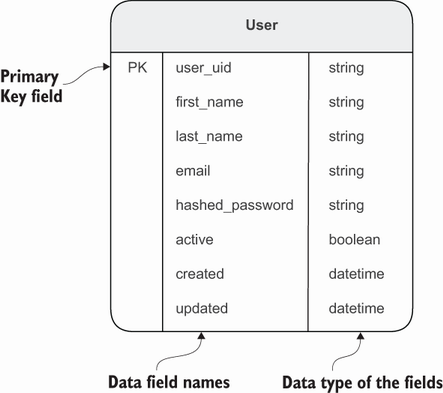 Figure 8.2 The ERD (entity relationship diagram) of the User table showing its fields and their data types
Sending Emails
The process of sending emails in the MyBlog application is encapsulated in the send_mail() function, located in the app/emailer.py module. This function leverages the SendInBlue API to send emails. Below is the listing for the send_mail() function:
Emailer Module
from logging import getLogger

import sib_api_v3_sdk                                       #1
from flask import current_app
from sib_api_v3_sdk.rest import ApiException

logger = getLogger(__name__)
configuration = sib_api_v3_sdk.Configuration()              #2
configuration.api_key['api-key'] =                          #2
current_app.config.get("SIB_API_KEY")                     #2

def send_mail(to, subject, contents):
    api_instance = sib_api_v3_sdk.TransactionalEmailsApi(
    sib_api_v3_sdk.ApiClient(configuration))              #3
    smtp_email = sib_api_v3_sdk.SendSmtpEmail(              #4
        to=[{"email": to}],                                 #4
        html_content= contents,                             #4
        sender={"name": "MyBlog", "email":                  #4
        "no-reply@myblog.com"},                           #4
        subject=subject                                     #4
    )                                                       #4
    try:
        api_instance.send_transac_email(smtp_email)         #5
        logger.debug(f"Confirmation email sent to {to}")
    except ApiException as e:
        logger.exception("Exception sending email", exc_info=e)
#1 Imports the SendInBlue API module
#2 Configures the API with your API key
#3 Creates an instance of the API
#4 Creates the email object
#5 Sends the email object to be emailed
This code sets up the SendInBlue API with the necessary API key, creates an email object with the recipient's details, and sends the email using the API.
Confirmation Email
A key feature of the MyBlog application is sending confirmation emails to newly registered users. This email includes a link back to the application with encrypted information. Users must confirm their registration by clicking the link within a specified timeout period, typically set to 12 hours.
Sending Confirmation Email
The send_confirmation_email() function is responsible for constructing and sending the confirmation email. It generates a unique confirmation token and constructs a URL that the user can click to confirm their registration. Here is the function:
def send_confirmation_email(user):
    confirmation_token = user.confirmation_token()    #1
    confirmation_url = url_for(                       #2
        "auth_bp.confirm",                            #2
        confirmation_token=confirmation_token,        #2
        _external=True                                #2
    )                                                 #2
    timeout = current_app.config.get(                 #3
    "CONFIRMATION_LINK_TIMEOUT")                    #3
    to = user.email                                   #3
    subject = "Confirm Your Email"                    #3
    contents = (                                      #3
        f"""Dear {user.first_name},<br /><br />       #3
        Welcome to MyBlog, please click the link to   #3
        confirm your email within {timeout} hours:  #3
        {confirmation_url}<br /><br />                #3
        Thank you!                                    #3
        """                                           #3
    )                                                 #3
    send_mail(to=to, subject=subject,                 #3
    contents=contents)                              #3
#1 Calls the new user method to construct a confirmation token
#2 Constructs a URL to insert in the email that, when clicked, will inform MyBlog that the user has confirmed
#3 Constructs and sends an email with the confirmation URL to the user
This function ensures that the user receives a confirmation email with a clickable link, which is essential for completing the registration process. The link directs the user to a specific URL handler in the application, confirming their registration upon access.
FAQ (Frequently asked questions)
How does the MyBlog application send emails?
What types of emails does the MyBlog application send?
What is the role of the SendInBlue API in the MyBlog application?
What library is used for email functionality in the MyBlog application?
How is the SendInBlue API configured in the MyBlog application?
What does the 'send_mail()' function do in the MyBlog application?
How does the MyBlog application handle exceptions when sending emails?
Where is the 'send_mail()' function located in the MyBlog application?
What API does the 'send_mail()' function use to send emails?
What components are included in the email object created by the 'send_mail()' function?
What is the purpose of the confirmation email in the MyBlog application?
What does the confirmation email contain?
What is the timeout period for confirming registration in the MyBlog application?