Flask
Flask is a lightweight and popular web application framework for Python, known for its simplicity and flexibility. It allows developers to build web applications quickly and efficiently by providing mechanisms to handle HTTP requests, connect them to Python code, and dynamically build responses. Flask is particularly suitable for small to medium-sized projects and is favored for its minimalistic approach, which allows developers to start small and scale their applications as needed.
Overview of Flask
Flask is a micro web framework that facilitates the creation of web applications by employing templates to generate HTML and supporting routing to map URLs to specific functions within applications. It operates synchronously, meaning each request is handled one at a time, which can be a limitation in scenarios requiring high concurrency. Despite this, Flask's design makes it an excellent choice for developers looking to build web applications efficiently.
Building Web Applications with Flask
Flask applications are built by defining routes and connecting them to Python functions using decorators. For example, the @app.route("/") decorator connects a function to the root URL, executing the function when a user navigates to this URL. Here's a simple example of a Flask application:
from flask import Flask

app = Flask(__name__)

@app.route("/")
def home():
    return "Hello World!"
This code snippet sets up a basic Flask application that responds with "Hello World!" when accessed at the root URL.
Serving Content with Flask
Flask serves content by mapping URL routes to Python functions, which return responses to the client. These responses can be static strings or dynamically generated content using templates. Flask's render_template function allows for the integration of dynamic data into HTML templates, providing a flexible way to serve content.
Dynamic Content
Flask supports dynamic content generation using Python functions and Jinja2 templates. This allows developers to include data from databases, perform calculations, or integrate other services into their web pages, creating interactive and engaging user experiences.
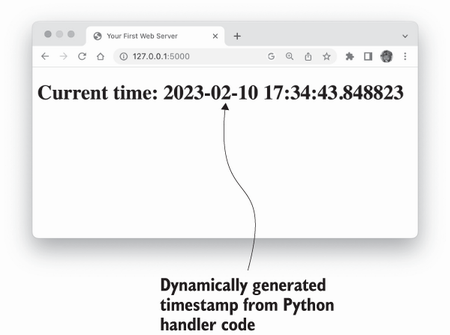 Figure 6.4 Your first dynamically built web pages served from your Flask application
Flask Servers
Flask servers are designed to run indefinitely, processing requests as they arrive through an event loop that listens for HTTP requests on a specified port, typically 127.0.0.1:5000 in development mode. While Flask's built-in server is suitable for development, it is not recommended for production due to security and performance limitations. For production, a WSGI server like Gunicorn is recommended.
Handling Data with Flask
In a typical Flask application, you might need to save and load data. Below is an example of how you can manage orders in a Flask application using JSON files:
import os
import json
from flask import Flask, render_template, request

def save_orders(orders, filename):
    with open(filename, "w") as f:
        json.dump(orders, f, indent=4)

def load_orders(filename):
    if os.path.exists(filename):
        with open(filename, "r") as f:
            return json.load(f)
    else:
        return []
This example demonstrates how to save and load orders using JSON files, although using a database would be a more robust solution for managing data in a web application.
Setting Up a Flask Application
To illustrate how Flask can be used to create a web application, consider a simple example where we build an endpoint to retrieve brand information from a database:
from flask import Flask, jsonify
import psycopg2

app = Flask(__name__)

conn_info = "dbname=products user=postgres password=password host=127.0.0.1"
db = psycopg2.connect(conn_info)

@app.route('/brands')
def brands():
    cur = db.cursor()
    cur.execute('SELECT brand_id, brand_name FROM brand')
    rows = cur.fetchall()
    cur.close()
    return jsonify([{'brand_id': row[0], 'brand_name': row[1]} for row in rows])
This example connects to a PostgreSQL database and retrieves brand information, demonstrating Flask's capability to interact with databases and serve dynamic content.
In summary, Flask's minimalistic design, ease of learning, and flexibility make it an excellent choice for developers looking to build web applications efficiently. Its ability to handle dynamic content and serve it through a simple yet powerful framework is why it remains a popular tool in the web development community.
| Book Title | Usage of Flask | Technical Depth | Connections to Other Concepts | Examples Used | Practical Application |
|------------|----------------|-----------------|-------------------------------|---------------|-----------------------|
| [The Well-Grounded Python Developer: How the pros use Python and Flask](https://www.manning.com/books/the-well-grounded-python-developer) | Discusses Flask as a lightweight framework for building web applications, emphasizing its simplicity and flexibility. | Covers HTTP request handling, dynamic content generation, and server management. | Integrates with databases, authentication, and other modules. | Provides a basic "Hello World" example and dynamic content generation. | Focuses on building scalable web applications with Flask. [more](https://livebook.manning.com/book/the-well-grounded-python-developer/chapter-6/58) |
| [A Pythonic Adventure: From Python basics to a working web app](https://www.manning.com/books/a-pythonic-adventure) | Introduces Flask as a micro web framework suitable for small to medium projects. | Explains routing, template rendering, and data handling with JSON. | Discusses file handling and suggests database use for data management. | Demonstrates handling data with JSON files and initializing a Flask app. | Guides on creating a web form for a coffee shop and managing orders. [more](https://livebook.manning.com/book/a-pythonic-adventure/chapter-10/1) |
| [Python Concurrency with asyncio](https://www.manning.com/books/python-concurrency-with-asyncio) | Describes Flask as a synchronous framework, highlighting its limitations in concurrent request handling. | Details installation and setup, including database connectivity with PostgreSQL. | Compares Flask with asynchronous frameworks like `aiohttp`. | Provides an example of retrieving data from a PostgreSQL database. | Advises using Gunicorn for production to handle multiple requests. [more](https://livebook.manning.com/book/python-concurrency-with-asyncio/chapter-9/55) |
FAQ (Frequently asked questions)
What is Flask in Python?
Why is Flask considered lightweight?
How does Flask generate HTML?
What is routing in Flask?
What is Flask used for in a coffee shop web application?
How does Flask handle web forms?
How does Flask handle errors for undefined routes?
How does Flask serve content?
What is the render_template function used for in Flask?
How does Flask generate dynamic content?
What role do Jinja2 templates play in Flask?
What is Flask in Python?
Why is Flask popular among developers?
How does Flask handle HTTP requests?
What does Figure 6.4 in the book illustrate?
How do you create a basic Flask web server?
What does the @app.route("/") decorator do in Flask?
Why do developers choose Flask for web development?
What makes Flask a flexible web framework?
How does a Flask server handle HTTP requests?
Is Flask's built-in server suitable for production?
How are routes connected to functions in Flask?
What happens when a user navigates to a route in Flask?
How do Flask servers process requests?
What happens when a Flask server is idle?
What response does Flask give for undefined URL routes?
What is Flask used for in Python?
Is Flask synchronous or asynchronous?
How does aiohttp compare to Flask?
How do you create a simple Flask application to retrieve brands?
What libraries are used in the Flask application example for retrieving brands?
What does the '/brands' route do in the Flask application?