Global Keyword in Python
The global keyword in Python is a powerful tool that allows you to modify variables that are defined in the global scope from within a function. This is particularly useful when you want to change a variable in a local scope that is defined globally, preventing the creation of a new local variable with the same name.
Understanding Global Scope and Namespace
In Python, a namespace is a collection of names. You can think of namespaces as dictionaries where the keys are the variable names and the values are the objects they refer to. The global namespace is the top-level namespace in a module, and it tracks all the variables, functions, and classes defined at the module level.
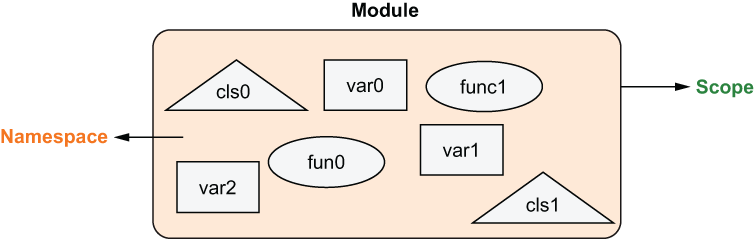 Figure 10.6 The relationship between the global namespace and the global scope. In a module, the global namespace tracks all the variables, as well as functions and classes, in the form of a dictionary. The global namespace resides in the global scope, which defines the boundary.
Example of Using Global Keyword
Consider the following example where we attempt to change a global variable without using the global keyword:
Listing 10.7 Attempting to change a global variable
db_filename = "N/A"

def set_database(db_name):
   db_filename = db_name

set_database("tasks.sqlite")

print(db_filename)
# [output: "N/A"](https://livebook.manning.com/book/python-how-to/chapter-10/190)
In this example, the variable db_filename is intended to be updated within the set_database function. However, without the global keyword, Python treats db_filename inside the function as a new local variable, leaving the global db_filename unchanged.
To successfully modify the global variable, we use the global keyword:
Listing 10.8 Changing a global variable successfully
db_filename = "N/A"

def set_database(db_name):
   global db_filename
   db_filename = db_name
   print(list(locals()))

set_database("tasks.sqlite")
# [output: ['db_name']](https://livebook.manning.com/book/python-how-to/chapter-10/190)

print(db_filename)
# [output: tasks.sqlite](https://livebook.manning.com/book/python-how-to/chapter-10/190)
In this corrected version, the global keyword is used to indicate that db_filename refers to the global variable. This allows the function to modify the global db_filename, and the change is reflected outside the function.
Exploring the Global Namespace
The global namespace can be inspected using the globals() function, which returns a dictionary of all global variables and their values. For example:
print(list(globals()))
# [output: ['__name__', '__doc__', '__package__', '__loader__', '__spec__',](https://livebook.manning.com/book/python-how-to/chapter-10/195)
# ['__annotations__', '__builtins__', 'db_filename', 'set_database']](https://livebook.manning.com/book/python-how-to/chapter-10/195)
This output shows that both db_filename and set_database are part of the global namespace.
In a module, classes and instances are also part of the global namespace. For instance, if a Task class and a task instance are defined in the same module, they can be accessed through the global namespace:
assert Task is globals()["Task"]
assert task is globals()["task"]
This demonstrates that the Task class and the task instance are registered in the global namespace, allowing them to be accessed globally within the module.
FAQ (Frequently asked questions)
What is the purpose of the global keyword in Python?
What is the relationship between the global namespace and the global scope in Python?
How can you change a global variable from within a function in Python?
What is the output of the set_database function in the provided code snippet?
What is the final value of db_filename after calling set_database("tasks.sqlite")?
How do you change a globally defined variable within a local scope in Python?