Iteration with iter in Python
Iteration is a fundamental concept in Python, allowing you to traverse through elements in a collection, such as lists, tuples, or dictionaries. The iter function plays a crucial role in this process by converting iterables into iterators.
Understanding Iterators
An iterator is an object that enables you to iterate over a collection. It is created from an iterable using the iter function. Once you have an iterator, you can retrieve its elements one by one using the next function. When there are no more elements to retrieve, the StopIteration exception is raised, signaling the end of the iteration process.
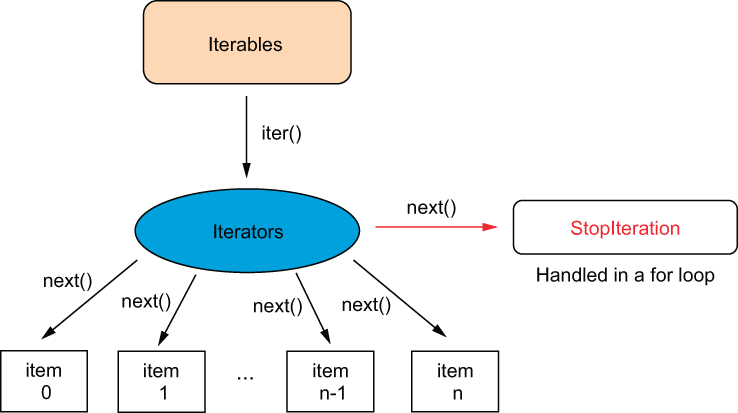 Figure 5.1 The workflow of iteration with iterators. Iterators are created by using the iter function from iterables. The iterators use the next function to retrieve the next item, if available. When the iterator exhausts its items, the StopIteration exception is raised.
Creating an Iterator
To illustrate the iteration process, consider a common iterable, a list object. You can create an iterator from this list using the iter function:
tasks = ["task0", "task1", "task2"]

tasks_iterator = iter(tasks)

tasks_iterator
# [output: <list_iterator object at 0x000001F232ACEE50>   #1](https://livebook.manning.com/book/python-how-to/chapter-5/29)
#1 The memory address will be different on your computer.
In this example, we start with a list object, tasks, and create an iterator tasks_iterator by calling the iter function. This iterator can then be used to access the list's elements sequentially.
Determining Iterability
From a practical perspective, any data type that can be used in a for loop is an iterable. Formally, an object is considered iterable if it can be converted to an iterator using the iter function. The following code snippet demonstrates how different objects behave in terms of their iterability:
iter(5)
# [ERROR: TypeError: 'int' object is not iterable](https://livebook.manning.com/book/python-how-to/chapter-5/29)

iter([1, 2, 3])
# [output: <list_iterator object at 0x000001F232A44700>](https://livebook.manning.com/book/python-how-to/chapter-5/29)
In this example, attempting to create an iterator from an integer results in a TypeError, indicating that integers are not iterable. However, creating an iterator from a list is successful, confirming that lists are iterable.
Checking for Iterability
To programmatically check whether an object is iterable, you can use a function like the following:
Listing 5.1 Checking whether an object is an iterable
def is_iterable(obj):
    try:
        _ = iter(obj)                          #1
    except TypeError:
        print(type(obj), "is not an iterable")
    else:
        print(type(obj), "is an iterable")     #2

is_iterable(5)
# [output: <class 'int'> is not an iterable](https://livebook.manning.com/book/python-how-to/chapter-5/29)

is_iterable([1, 2, 3])
# [output: <class 'list'> is an iterable](https://livebook.manning.com/book/python-how-to/chapter-5/29)
#1 Uses an underscore to denote that we don't use the return result
#2 The else clause executes when there is no TypeError exception.
In this function, we attempt to call the iter function on the object. If it succeeds, the object is iterable; if it raises a TypeError, the object is not iterable. This method allows you to test various data types to determine their iterability.
FAQ (Frequently asked questions)
How are iterators created in Python?
What function do iterators use to retrieve the next item?
What happens when an iterator exhausts its items?