Logging in Python
Logging in Python is a fundamental aspect of application development, providing a mechanism to track events, monitor application behavior, and diagnose issues. The logging module in Python offers a flexible framework for configuring loggers, handlers, and formatters to direct log records to various outputs, such as files or the console. This capability is crucial for gaining insights into the application's execution path and identifying potential issues.
Overview of Logging
The logging module allows developers to configure different log levels, handlers, and formatters to capture and direct log messages. This setup is essential for monitoring and debugging applications effectively. By using logging, developers can record application events, which helps in tracking the application's flow and identifying issues. In applications like MyBlog, logging is designed to output messages to the standard output (STDOUT) with varying levels of severity, enabling developers to filter messages based on the environment, whether it be development or production.
Creating Logger Objects
Logger objects are created using the logging.getLogger(name) function. This function ensures that a shared instance of the Logger class is used throughout the application, promoting consistent configuration and behavior. It is a best practice to use getLogger(__name__) for module-level loggers, as it automatically uses the module's name as the logger's name.
Logging Levels
Logging levels in Python's logging module indicate the severity of log messages. The levels, in order of increasing severity, are:
- DEBUG
- INFO
- WARNING
- ERROR
- CRITICAL
These levels help in filtering and categorizing log messages based on their importance, allowing developers to focus on critical issues while still having access to detailed information when needed. In development environments, more verbose logging, such as DEBUG-level messages, can be enabled to assist in tracking the application's execution path and debugging issues.
Storing Application Events
Storing application events in files is a sustainable approach to logging. By using a FileHandler, logs can be written to a file, allowing for persistent storage and later examination. This method is more reliable than using print statements, which only display output in the console.
Reading Logs
To read logs programmatically, open the log file using the with statement to ensure it closes automatically. This approach allows developers to examine logs as needed for debugging or analysis.
Logging Configuration
The configuration of the logging system can be managed through configuration files, such as YAML, which specify the format, handlers, and levels for logging. For example, in the MyBlog application, the configuration is applied using a function that reads the logging configuration from a file named logging_config.yaml. This setup allows for different logging levels in development and production environments.
YAML Configuration Example
version: 1
disable_existing_loggers: true
formatters:
  default:
    format: '[%(asctime)s.%(msecs)03d] %(levelname)s in %(module)s: %(message)s'
    datefmt: '%Y-%m-%d %H:%M:%S'
handlers:
  console:
    level: DEBUG
    class: logging.StreamHandler
    formatter: default
    stream: ext://sys.stdout
loggers:
  '':
    level: DEBUG
    handlers: [console]
    propagate: false
Example: Logging Records at Different Levels
The following example demonstrates how to log messages at different levels:
def logging_messages_all_levels():
   logger.critical("--Critical message")
   logger.error("--Error message")
   logger.warning("--Warning message")
   logger.info("--Info message")
   logger.debug("--Debug message")

logging_messages_all_levels()

log_records = check_log_content("taskier.log")
print(log_records)
The General Process of Logging
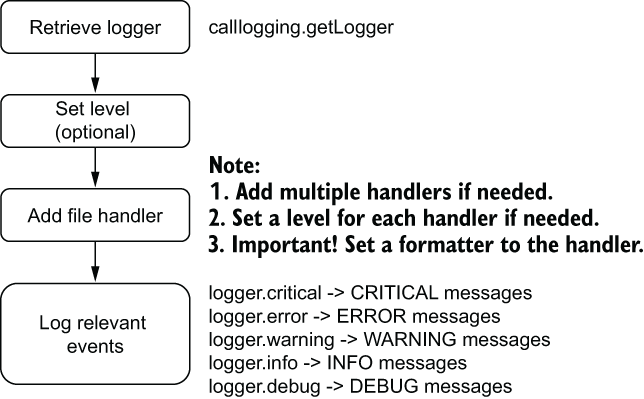
By following these practices and utilizing the logging module effectively, developers can ensure that their applications are well-monitored and easier to debug.
| Book Title | Usage of logging | Technical Depth | Connections to Other Concepts | Examples Used | Practical Application |
|------------|------------------|-----------------|-------------------------------|---------------|-----------------------|
| [Python How-To](https://www.manning.com/books/python-how-to) | Discusses logging as a crucial aspect of application development, focusing on tracking events and diagnosing issues. [more](https://livebook.manning.com/book/python-how-to/chapter-12/1) | Provides detailed explanation of logging levels, handlers, and formatters. [more](https://livebook.manning.com/book/python-how-to/chapter-12/66) | Connects logging to application monitoring and debugging. [more](https://livebook.manning.com/book/python-how-to/chapter-12/54) | Includes examples of logging at different levels and storing logs in files. [more](https://livebook.manning.com/book/python-how-to/chapter-12/71) | Emphasizes the importance of logging for maintaining and debugging applications. [more](https://livebook.manning.com/book/python-how-to/chapter-12/68) |
| [The Well-Grounded Python Developer: How the pros use Python and Flask](https://www.manning.com/books/the-well-grounded-python-developer) | Highlights logging as essential for tracking application execution in the MyBlog application. [more](https://livebook.manning.com/book/the-well-grounded-python-developer/chapter-7/212) | Discusses logging configuration using YAML files and environment-based logging levels. [more](https://livebook.manning.com/book/the-well-grounded-python-developer/chapter-7/218) | Integrates logging with Flask application setup and environment management. [more](https://livebook.manning.com/book/the-well-grounded-python-developer/chapter-7/218) | Provides examples of adding DEBUG-level log messages in web application routes. [more](https://livebook.manning.com/book/the-well-grounded-python-developer/chapter-12/51) | Focuses on using logging to gain insights into application execution and debugging. [more](https://livebook.manning.com/book/the-well-grounded-python-developer/chapter-7/212) |
FAQ (Frequently asked questions)
What is the purpose of logging in the MyBlog application?
Which module is used for logging in the MyBlog application?
How does the MyBlog application filter log messages?
How is logging configured in the MyBlog application?
What does the logging configuration disable in the MyBlog application?
What handler is used in the MyBlog application's logging configuration?
What is the format of log messages in the MyBlog application?
How is the logging configuration applied in the MyBlog application?
Where are log messages output in the MyBlog application?
What is the role of logging in an application?
Which tool is recommended for logging in Python applications?
How does logging assist in debugging?
Can the verbosity of logging be adjusted?
What is logging in Python used for?
What does the logging module in Python provide?
How do you create a Logger object in Python?
Why is it a best practice to use getLogger(__name__) for module-level loggers?
Why should you use logging.getLogger(name) across your application?
What is the benefit of using getLogger(__name__) for module-level loggers?
Why is using files to store application events a sustainable approach?
What is the role of a FileHandler in logging?
How can you read logs programmatically in Python?
Why is it important to use the with statement when reading log files?
Why is logging essential in application development?
What is the difference between using a stream handler and a file handler in logging?
What is the purpose of logging in Python?
How does the logging module help in capturing log messages?
What is the first step in the general process of logging?
How can you log records in a file?
What are some examples of logging messages at different levels?
What is the output of logging messages at different levels?
What are the logging levels in Python's logging module?
Why are logging levels important?