Next Command in Python
The next command in Python is a built-in function that retrieves the next item from an iterator. If the iterator is exhausted, it raises a StopIteration exception unless a default value is provided. This command is particularly useful when working with iterators and generator expressions, allowing you to manually iterate through items one at a time.
Using the next Command with Generators
Consider a generator expression that generates squares of numbers. You can use the next command to retrieve each square sequentially:
>>> next(squares_gen_exp)
1
>>> next(squares_gen_exp)
4
>>> next(squares_gen_exp)
9
In this example, squares_gen_exp is a generator expression that yields the squares of numbers. Each call to next(squares_gen_exp) retrieves the next square in the sequence.
Debugging with the next Command
The next command is also used in debugging to execute the next line of code. It differs from the step command, which attempts to execute the next line but stops at the next possible occasion, such as when a function is called. This distinction is crucial for understanding how to control the flow of execution during debugging sessions.
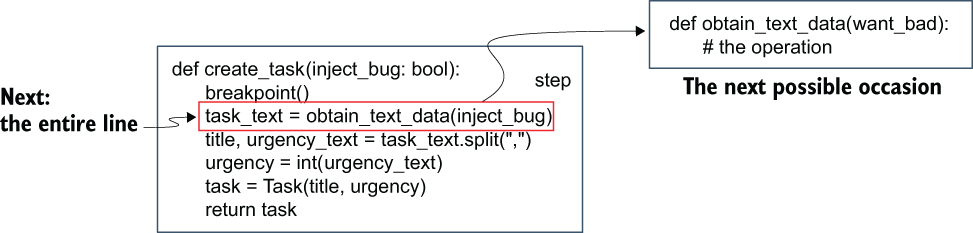 Figure 13.5 The difference between the next and step commands in debugging. The next command executes the entire line; the step command attempts to execute the next line but stops at the next possible occasion. In the example, step is calling another function.
In Figure 13.5, the next command is shown to execute the entire line of code, whereas the step command stops at the next possible occasion, such as when a function is called. This behavior is useful for developers who need to control the execution flow precisely during debugging.
FAQ (Frequently asked questions)
What does the next command do in a generator?
How does the next command work with a generator expression?
What is the difference between the next and step commands in debugging?
How does the next command function in debugging?
What happens when you use the step command in debugging?