The os Module in Python
The os module in Python is a versatile and powerful tool that provides a way to interact with the operating system. It is part of the Python Standard Library, making it readily available in every Python installation. This module is essential for performing operating system-dependent tasks such as file manipulation, directory management, and process handling. It is particularly useful for tasks like reading or writing to the file system, directory traversal, and environment variable management.
Key Functions of the os Module
Checking File Existence
One of the primary uses of the os module is to check whether a file exists in the file system. This can be done using functions like os.path.isfile() and os.path.exists(). These functions help prevent errors that occur when trying to access a non-existent file.
For example, using os.path.isfile():
import os
print(os.path.isfile('blargh'))  # Output: False
In this example, the function checks for the existence of a file named "blargh" and returns False, indicating that the file does not exist.
Similarly, os.path.exists() can be used to check for a file's existence:
import os
import json

def load_orders(filename):
    if os.path.exists(filename):
        with open(filename, "r") as f:
            orders = json.load(f)
        return orders
    else:
        return []
In this example, the function load_orders checks if the specified file exists before attempting to read from it, thus preventing potential errors.
Extracting File Path Components
The os module provides functions to extract different components of a file path, such as os.path.dirname() and os.path.basename(). These functions are used to get the directory name and the base name of a file path, respectively.
For instance:
file = '/var/lib/db.txt'
print(os.path.dirname(file))  # Output: '/var/lib'
print(os.path.basename(file))  # Output: 'db.txt'
This functionality is illustrated in Figure 5.1.
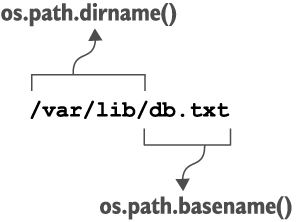 Figure 5.1 The os module has handy functions like os.path.dirname() and os.path.basename() for getting parts of file paths.
Opening and Reading Files
Once you have determined that a file exists using os.path.isfile(), you can open and read it. The open() function is used to open a file, and it returns a file handle, which is a reference to the file. You can then use this file handle to read the contents of the file.
file = 'inputs/fox.txt'
if os.path.isfile(file):
    with open(file) as fh:
        content = fh.read()
In this example, the code checks if the file inputs/fox.txt exists. If it does, the file is opened, and a file handle fh is created. You can then use fh.read() to read the contents of the file.
Conclusion
The os module is an essential part of Python's standard library, providing a wide range of functions for interacting with the operating system. Whether you need to check for file existence, manipulate file paths, or open and read files, the os module offers the necessary tools to perform these tasks efficiently. For more detailed information, you can consult the official Python documentation at https://docs.python.org/3/library/os.html or use the help(os) command in the Python REPL.
| Book Title | Usage of os module | Technical Depth | Connections to Other Concepts | Examples Used | Practical Application |
|------------|--------------------|-----------------|-------------------------------|---------------|-----------------------|
| [Tiny Python Projects: Learn coding and testing with puzzles and games](https://www.manning.com/books/tiny-python-projects) | Discusses file manipulation, directory traversal, and environment variable management. [more](https://livebook.manning.com/book/tiny-python-projects/chapter-5/20) | Covers key functions like `os.path.isfile()`, `os.path.dirname()`, and `os.path.basename()`. [more](https://livebook.manning.com/book/tiny-python-projects/chapter-5/20) | Connects to file handling and path manipulation. [more](https://livebook.manning.com/book/tiny-python-projects/chapter-5/20) | Examples include checking file existence and extracting file path components. [more](https://livebook.manning.com/book/tiny-python-projects/chapter-5/20) | Practical tasks like checking file existence and reading files. [more](https://livebook.manning.com/book/tiny-python-projects/chapter-5/20) |
| [A Pythonic Adventure: From Python basics to a working web app](https://www.manning.com/books/a-pythonic-adventure) | Focuses on file manipulation and process handling. [more](https://livebook.manning.com/book/a-pythonic-adventure/chapter-9/1) | Explains `os.path.exists()` for checking file existence. [more](https://livebook.manning.com/book/a-pythonic-adventure/chapter-9/1) | Integrates with JSON data handling for file operations. [more](https://livebook.manning.com/book/a-pythonic-adventure/chapter-9/1) | Example of loading orders from a file using `os.path.exists()`. [more](https://livebook.manning.com/book/a-pythonic-adventure/chapter-9/1) | Demonstrates robust file I/O operations with error handling. [more](https://livebook.manning.com/book/a-pythonic-adventure/chapter-9/1) |
FAQ (Frequently asked questions)
What does the os module in Python do?
How can you check if a file exists in Python using the os module?
What functions does the os module provide for handling file paths?
How can I get parts of file paths in Python?