Password in Python
In Python programming, the concept of a "password" is crucial for ensuring security in applications. Passwords are used to authenticate users and protect sensitive information. This entry synthesizes information from two Python books, "The Well-Grounded Python Developer" and "Tiny Python Projects," to provide a comprehensive understanding of password management and generation in Python.
Password Management in Applications
In the context of web applications, such as the MyBlog application discussed in The Well-Grounded Python Developer, password management is a critical component for user security. This involves securely storing passwords and providing mechanisms for users to reset their passwords if needed.
Password Hashing
Passwords should never be stored in plain text. Instead, they are hashed using libraries like Flask_bcrypt before being stored in the database. This ensures that even if the database is compromised, the actual passwords remain secure. The User model in applications typically includes methods to set and verify passwords, handling the hashing and checking processes.
Password Reset Process
The password reset process is designed to be secure and user-friendly. It involves several steps:
-
Requesting a Password Reset: Users can request a password reset by entering their email address in a form. This form is presented when the application receives an HTTP
GETrequest, as shown in Figure 9.2.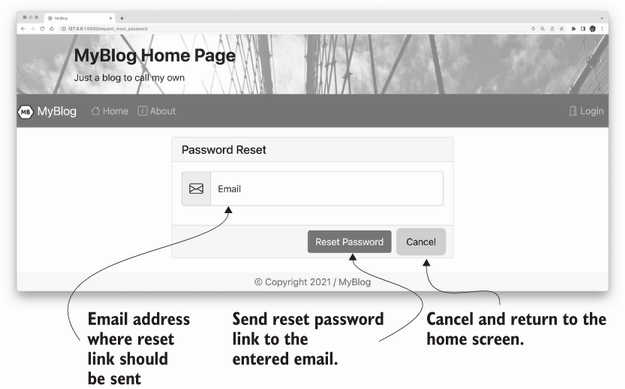 Figure 9.2 The form that allows registered users to reset their password
-
Sending the Reset Email: If a user is found for the entered email, a reset link is sent to their email address. This link contains an encrypted
user_uidand an expiration timeout, which is configurable. -
Resetting the Password: When the user clicks the link in the email, they are directed to a form where they can enter a new password. The
user_uidis decrypted from the token, and the user is verified in the database. If the user is found and the form validates, the password is updated and saved.
This comprehensive approach ensures that passwords are handled securely throughout their lifecycle in applications.
Password Generation
In "Tiny Python Projects," password generation is explored through the creation of memorable and secure passwords using Python scripts.
Password Sampling
The program utilizes the random.sample() function to randomly select a specified number of words from a sorted list of unique words to create a password. This method ensures that the selection is reproducible when a random seed is used, allowing for consistent password generation across different runs.
Password Generation Process
The process involves generating a specified number of passwords by randomly sampling words from a set. Each password is formed by joining a random sample of words. If the --l33t flag is set, the password is transformed using the l33t() function before being printed.
for _ in range(args.num):                                        #1
    password = ''.join(random.sample(words, args.num_words))     #2
    print(l33t(password) if args.l33t else password)             #3
Generating Memorable Passwords
To create more memorable passwords, the program can draw from actual pieces of English text, such as the US Constitution. This requires removing any punctuation from the text. Another strategy is to limit the pool of words to more interesting parts of speech, like nouns, verbs, and adjectives, extracted from texts like novels or poetry.
Leet-Speak Obfuscation
To enhance password security, the program provides a --l33t flag to obfuscate the text using leet-speak. This transformation replaces certain letters with numbers or symbols, making the password harder to guess while still being somewhat recognizable.
In summary, Python provides robust tools and libraries for both managing and generating passwords, ensuring that applications can maintain high security standards while also offering flexibility in password creation.
| Book Title | Usage of password | Technical Depth | Connections to Other Concepts | Examples Used | Practical Application |
|------------|-------------------|-----------------|-------------------------------|---------------|-----------------------|
| [The Well-Grounded Python Developer: How the pros use Python and Flask](https://www.manning.com/books/the-well-grounded-python-developer) | Discusses password management in web applications, focusing on secure storage and reset processes. [more](https://livebook.manning.com/book/the-well-grounded-python-developer/chapter-8/24) | Explains password hashing using `Flask_bcrypt` and secure reset mechanisms. [more](https://livebook.manning.com/book/the-well-grounded-python-developer/chapter-8/24) | Connects password management to user authentication and database security. [more](https://livebook.manning.com/book/the-well-grounded-python-developer/chapter-9/62) | Provides code snippets for password reset processes and hashing. [more](https://livebook.manning.com/book/the-well-grounded-python-developer/chapter-9/62) | Focuses on implementing secure password handling in Flask applications. [more](https://livebook.manning.com/book/the-well-grounded-python-developer/chapter-9/62) |
| [Tiny Python Projects: Learn coding and testing with puzzles and games](https://www.manning.com/books/tiny-python-projects) | Covers password generation using random word sampling and leet-speak obfuscation. [more](https://livebook.manning.com/book/tiny-python-projects/chapter-20/1) | Discusses the use of `random.sample()` for reproducible password generation. [more](https://livebook.manning.com/book/tiny-python-projects/chapter-20/104) | Links password generation to text processing and word selection from literature. [more](https://livebook.manning.com/book/tiny-python-projects/chapter-20/1) | Includes examples of passwords generated from various texts and parts of speech. [more](https://livebook.manning.com/book/tiny-python-projects/chapter-20/1) | Demonstrates creating memorable and secure passwords using Python scripts. [more](https://livebook.manning.com/book/tiny-python-projects/chapter-20/1) |
FAQ (Frequently asked questions)
How are passwords stored in the MyBlog application?
What methods does the User model include for handling passwords?
What is the process for resetting a password in the MyBlog application?
How is the user identified during the password reset process?
How is a password generated in the context of this book?
Can the number of passwords and words per password be customized?
What method is used to select words for creating a password?
How can the selection of words be made reproducible?
What is the process of creating passwords in this book?
What happens if the l33t flag is set during password creation?
What bug was identified in the password creation process?
How are passwords created in the code snippet provided?
What does the l33t flag do in the password creation process?
What issue arises from calling the l33t() function in the password creation process?