Path in Python
In Python, the term "path" can refer to several concepts, each crucial for different aspects of programming. A path can denote a sequence of edges in graph theory, a string representing a file location in a file system, or a list of directories that Python searches for modules. Understanding these contexts is essential for effective programming and problem-solving in Python.
Path in Graph Theory
In graph theory, a path is a sequence of edges that connects two vertices. This concept is fundamental in applications such as network design, routing, and optimization problems. A path allows traversal from a starting vertex to a destination vertex, passing through intermediate vertices as necessary. This is crucial for solving problems like finding the shortest path, determining connectivity, and analyzing network flow.
For example, in a Hyperloop network, a path can be visualized as a sequence of cities connected by tubes. The challenge often lies in finding the optimal path between vertices, which involves determining the most efficient route based on criteria such as distance, cost, or time.
For more details, refer to Classic Computer Science Problems in Python.
Path in Python's File System
In Python, a path is a string that specifies the location of a file or directory within a file system. The pathlib module, introduced in Python 3.4, provides the Path class, which offers an object-oriented approach to handling and manipulating these paths. This class allows for cross-platform path operations, making it easier to write code that works on different operating systems.
The Path Class
The Path class provides a robust interface for interacting with file system paths. It allows you to perform various operations such as accessing file metadata, manipulating paths, and performing file operations like deletion.
Accessing File Metadata
An instance of the Path class can be used to retrieve various components of a file's path, including:
- Parent: The directory containing the file.
- Name: The filename, including its extension.
- Stem: The filename without its extension.
- Suffix: The file extension.
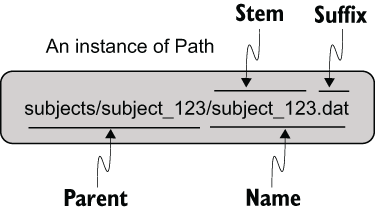 Figure 11.6 Retrieving a file’s filename-related data with an instance of the Path class.
Deleting Files
The Path class provides the unlink method to delete files. Below is an example demonstrating how to delete all .txt files in a directory named data:
from pathlib import Path

data_folder = Path("data")

for file in data_folder.glob("*.txt"):
   before = file.exists()
   file.unlink()
   after = file.exists()
   print(f"Deleting {file}, existing? {before} -> {after}")
For more information, see Python How-To.
Path in Python's Module Management
The sys.path variable is a list of directories that Python searches through to locate modules when an import statement is executed. It is initialized from the PYTHONPATH environment variable or a default set of directories. Understanding and managing sys.path is essential for effective module handling.
Modifying sys.path
One common method to modify sys.path is by using .pth files. These files allow you to specify additional directories that should be included in the sys.path list. By placing a .pth file in one of the directories already in sys.path, you can extend the search path without altering the Python environment or the code directly.
Example of a .pth File
Consider the following example, which demonstrates how to use a .pth file to add directories to the sys.path variable:
File myModules.pth
mymodules
c:\Users\naomi\My Documents\python\modules
When this file is placed in a directory that is already part of sys.path, Python will automatically include these specified directories in its module search path. This allows Python to locate and import modules stored in these additional directories seamlessly.
For further reading, refer to The Quick Python Book, Fourth Edition.
| Book Title | Usage of path | Technical Depth | Connections to Other Concepts | Examples Used | Practical Application |
|------------|---------------|-----------------|-------------------------------|---------------|-----------------------|
| [Classic Computer Science Problems in Python](https://www.manning.com/books/classic-computer-science-problems-in-python) | Discusses paths in the context of graph theory, focusing on traversing vertices. [more](https://www.manning.com/books/classic-computer-science-problems-in-python) | Explores pathfinding algorithms and their efficiency in network design and optimization. | Connects paths to graph theory concepts like shortest path and network flow. | Uses examples like Hyperloop networks to illustrate pathfinding. | Applies path concepts to solve classic computer science problems. |
| [Python How-To](https://www.manning.com/books/python-how-to) | Describes paths as file system locations, using the `pathlib` module. [more](https://www.manning.com/books/python-how-to) | Provides a detailed look at the `Path` class and its methods for file manipulation. | Links path operations to file system management and cross-platform compatibility. | Demonstrates file deletion using the `unlink` method with code examples. | Focuses on practical file system operations and cross-platform path handling. |
| [The Quick Python Book, Fourth Edition](https://www.manning.com/books/the-quick-python-book-fourth-edition) | Explains `sys.path` for module management and import handling. [more](https://www.manning.com/books/the-quick-python-book-fourth-edition) | Discusses the initialization and modification of `sys.path` using `.pth` files. | Relates `sys.path` to module search paths and environment configuration. | Provides examples of `.pth` files to extend module search paths. | Emphasizes maintaining organized project structures and module accessibility. |
FAQ (Frequently asked questions)
What is a path in a file system?
How does Python handle paths in a cross-platform manner?
What does a path represent in Python?
What is the Path class in Python used for?
What filename-related information can be retrieved using the Path class in Python?
What is the sys.path variable in Python?
How is the sys.path variable initialized?
Can the sys.path variable be modified?
What is a .pth file used for in Python?
How can you add directories to the sys.path variable?
What is an example of a .pth file for adding directories to sys.path?