Push in Python
In Python, the term "push" is used in various contexts, primarily related to data structures and version control systems. It generally refers to the action of adding or transferring data, whether it be adding an element to a data structure or uploading changes to a repository. Below, we explore the different contexts in which "push" is used in Python programming.
Push Operation in Data Structures
Push in Stacks
In the context of a stack, the push operation adds a new item to the top of the stack. Stacks are a type of data structure that follows the Last In, First Out (LIFO) principle. When an item is pushed onto the stack, it becomes the new top element, and any subsequent operations will interact with this element until it is removed. This operation is fundamental to the functioning of stack data structures.
Push in Priority Queues
The concept of pushing elements is also applicable in priority queues, which are often implemented using binary heaps. Python’s standard library provides heappush() and heappop() functions that maintain a list as a binary heap. These functions can be used to implement a priority queue, where elements are pushed and popped based on their priority rather than their order of insertion.
Example: PriorityQueue Class
class PriorityQueue(Generic[T]):
    def __init__(self) -> None:
        self._container: List[T] = []

    @property
    def empty(self) -> bool:
        return not self._container  # not is true for empty container

    def push(self, item: T) -> None:
        heappush(self._container, item)  # in by priority

    def pop(self) -> T:
        return heappop(self._container)  # out by priority

    def __repr__(self) -> str:
        return repr(self._container)
In this class, the push() method adds an item to the priority queue, ensuring that the queue maintains the correct order based on the priority of the elements.
Push in A* Search Algorithm
The push operation is also utilized in search algorithms, such as the A* search algorithm. In this context, the push operation is used to add nodes to the frontier, which is a priority queue that keeps track of nodes that need to be explored.
Example: A* Search Function
def astar(initial: T, goal_test: Callable[[T], bool], successors:
     Callable[[T], List[T]], heuristic: Callable[[T], float]) ->
     Optional[Node[T]]:
    # frontier is where we've yet to go
    frontier: PriorityQueue[Node[T]] = PriorityQueue()
    frontier.push(Node(initial, None, 0.0, heuristic(initial)))
    # explored is where we've been
    explored: Dict[T, float] = {initial: 0.0}

    # keep going while there is more to explore
    while not frontier.empty:
        current_node: Node[T] = frontier.pop()
        current_state: T = current_node.state
        # if we found the goal, we're done
        if goal_test(current_state):
            return current_node
        # check where we can go next and haven't explored
        for child in successors(current_state):
            new_cost: float = current_node.cost + 1  # 1 assumes a grid, need
     a cost function for more sophisticated apps

            if child not in explored or explored[child] > new_cost:
                explored[child] = new_cost
                frontier.push(Node(child, current_node, new_cost,
     heuristic(child)))
    return None  # went through everything and never found goal
In this function, the push() method is used to add new nodes to the frontier, ensuring that nodes with lower estimated total costs (cost + heuristic) are explored first.
Push in Version Control Systems
Definition of Push
In the context of version control systems (VCS), "push" refers to the action of uploading your local repository to an online repository. This is a crucial step in collaborative software development, as it allows team members to share their progress and updates with others by synchronizing their local changes with the main repository.
Push in Distributed Version Control Systems
Distributed version control systems (DVCS) like Git and platforms such as GitHub are widely used in software development. In a DVCS, each team member has their own local repository, which is a clone of the main repository hosted online. This setup allows developers to work independently on their local copies of the codebase.
Workflow of a Distributed VCS
The workflow in a distributed VCS involves several key actions:
- Commit: When a developer makes progress on their local repository, they can save these changes by committing them. This action records the changes in the local repository.
- Push: Once the developer is satisfied with their progress and believes it is ready to be shared with the team, they can push these changes to the online repository. This updates the main repository with the latest changes from the local repository.
- Pull and Update: Conversely, developers can pull the latest changes from the shared online repository to ensure their local working copy is up-to-date with the team's progress.
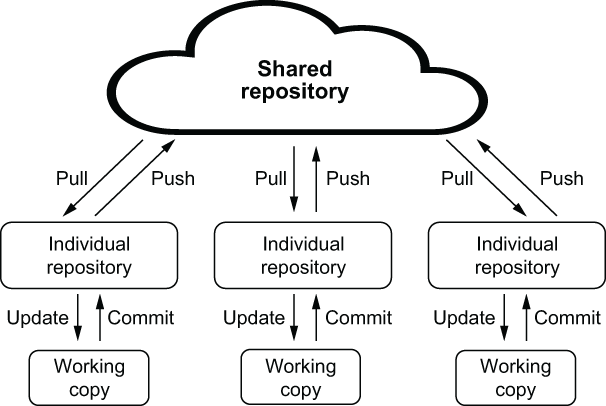 Figure D.3 The workflow of a distributed VCS.
This figure demonstrates the bidirectional nature of interactions in a DVCS, highlighting the importance of both pushing changes to the online repository and pulling updates from it to maintain synchronization across all team members' local repositories.
For more detailed information, you can refer to the Classic Computer Science Problems in Python and Python How-To books.
| Book Title | Usage of push | Technical Depth | Connections to Other Concepts | Examples Used | Practical Application |
|------------|---------------|-----------------|-------------------------------|---------------|-----------------------|
| [Classic Computer Science Problems in Python](https://www.manning.com/books/classic-computer-science-problems-in-python) | Discusses push in the context of stack operations, priority queues, and search algorithms like A*. | Explains push in data structures and algorithms, including binary heaps and A* search. | Connects push to stack operations, priority queues, and search algorithms. | Provides code examples for PriorityQueue class and A* search function. | Demonstrates practical use in implementing data structures and search algorithms. [more](https://livebook.manning.com/book/classic-computer-science-problems-in-python/chapter-1/122) |
| [Python How-To](https://www.manning.com/books/python-how-to) | Describes push in the context of version control systems, specifically in DVCS like Git. | Covers the workflow of distributed version control systems, including commit, push, and pull actions. | Links push to version control concepts and collaborative software development. | Includes a figure illustrating the workflow of a distributed VCS. | Highlights the importance of push in synchronizing local and online repositories in collaborative environments. [more](https://livebook.manning.com/book/python-how-to/appendix-d/1) |
FAQ (Frequently asked questions)
What does it mean to push in version control?
How do you upload your local repository to an online repository?
What does 'push' mean in the context of a stack?
How does the 'push' operation affect a stack?