Rectangle
In the context of Python programming, particularly when using the arcade library, a Rectangle class can be defined to represent a geometric rectangle on a graphical window. This class encapsulates various attributes and methods to manage the rectangle's properties and behavior on the screen.
UML Diagram
The UML diagram in Figure 4.2 illustrates the structure of the Rectangle class, highlighting its attributes and methods. This diagram serves as a blueprint for the class definition in Python.
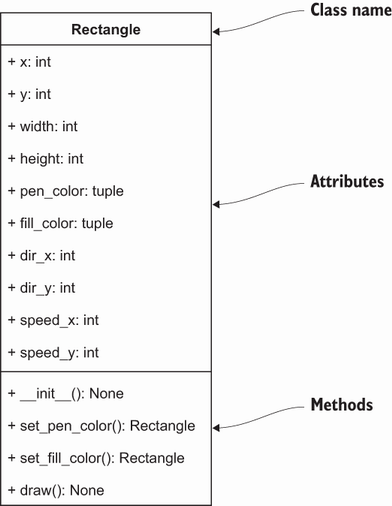 Figure 4.2 UML diagram for the Rectangle class
Class Definition
The Rectangle class is defined with several attributes and methods. Below is the Python code for the class:
class Rectangle:
    def __init__(
        self,
        x: int,
        y: int,
        width: int,
        height: int,
        pen_color: tuple = COLOR_PALETTE[0],
        fill_color: tuple = COLOR_PALETTE[1],
        dir_x: int = 1,
        dir_y: int = 1,
        speed_x: int = 1,
        speed_y: int = 1
    ):
        self.x = x
        self.y = y
        self.width = width
        self.height = height
        self.pen_color = pen_color
        self.fill_color = fill_color
        self.dir_x = 1 if dir_x > 0 else -1
        self.dir_y = 1 if dir_y > 0 else -1
        self.speed_x = speed_x
        self.speed_y = speed_y

    def set_pen_color(self, color: tuple) -> Rectangle:
        self.pen_color = color
        return self

    def set_fill_color(self, color: tuple) -> Rectangle:
        self.fill_color = color
        return self

    def draw(self):
        arcade.draw_xywh_rectangle_filled(
            self.x, self.y, self.width, self.height, self.fill_color
        )
        arcade.draw_xywh_rectangle_outline(
            self.x, self.y, self.width, self.height, self.pen_color, 3
        )
Attributes
- x, y: Coordinates of the rectangle's position on the screen.
- width, height: Dimensions of the rectangle.
- pen_color, fill_color: Colors for the rectangle's outline and fill.
- dir_x, dir_y: Direction of movement along the x and y axes.
- speed_x, speed_y: Speed of movement along the x and y axes.
Methods
- set_pen_color(color: tuple) -> Rectangle: Sets the pen color and returns the rectangle instance for method chaining.
- set_fill_color(color: tuple) -> Rectangle: Sets the fill color and returns the rectangle instance for method chaining.
- draw(): Draws the rectangle on the screen using the
arcadelibrary.
Animation and Interaction
The Rectangle class is used in conjunction with a Window class to animate and render rectangles on the screen. The Window class includes methods like on_update() and on_draw() to manage the animation loop.
Updating Position
The on_update() method updates the position of each rectangle based on its speed:
def on_update(self, delta_time):
    for rectangle in self.rectangles:
        rectangle.x += rectangle.speed_x
        rectangle.y += rectangle.speed_y
Drawing on Screen
The on_draw() method clears the screen and draws each rectangle:
def on_draw(self):
    # Clear the screen and start drawing
    arcade.start_render()

    # Draw the rectangles
    for rectangle in self.rectangles:
        rectangle.draw()
Changing Colors
The change_colors() method demonstrates method chaining by changing the pen and fill colors of rectangles:
def change_colors(self, interval):
    for rectangle in self.rectangles:
        rectangle.set_pen_color(choice(COLOR_PALETTE)).set_fill_color(
            choice(COLOR_PALETTE)
        )
Example Application
When the examples/CH_04/example_02 application runs, it creates a window and animates a rectangle, as shown in Figure 4.3. The rectangle moves diagonally and changes colors every second.
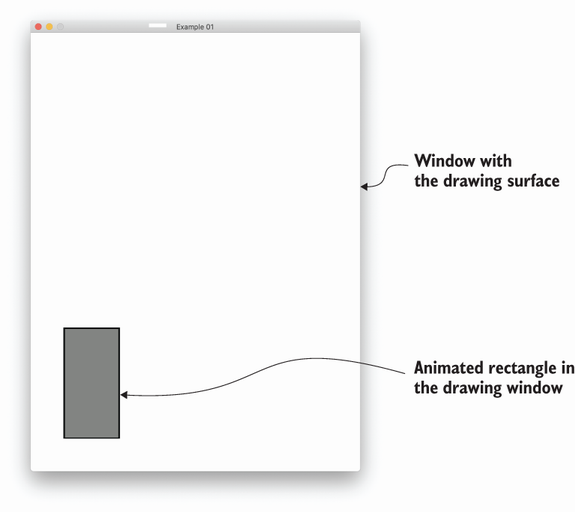 Figure 4.3 Screenshot of the rectangle on the Window drawing surface
FAQ (Frequently asked questions)
What does the UML diagram for the Rectangle class look like?
How is a Rectangle class defined in Python?
What parameters are required to initialize a Rectangle object?
How can you change the pen color of a Rectangle object?
How can you change the fill color of a Rectangle object?
How does the draw method work in the Rectangle class?