Role in the MyBlog Application
In the MyBlog application, a role is a fundamental concept that defines a set of permissions for users. Roles are crucial for managing what actions users can perform within the application, and they are stored in the database. The primary roles include administrator, editor, and registered user, each with specific permissions that dictate their capabilities within the application.
Definition and Purpose
A user's role in a web application determines their capabilities while logged in. It is an integral part of the authorization process, which complements authentication. In the MyBlog application, roles are used to control access to certain pages, particularly those that allow system-wide changes or modifications to content created by other users.
Role Model Implementation
The Role model is implemented in the application to manage these roles and their associated permissions. Below is the code snippet that defines the Role class:
class Role(db.Model):                                             #1
    class Permissions(Flag):                                      #2
        REGISTERED = auto()                                       #2
        EDITOR = auto()                                           #2
        ADMINISTRATOR = auto()                                    #2

    __tablename__ = "role"                                        #3
    role_uid = db.Column(db.String,                               #4
    primary_key=True, default=get_uuid)                         #4
    name = db.Column(db.String, nullable=False,                   #4
    unique=True)                                                #4
    description = db.Column(db.String,                            #4
    nullable=False)                                             #4
    raw_permissions = db.Column(db.Integer)                       #4
    users = db.relationship("User",
    backref=db.backref("role", lazy="joined"))                  #5
    active = db.Column(db.Boolean, nullable=False, default=True)
    created = db.Column(db.DateTime,
    nullable=False, default=datetime.now(
    tz=timezone.utc))
    updated = db.Column(
        db.DateTime,
        nullable=False,
        default=datetime.now(tz=timezone.utc),
        onupdate=datetime.now(tz=timezone.utc)
    )

    @property                                                     #6
    def permissions(self):                                        #6
        return Role.Permissions(                                  #6
        self.raw_permissions)                                   #6
#1 Creates the Role class model
#2 Creates the Permissions class internal to the Role class
#3 Defines the table name for roles in the database
#4 Creates the columns for a Role record
#5 Establishes the one-to-many relationship with the User table
#6 Creates a read property for a role’s permissions
Key Components of the Role Model
- Permissions Class: This internal class within
Roledefines different levels of permissions such as REGISTERED, EDITOR, and ADMINISTRATOR. - Database Table: The
Roleclass is mapped to the "role" table in the database, with columns for role UID, name, description, and raw permissions. - User Relationship: A one-to-many relationship is established between roles and users, meaning many users can have a certain role, but each user can only have one role.
Role Initialization and Context Injection
To initialize the Roles table, the following code is added to the create_app() function:
# [initialize the role table](https://livebook.manning.com/book/the-well-grounded-python-developer/chapter-9/100)
from .models import Role
Role.initialize_role_table()
Additionally, to make role permissions available in all templates, the following context processor is used:
# [inject the role permissions class into all template contexts](https://livebook.manning.com/book/the-well-grounded-python-developer/chapter-9/100)
@ app.context_processor
def inject_permissions():
    return dict(Permissions=Role.Permissions)
Role and User Relationship
The roles are initialized by the application and maintained in the database. The users in the database have a relationship to the defined roles. The one-to-many relationship between roles and users is illustrated in the following Entity-Relationship Diagram (ERD):
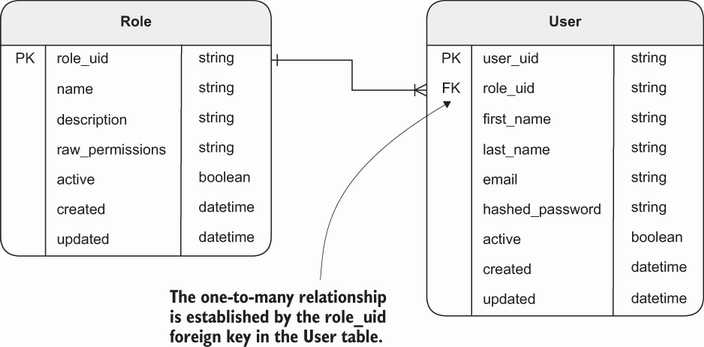 Figure 9.5 The new Role table and its relationship to the existing User table
This diagram shows how the Role table is related to the User table, emphasizing the one-to-many relationship where each user can have only one role, but a role can be assigned to multiple users.
FAQ (Frequently asked questions)
What is a role in the MyBlog application?
Where are roles stored in the MyBlog application?
What are some examples of roles in the MyBlog application?
What do roles determine in the MyBlog application?
What does Figure 9.5 illustrate in the context of roles?
What is the purpose of the Role class in the code snippet?
What does the Permissions class within the Role class represent?
How is the relationship between Role and User tables established?
What is the purpose of the 'permissions' property in the Role class?
What does a user's role determine in a web application?
How is role related to the authorization process?
How are roles used in the MyBlog application?