Server
Overview
A server is an application running on a computer, or multiple computers, that provides functionality to other applications across a network. This setup is commonly referred to as the client-server model. It is the software that transforms a computer into a server, not the hardware configuration. This distinction is crucial as it emphasizes the role of software in defining server capabilities.
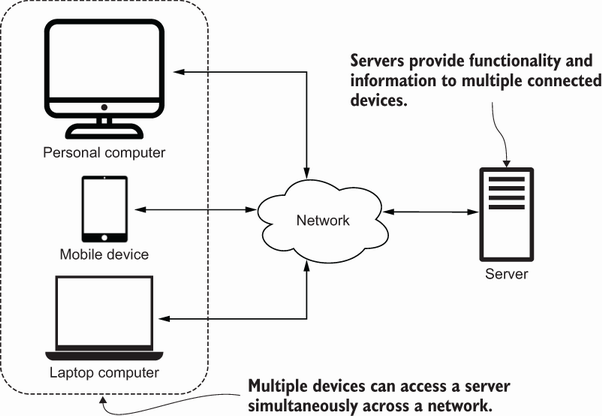 Figure 6.1 Multiple devices connecting to the functionality provided by a server
Request-Response Model
In the request-response model, the server is designed to process requests from clients and return appropriate responses. The server remains inactive until it receives a request. This model is prevalent in web applications, where a client browser requests an HTML page from the server, and the server responds with the requested page.
Server in Flask
A Flask server is a lightweight web server that operates by running an event loop to listen for HTTP requests. It processes these requests and returns responses based on the routes and associated Python functions defined within the application. Flask's built-in server is particularly suitable for development environments due to its simplicity and ease of use. However, it is not recommended for production environments because of its security and performance limitations.
Example: Running a Flask Server
When building applications like MyBlog, you can run them on your local computer, effectively turning it into a server. The following is a simple example of a Flask application:
from flask import Flask      #1

app = Flask(__name__)        #2

@app.route("/")              #3
def home():                  #4
    return "Hello World!"
#1 Imports the Flask system into the application
#2 Creates a Flask instance object, passing it the name of the current file
#3 This decorator connects the home function to the "/" application route.
#4 The home function will run when the user navigates to the "/" route.
In this example, the Flask application listens for requests on the root route ("/") and responds with "Hello World!" when accessed.
Production Considerations
While Flask's built-in server is excellent for development, it is not suitable for production use. For production environments, it is recommended to use a WSGI server such as uWSGI or Gunicorn. These servers provide a standardized interface to forward requests from a web server to a Python web application, ensuring better performance and security.
FAQ (Frequently asked questions)
What is a server in the client-server model?
Does the hardware configuration make a computer a server?
What does Figure 6.1 illustrate in the context of servers?
How can you turn your local computer into a server?
What makes a computer a server?
What is the request-response model?
How is the request-response model used in web applications?
What is a Flask server?
Is Flask's built-in server suitable for production?
How do you create a simple Flask application?
What is the recommended server for running a Python web application in production?
What does a server refer to in the context of this chapter?
What is a server in the context of computer networks?
What role do servers play in file fetching?
What is a MongoDB server used for?