Step Command in Python
The step command in Python is a versatile tool used in both slicing operations and debugging processes. This page explores its application in these contexts, providing examples and explanations to illustrate its functionality.
Slicing with Step Command
In Python, the step command is often used in slicing operations to specify the interval at which elements are selected from a sequence. The syntax for slicing with a step is sequence[start:stop:step]. Here are some examples:
numbers = [1, 2, 3, 4, 5, 6, 7, 8, 9]

assert numbers[2:5:2] == [3, 5]                        #1

assert numbers[::3] == [1, 4, 7]                       #2

assert numbers[::-1] == [9, 8, 7, 6, 5, 4, 3, 2, 1]    #3
- Example 1:
numbers[2:5:2]results in[3, 5]. Here, the slicing starts at index 2 and stops before index 5, with a step of 2, meaning every other item is selected. - Example 2:
numbers[::3]results in[1, 4, 7]. This slice selects every third item from the list, starting from the beginning. - Example 3:
numbers[::-1]results in[9, 8, 7, 6, 5, 4, 3, 2, 1]. A step of-1reverses the list, as it starts from the right and moves toward the left.
Debugging with Step Command
In debugging, the step command is used to control the execution flow of a program. It allows the developer to execute the next line of code and pause at the next possible occasion, which is particularly useful for stepping into function calls to examine their behavior.
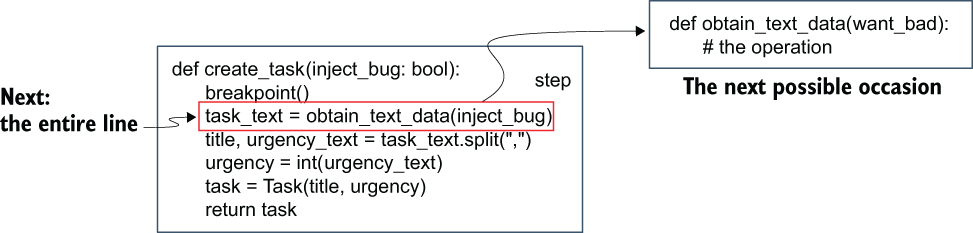 Figure 13.5 The difference between the next and step commands in debugging. The next command executes the entire line; the step command attempts to execute the next line but stops at the next possible occasion. In the example, step is calling another function.
In Figure 13.5, the distinction between the next and step commands is illustrated. The next command executes the entire line of code, while the step command attempts to execute the next line but pauses at the next possible occasion, such as when a function is called. This allows for a more granular examination of the program's execution, making it easier to identify and fix bugs.
FAQ (Frequently asked questions)
How does a stride of 3 affect a Python list slice?
What does the stride of 2 do in Python slicing?
What happens when you use a stride of -1 in Python slicing?
What is the difference between the next and step commands in debugging?
What does the step command do in debugging?