Config File in Rust Web Development
Overview
Config files play a crucial role in the deployment and maintenance of web services by storing parameters that might change over time. They allow developers to decouple these parameters from the source code, making it easier to adjust settings such as database names or port numbers without modifying the code itself. This approach reduces the risk of introducing bugs when changes are necessary. Config files can be formatted in various ways, including JSON, TOML, or YAML.
Using Config Files in Rust
In Rust web development, handling config files can be efficiently managed using the config-rs crate. This crate provides the necessary tools to parse files and read configurations, supporting formats like TOML, JSON, and YAML. To utilize this crate, it must be added to the Cargo.toml file of the project, as shown in Listing 10.1.
[Listing 10.1: Adding config-rs to Cargo.toml](https://livebook.manning.com/book/rust-web-development/chapter-10/24)
[package]
name = "rust-web-dev"
version = "1.0.0"
edition = "2021"

[dependencies]
warp = "0.3"
serde = { version = "1.0", features = ["derive"] }
serde_json = "1.0"
tokio = { version = "1.1.1", features = ["full"] }
handle-errors = { path = "handle-errors", version = "0.1.0" }
tracing = { version = "0.1", features = ["log"] }
tracing-subscriber = "0.2"
sqlx = { version = "0.5", features = [ "runtime-tokio-rustls", "migrate", "postgres" ] }
reqwest = { version = "0.11", features = ["json"] }
reqwest-middleware = "0.1.1"
reqwest-retry = "0.1.1"
rand = "0.8"
rust-argon2 = "1.0"
paseto = "2.0"
config = { version = "0.13.1", features = ["toml"] }
Example Config File
A typical config file, such as setup.toml, might look like Listing 10.2. This file is placed in the root folder of the project and contains various configuration parameters.
[Listing 10.2: Adding the setup.toml file](https://livebook.manning.com/book/rust-web-development/chapter-10/24)
log_level = "warn"
database_host = "localhost"
database_port = 5432
database_name = "rustwebdev"
port = 8080
Reading Config Files
Once the config file is set up, the next step is to read these parameters into the application. This is done in the main.rs file, as demonstrated in Listing 10.3. The config-rs crate is used to read and deserialize the config file into a Rust struct, allowing the application to use these parameters dynamically.
[Listing 10.3: Reading the parameters from the setup.toml file inside main.rs](https://livebook.manning.com/book/rust-web-development/chapter-10/24)
#![warn(clippy::all)]

use config::Config;
use handle_errors::return_error;
use tracing_subscriber::fmt::format::FmtSpan;
use warp::{http::Method, Filter};
use std::env;

mod profanity;
mod routes;
mod store;
mod types;

#[derive(Parser, Debug, Default, serde::Deserialize, PartialEq)]
struct Args {
    log_level: String,
    database_host: String,
    database_port: u16,
    database_name: String,
    port: u16,
}

#[tokio::main]
async fn main() -> Result<(), sqlx::Error> {
    let config = Config::builder()
        .add_source(config::File::with_name("setup"))
        .build()
        .unwrap();

    let config = config
        .try_deserialize::<Args>()
        .unwrap();

    let log_filter = std::env::var("RUST_LOG").unwrap_or_else(|_| {
        format!(
            "handle_errors={},rust_web_dev={},warp={}",
            config.log_level, config.log_level, config.log_level
        )
    });

    let store = store::Store::new(&format!(
        "postgres://{}:{}/{}",
        config.database_host, config.database_port, config.database_name
    ))
    .await?;

    sqlx::migrate!().run(&store.clone().connection).await?;

    let store_filter = warp::any().map(move || store.clone());

    warp::serve(routes).run(([127, 0, 0, 1], config.port)).await;

    Ok(())
}
Advantages of Config Files
Config files offer several advantages, such as simplifying the process of starting a server by providing a clear view of the parameters in use. They eliminate the need to remember complex command-line inputs and allow for easy changes to settings without altering the codebase. However, sensitive information like API keys should not be stored in config files that are checked into version control systems.
Figure: Accessing Config Files
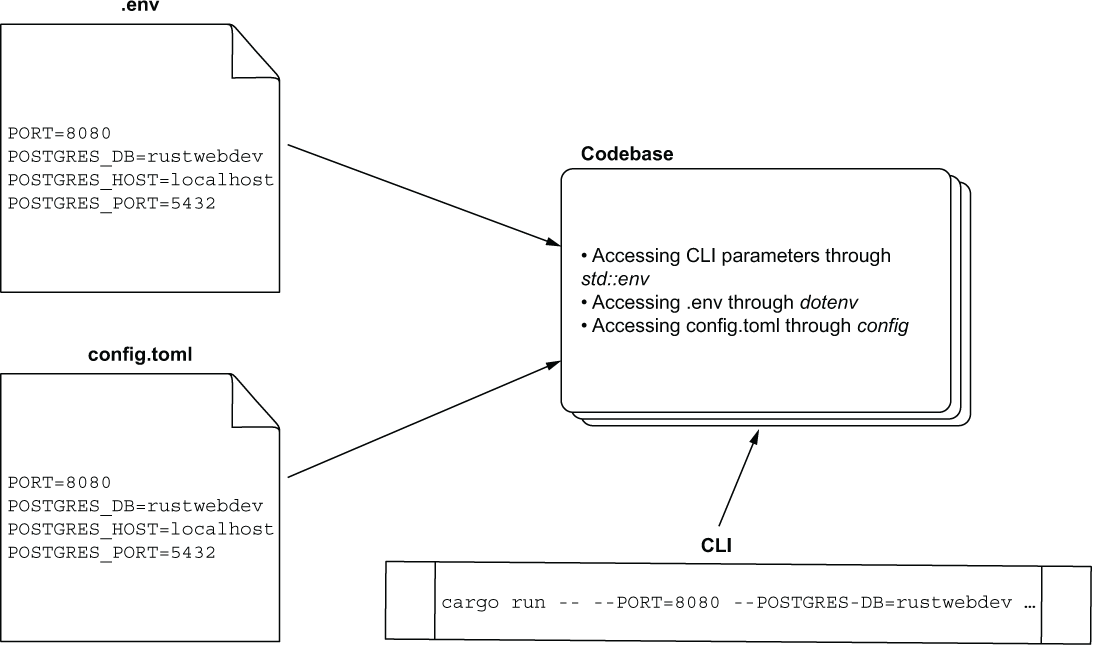 Figure 10.1 Accessing config files and parameters through crates and the standard library
This figure illustrates the process of accessing config files and parameters using crates and the standard library, highlighting the integration of external parameters into the code.
FAQ (Frequently asked questions)
What are config files used for in web development?
Why are config files important for decoupling parameters from source code?
What formats can config files be in?
How can config files and parameters be accessed in Rust web development?
What is an example of a config file in a Rust web development project?
What parameters might be included in a setup.toml config file?