Database Connection in Rust Web Development
In Rust web development, establishing a database connection is a crucial step for enabling data persistence and retrieval. This is typically achieved using a connection pool, which is a collection of database connections that can be reused by different parts of the application. The connection pool is stored in a Store object, allowing route handlers to efficiently perform database queries.
Setting Up the Connection Pool
To set up a connection pool, we utilize the SQLx library, which provides asynchronous support for interacting with databases. The connection pool is initialized in the store.rs file, replacing the previous method of reading from a local JSON file. This transition from file-based storage to a database-centric approach is illustrated in Listing 7.8.
[Listing 7.8: Updating store.rs to Replace the JSON File with a Database Connection](https://livebook.manning.com/book/rust-web-development/chapter-7/49)
use tokio::sync::RwLock;
use std::collections::HashMap;
use std::sync::Arc;
use sqlx::postgres::{PgPoolOptions, PgPool, PgRow};
use sqlx::Row;

use crate::types::{
    answer::Answer,
    question::{Question, QuestionId},
};

#[derive(Debug, Clone)]
pub struct Store {
    pub connection: PgPool,
}

impl Store {
    pub async fn new(db_url: &str) -> Self {
        let db_pool = match PgPoolOptions::new()
        .max_connections(5)
        .connect(db_url).await {
            Ok(pool) => pool,
            Err(e) => panic!("Couldn't establish DB connection:[]", e),
        };

        Store {
            connection: db_pool,
        }
    }

    fn init() -> HashMap<QuestionId, Question> {
        let file = include_str!("../questions.json");
        serde_json::from_str(file).expect("can't read questions.json")
    }
}
In this listing, the Store struct is modified to include a connection field, which holds the connection pool for the PostgreSQL database. The new function is asynchronous, reflecting the nature of database connections, which can potentially fail.
Passing the Database URL
The database URL is passed to the Store when it is created. This is done in the main.rs file, as shown in Listing 7.9. The database runs on localhost, and the PostgreSQL server uses the standard port (5432). The database name is rustwebdev.
[Listing 7.9: Passing Down the Database URL Inside main.rs](https://livebook.manning.com/book/rust-web-development/chapter-7/49)
#[tokio::main]
async fn main() -> Result<(), sqlx::Error>{
    let log_filter = std::env::var("RUST_LOG").unwrap_or_else(|_| {
        "handle_errors=warn,practical_rust_book=warn,warp=warn".to_owned()
    });

    // if you need to add a username and password,
    // the connection would look like:
    // "postgres:/ /username:password@localhost:5432/rustwebdev"
    let store =
        store::Store::new("postgres:/ /localhost:5432/rustwebdev").await;
    let store_filter = warp::any().map(move || store.clone());
}
The new function is awaited because opening the database connection is an asynchronous operation.
Benefits of Connection Pools
Connection pools allow multiple connections to the database to remain open simultaneously, enabling the application to handle more database operations concurrently. This is particularly beneficial in web applications where multiple requests may need to access the database at the same time. Figure 7.2 illustrates the concept of connection pools.
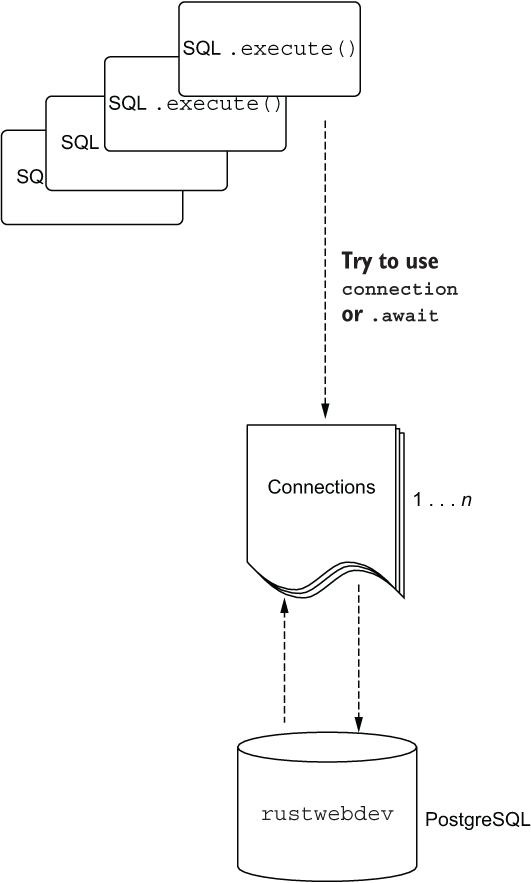 Figure 7.2 Connection pools allow us to keep more than one connection to the database open so we can process more database operations at the same time.
By using a connection pool, the application can efficiently manage database connections, reducing the overhead of establishing new connections for each request and improving overall performance.
FAQ (Frequently asked questions)
How is a database connection established in Rust Web Development?
What is the purpose of storing a connection pool in the Store object?