Filter in Warp Web Development
In the context of Warp, a Rust web framework, a filter is a fundamental concept used to process HTTP requests. Filters are composable units of functionality that can parse, mutate, and return data. They are implemented via a trait and are essential for handling routes in a Warp server.
Overview of Filters
Filters in Warp are used to create routes by chaining them together. Each incoming HTTP request attempts to match a filter, and if it fails, the request moves to the next filter in the chain. Filters are versatile and can be used for various tasks, such as extracting headers, parameters, and JSON bodies from requests. They are also used for more complex operations like authentication, where a filter can ensure that requests contain a valid Authorization header with a token.
Creating and Using Filters
To start using filters in Warp, you need to import the Filter trait. Filters can be created for specific paths and can be chained together using the and keyword. Below is an example of starting a Warp server with a simple route filter:
[Listing 3.1: Starting a Warp Server with a Routes Filter Object](https://livebook.manning.com/book/rust-web-development/chapter-3/31)
// import the Filter trait from warp
use warp::Filter;
#[tokio::main]
async fn main() {
   // create a path Filter
   let hello = warp::path("hello").map(|| format!("Hello, World!"));

   // start the server and pass the route filter to it
   warp::serve(hello).run(([127, 0, 0, 1], 3030)).await;
}
In this example, a path filter is created for the path "hello", which responds with "Hello, World!" when accessed. The server is then started with this route filter.
Error Handling with Filters
Filters can also be used to handle errors in a structured way. By chaining filters with error handling functions, you can manage how errors are returned to the client. Here's an example of using error handling in a route filter:
[Listing 3.9: Using Our Error Handling in the Route Filter](https://livebook.manning.com/book/rust-web-development/chapter-3/65)
...

#[tokio::main]
async fn main() {
    let get_items = warp::get()
        .and(warp::path("questions"))
        .and(warp::path::end())
        .and_then(get_questions)
        .recover(return_error);

    let routes = get_items;

    warp::serve(routes)
        .run(([127, 0, 0, 1], 3030))
        .await;
}

...
In this listing, the get_items filter is created to handle GET requests to the "questions" path. The recover method is used to handle any errors that occur during the request processing.
Visualizing Filter Processing
The process of handling an HTTP request through Warp filters can be visualized as follows:
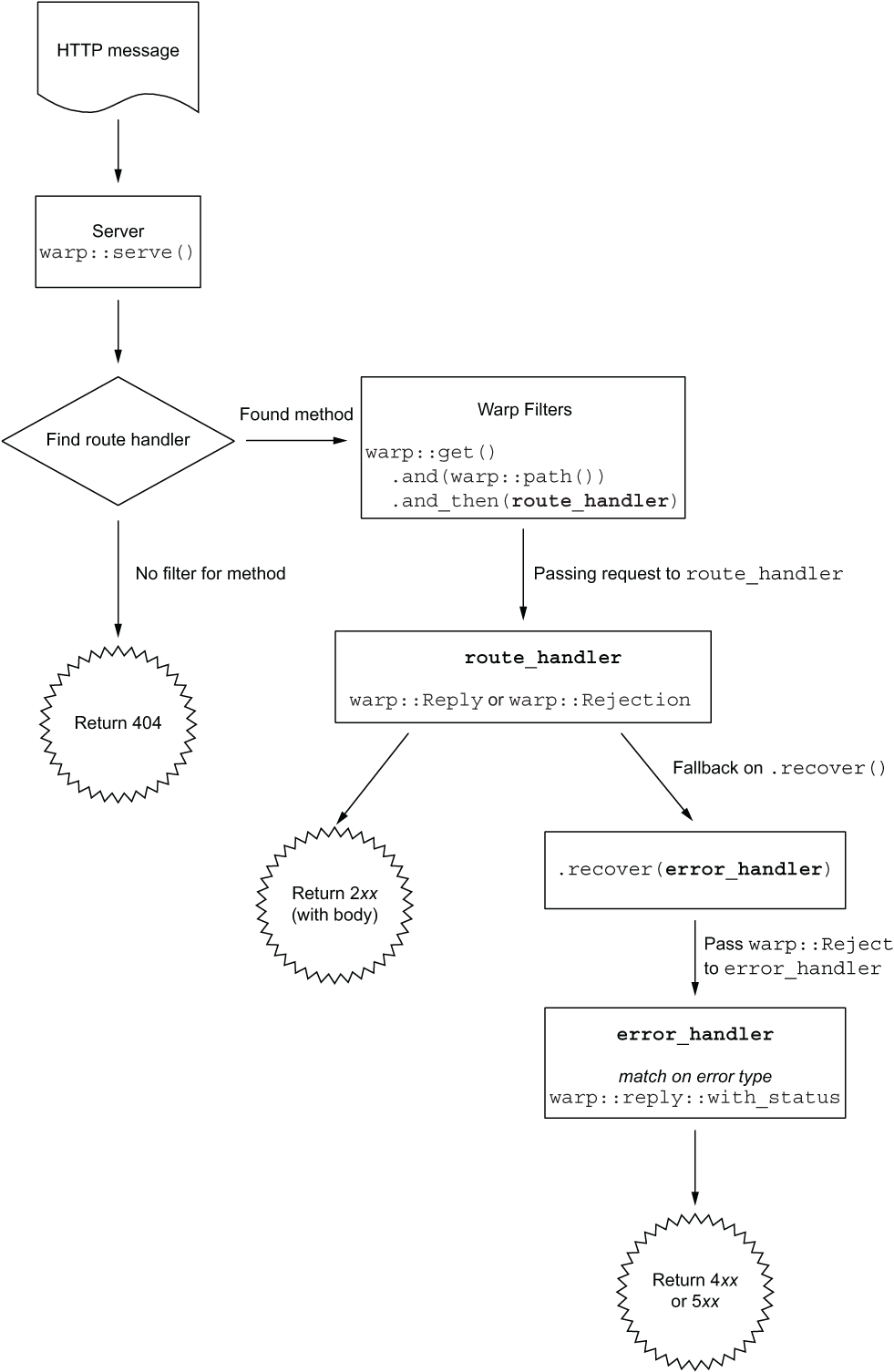 Figure 3.4 Getting an HTTP request, sending it through Warp filters and the route handler, and then returning a proper HTTP message
This figure illustrates how an HTTP request is processed through various Warp filters and the route handler, ultimately resulting in a proper HTTP response being returned to the client.
State Management with Filters
To manage state across multiple route handlers, you can create a filter that returns a copy of the object you want to share. This allows you to pass state around efficiently without needing to start a server for testing, as filters can be tested using the warp::test module.
In summary, filters in Warp are powerful tools for building and managing web applications in Rust, providing a flexible and composable way to handle HTTP requests and responses.
FAQ (Frequently asked questions)
What is the role of filters in Warp's routing system?
What happens if a request does not match a filter in Warp?
How do you start a Warp server with a route filter?
What is a filter in Warp?
How are filters used in Warp?
How does Warp handle HTTP requests with filters?
How can you handle errors in Warp route filters?
How can you pass state between route handlers in Warp?
What is a filter in the context of Warp?
How can you test Warp filters?
What is the purpose of the auth filter in Warp?