Logging in Rust Web Development
Logging is a crucial aspect of web development, providing insights into the behavior and state of applications. In Rust, logging is implemented using a facade pattern with the log crate, which allows developers to record messages at various levels such as info, warn, error, and debug. These logs can be directed to different outputs like stdout, stderr, or files, and can be formatted in structured formats like JSON for easier parsing and analysis.
Logging Levels
Rust's log crate provides several logging levels to categorize the importance and type of log messages. These levels include:
- Info: General information about the application's operation.
- Warn: Indications of potential issues or important events.
- Error: Errors that have occurred, which might require attention.
- Debug: Detailed information useful for debugging.
Using different log levels helps in filtering and managing log output, especially in production environments where you might only want to see warnings and errors. This can be controlled by setting environment variables to specify which log levels should be active.
Example of Log Levels
Below is an example of how different log levels can be used in Rust:
use log::{info, warn, error, debug};

info!("User {} logged in", user.id);
warn!("User {} logged in {} times", user.id, login_count);
error!("Failed to load User {} from DB", user.id);
debug!(
    "User {} access controls: {}, {}",
    user.id, user.admin, user.supervisor
);
Listing 6.1 Log levels
Logging Output: stdout vs. stderr
In Rust, logging libraries typically write to stderr, which is used for diagnostics and error messages, while stdout is used for general program output. This separation allows for better management of log data, ensuring that diagnostic information does not mix with regular output. However, it is possible to configure logging libraries to send logs to stdout if desired.
Implementing Logging in Web Services
To implement logging in a Rust web service, you typically set up a logging facade using the log crate and choose a logging implementation like env_logger or log4rs. The logger is initialized in the main function, and logging macros are used throughout the application to log messages at different levels.
Structured Logging
Structured logging involves formatting logs in a way that they can be easily parsed and analyzed, often using a format like JSON. The log4rs crate can be configured to output logs in JSON format, including details such as time, message, module path, file, line, and level.
Tracing
Tracing is a related concept that involves following a request through the entire stack, providing detailed insights into the application's execution flow. This is particularly useful in asynchronous applications. The tracing crate in Rust supports this by offering features like spans and events to track execution.
Logging vs. Tracing
While logging records messages about the state and behavior of an application, tracing provides a more detailed view of the application's execution flow. Tracing is especially beneficial in complex, asynchronous applications where understanding the flow of execution can be challenging.
Logging Crates and Macros
When using a crate for logging in Rust, it is common to use the logging macros from the log crate. This crate acts as a facade, and you will typically import both the log crate and a logging implementation that suits your needs.
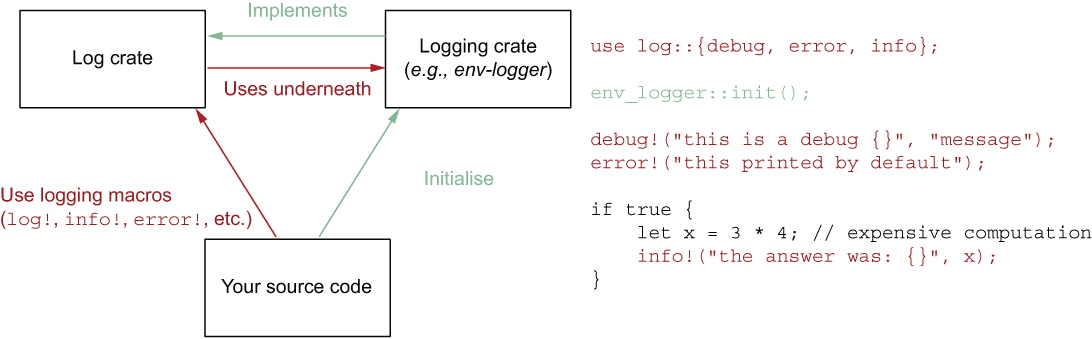 Figure 6.2 When using a crate for logging, chances are high that you will use the logging macros from a crate called log.
By understanding and implementing these logging practices, developers can effectively monitor, debug, and understand the behavior of their Rust web services.
FAQ (Frequently asked questions)
Where can logs be directed in Rust?
How can logs be formatted in Rust?
What is logging in Rust?
Why is logging important in web services?
Which crate is commonly used for logging in Rust?
What are some log levels available in Rust?
How do you log a message in Rust using the log crate?
How can you modify the record format in Rust logging?
Why would you use JSON format for logs?
What is the difference between stdout and stderr?
Where do logging libraries in Rust typically write logs?
Why is stderr preferred for logging?
Is it possible to log to stdout in Rust?
Why is logging to stdout less common?
Why is logging to stderr a common practice?
Can stderr logs be redirected?
How do you implement logging in a Rust web service?
Where do you initialize the logger in a Rust application?
What details are logged for incoming HTTP requests?
How can you log HTTP request details in Rust?
What are structured logs?
How can you create structured logs in Rust?
What is tracing in the context of logging?
Which crate in Rust supports tracing?
What is the difference between logging and tracing?
Why is tracing useful in asynchronous applications?