PhantomData in Rust
In Rust, PhantomData is a zero-sized type used to indicate that a generic type parameter is being utilized, even if it doesn't appear directly in the struct's fields. This is particularly useful for signaling to the compiler that a type parameter is relevant for compile-time checks, such as in the type state pattern. It allows developers to maintain compile-time type information without actually storing the type in the struct, thus avoiding runtime overhead.
Basic Usage of PhantomData
PhantomData is often used in scenarios where a generic parameter is needed for compile-time checks but does not have a corresponding runtime representation. Consider the following example where we define a Dog struct with a generic parameter Breed:
use std::marker::PhantomData;

struct Dog<Breed> {
    name: String,
    breed: PhantomData<Breed>,
}
Here, PhantomData<Breed> is used to inform the Rust compiler that the Breed type parameter is intentionally included for compile-time checks, even though it doesn't have a corresponding runtime representation. This prevents the compiler from throwing an error about the unused generic parameter.
Compiler Error Without PhantomData
If you attempt to define the Dog struct without using PhantomData, the Rust compiler will produce an error:
error[E0392]: parameter `Breed` is never used
  --> src/main.rs:27:12
   |
27 | struct Dog<Breed> {
   |            ^^^^^ unused parameter
   |
   = help: consider removing `Breed`, referring to it in a field,
   or using a marker such as `PhantomData`
   = help: if you intended `Breed` to be a const parameter,
   use `const Breed: usize` instead
This error occurs because the Breed parameter is not used in any of the struct's fields, and the compiler suggests using a marker like PhantomData to resolve this.
Constructing a Struct with PhantomData
When constructing a Dog instance, you still need to provide the phantom data, although it will be optimized out at compile time:
use std::marker::PhantomData;

let my_poodle: Dog<Poodle> = Dog {
    name: "Jeffrey".into(),
    breed: PhantomData,
};
In this example, PhantomData acts as a marker struct, which is a special kind of marker you'll encounter in Rust. Unlike marker traits, which are used to define behaviors, marker structs like PhantomData are used to enforce type constraints at compile time.
Advanced Usage: Modeling Session States
PhantomData can also be used in more complex scenarios, such as modeling session states in a state machine. Consider the following example:
pub trait SessionState {}

#[derive(Debug, Default)]
pub struct Session<State: SessionState = Initial> {
    session_id: Uuid,
    props: HashMap<String, String>,
    phantom: PhantomData<State>,
}

#[derive(Debug, Default)]
pub struct Initial;
#[derive(Debug, Default)]
pub struct Anonymous;
#[derive(Debug, Default)]
pub struct Authenticated;
#[derive(Debug, Default)]
pub struct LoggedOut;

impl SessionState for Initial {}
impl SessionState for Anonymous {}
impl SessionState for Authenticated {}
impl SessionState for LoggedOut {}
In this example, PhantomData is used to tag the Session struct with a specific state, such as Initial, Anonymous, Authenticated, or LoggedOut. This allows the Session struct to enforce state-specific behaviors at compile time without storing the state information at runtime.
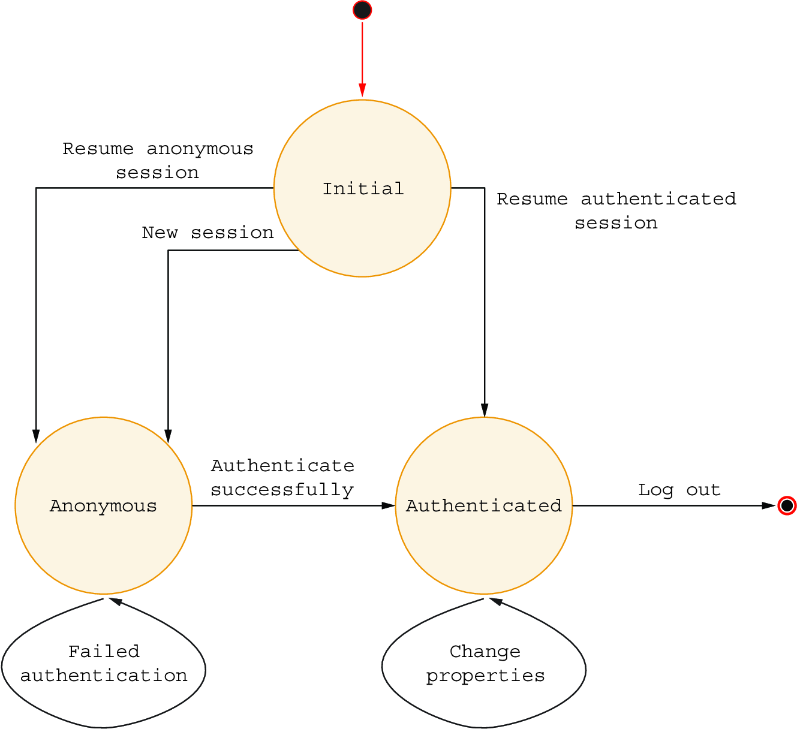 Figure 8.1 Modeling a user session with a state machine
Usage in Type State Pattern
The type state pattern is a design pattern that uses types to represent different states of an object, ensuring that only valid state transitions are possible. PhantomData plays a crucial role in this pattern by allowing the compiler to enforce these transitions at compile time.
Example: Traffic Light
Consider a traffic light system where the light can only transition between valid states: from green to red and vice versa. We can enforce these transitions using a marker trait and PhantomData.
trait Light {}

struct Green {}
struct Red {}

impl Light for Green {}
impl Light for Red {}

struct TrafficLight<T: Light> {
    marker: PhantomData<T>
}

impl TrafficLight<Green> {
    fn turn_red(&self) -> TrafficLight<Red> {
        TrafficLight {
            marker: Default::default(),
        }
    }
}

impl TrafficLight<Red> {
    fn turn_green(&self) -> TrafficLight<Green> {
        TrafficLight {
            marker: Default::default(),
        }
    }
}

fn main() {
    let light = TrafficLight { marker: Default::default() };
    light.turn_red().turn_green();
}
This approach guarantees that the traffic light can only transition between valid states, with the compiler ensuring correctness.
Usage in Builder Pattern
PhantomData is also useful in the builder pattern, where it can be used to track the state of a builder through its generic parameters.
Example: Builder Definition
In the builder pattern, PhantomData can be used to mark the state of the builder, ensuring that certain methods can only be called in specific states.
pub fn builder_definition(name: &Ident, fields: &Punctuated<Field, Comma>)
    -> TokenStream {
    let builder_fields = fields.iter().map(|f| {
        let (field_name, field_type) = get_name_and_type(f);
        quote! { #field_name: Option<#field_type> }
    });
    let builder_name = create_builder_ident(name);

    quote! {
        pub struct #builder_name<T: MarkerTraitForBuilder> {
            marker: std::marker::PhantomData<T>,
            #(#builder_fields,)*
        }
    }
}
This setup allows the builder to track its state through its generic parameter, ensuring that methods are called in the correct order and that the builder is in a valid state before finalizing the object.
| Book Title | Usage of phantomdata | Technical Depth | Connections to Other Concepts | Examples Used | Practical Application |
|------------|----------------------|-----------------|-------------------------------|---------------|-----------------------|
| [Idiomatic Rust](https://www.manning.com/books/idiomatic-rust) | Discusses `PhantomData` as a tool for compile-time type information without runtime overhead. [more](https://livebook.manning.com/book/idiomatic-rust/chapter-2/9) | Covers basic to advanced usage, including modeling session states. [more](https://livebook.manning.com/book/idiomatic-rust/chapter-2/9) | Connects to state machine modeling and type constraints. [more](https://livebook.manning.com/book/idiomatic-rust/chapter-2/9) | Examples include a `Dog` struct and session state modeling. [more](https://livebook.manning.com/book/idiomatic-rust/chapter-2/9) | Emphasizes enforcing type constraints and state-specific behaviors. [more](https://livebook.manning.com/book/idiomatic-rust/chapter-2/9) |
| [Write Powerful Rust Macros](https://www.manning.com/books/write-powerful-rust-macros) | Highlights `PhantomData` in the type state pattern and builder pattern. [more](https://livebook.manning.com/book/write-powerful-rust-macros/chapter-8/102) | Explores its role in enforcing state transitions and builder state tracking. [more](https://livebook.manning.com/book/write-powerful-rust-macros/chapter-8/102) | Links to type state pattern and builder pattern. [more](https://livebook.manning.com/book/write-powerful-rust-macros/chapter-8/102) | Examples include a traffic light system and builder pattern. [more](https://livebook.manning.com/book/write-powerful-rust-macros/chapter-8/102) | Focuses on ensuring valid state transitions and method call order. [more](https://livebook.manning.com/book/write-powerful-rust-macros/chapter-8/102) |
FAQ (Frequently asked questions)
What is PhantomData used for in Rust?
How does PhantomData affect runtime in Rust?
Why would you use PhantomData in a Rust struct?
What is PhantomData in Rust?